The post 3 Reasons to Add Cooling to Computer Enclosures appeared first on ITSENCLOSURES.
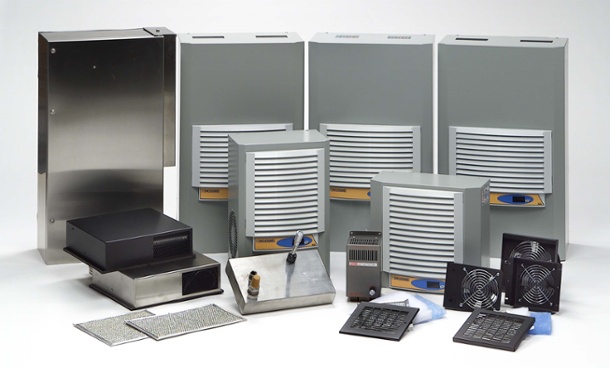
]]>Why Proper Thermal Management Helps:
- Prolongs the Life of Electronics
The average lifetime of a computer is approximately 3-5 years. According to AZ Central (USA Today Network), the lifespan is “gauged by a variety of factors including environmental conditions, usage patterns, and computing needs. Many computers will last far longer than this, and possibly a decade or more if properly maintained.” In general, computers and electronics will not survive – on their own – in a hot, dusty manufacturing facility, if not protected inside of a pc enclosure. Furthermore, electronics – installed within the sealed computer enclosure– may also need thermal management to survive. When electronics are used daily, it is good business to maximize their life cycle. If a printer is overheated, then the media may not print properly and if a computer is overheated, it may shut down completely. By keeping electronics running at optimal temperatures, production will never need to slow down.
 Reduces Costly Downtime
If electronics are housed in an computer enclosure, which is in a hot industrial environment, high ambient temperatures will slowly damage a computer or other electronic devices. If the inside of an enclosure is cool and humidity is removed, the equipment will not overheat and will continue to operate at a peak performance. If the computer or printer is needed for everyday tasks, then it must be WORKING(!)… plain and simple. According to the article, The Cost of IT Downtime, Michael Copeland writes, “Because there are so many differences in how businesses operate, downtime, at the low end, can be as much as $140,000 per hour, $300,000 per hour on average, and as much as $540,000 per hour at the higher end… Downtime is extremely expensive, and in ways that can make or break the success of your organization.” Time is money!
- Cuts Down on Replacements
Utilizing the same computer enclosure equipment for many years will offer a strong return on investment for businesses. To put it into perspective, the average computer can cost upwards of $800 to $1,200 (if not more), a replacement thermal transfer printer can run from $400 to thousands of dollars, and even standard LCD monitors are a few hundred dollars. Obviously, to save man-hours and money, a company does not want to constantly be swapping out its essential equipment. Plus, replacement products will take a long time to configure, and oftentimes replacements are in short supply – just adding to downtime and lost profits. The learning curve for brand-new equipment is also costly, as it takes time for employees to learn the latest computer system, printer, or other peripheral.
To determine the correct thermal management for an computer enclosure, it is always useful to perform the proper research, so that the electronics being housed are appropriately protected. Companies will often offer a website form to fill out, so that a buyer can purchase the appropriate equipment.
—–
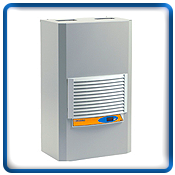
This formula can also be useful for picking the right thermal management:
(watts x 3.413) + (1.25 x area in square feet x ∆T temperature difference in degrees F) = BTU/hr.
Watts = The total heat load inside the enclosure (the sum of all heat-producing equipment)
Area = Total exposed surface area of the enclosure expressed in square feet
∆T = The difference in temperature between the maximum expected degrees Fahrenheit temperature outside the enclosure and the maximum degrees Fahrenheit temperature allowed inside of the enclosure
HAVE QUESTIONS? LET US KNOW HOW WE CAN BEST ASSIST YOU! CONTACT AN ‘ITSENCLOSURES EXPERT’ AT 1-800-423-9911 -or- SEND US AN EMAIL: INFO@ITSENCLOSURES.COM
The post 3 Reasons to Add Cooling to Computer Enclosures appeared first on ITSENCLOSURES.
]]>The post Industrial Computer Enclosures vs. Industrial Computers appeared first on ITSENCLOSURES.
]]>Extreme temperature fluctuations, dust, dirt, grease and splashing fluids are threatening for expensive electronics. Prior to implementing electronics on the plant floor, the system designer has the option of specifying an industrially hardened computer or an aptly sealed industrial computer enclosure to be used with a desktop computer. Either solution can perform splendidly, but, over time, the choice between the two will be an investment decision that will balance lifetime costs, operational stability, and versatility.
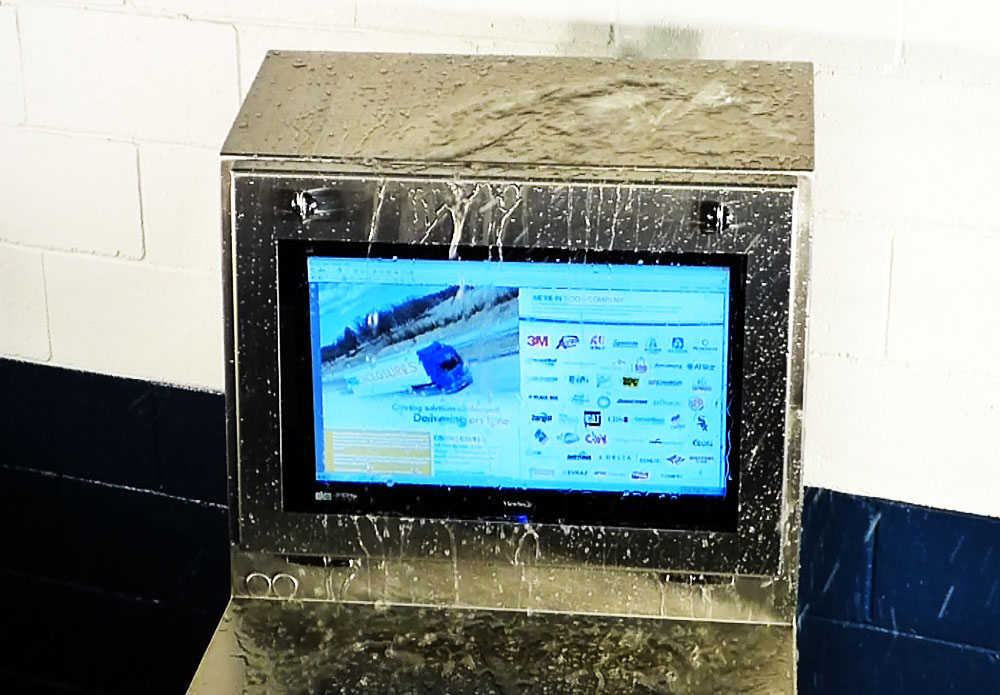 In general, the initial purchase price of an industrial computer will be much higher than the cost of a less expensive general-purpose industrial computer enclosure. It is important to understand the differences between the two solutions.
After either system is deployed into production, the first consideration comes into play during a hardware failure. Although the industrial-grade computer should provide significant longevity than a general-purpose PC, it is an electronic device and, over time, electronics will fail.
Industrial PCs can often be difficult to repair. The computer’s sealed design may warrant a service technician to provide repair work or worst-case scenario, require the unit to be sent back to the manufacturer for repair. Regardless, the end user will face production downtime, which is always costly. In addition, industrial computers are usually proprietary and difficult to upgrade. However, without an industrial computer enclosure, the computer has no protection against tampering with controls or misuse.
Protecting a computer in a NEMA-rated industrial computer enclosure can offer more flexibility. In the event of a computer failure, it will be far less expensive to replace a general-purpose computer vs. an industrial computer, and of course general purpose computers are available either in company inventory or a ‘day away’ from today’s electronic marketplace.
If the technology requires a change two to three years after the system has been implemented, utilizing a industrial computer enclosure will provide greater versatility. A PC enclosure allows the system integrator to easily swap out an older computer with a brand-new computer. A computer enclosure is lockable and will provide the peace of mind that the system is secured.
Many companies do not calculate how much a computer and related hardware will cost in terms of downtime and production loss. The proper computer enclosure will help extend the lifetime of electronics and reduce downtime, while offering a cost-effective alternative to industrial computers.
HAVE QUESTIONS? LET US KNOW HOW WE CAN BEST ASSIST YOU! CONTACT AN ‘ITSENCLOSURES EXPERT’ AT 1-800-423-9911 -or- SEND US AN EMAIL: INFO@ITSENCLOSURES.COM
The post Industrial Computer Enclosures vs. Industrial Computers appeared first on ITSENCLOSURES.
]]>The post Fuyao Glass America appeared first on ITSENCLOSURES.
]]>Fuyao Glass Industry Group Co. is a leading international manufacturer of automotive and industrial glass located in the People’s Republic of China. Fuyao Glass America is an OEM glass supplier for the world’s top auto manufacturers, including GM, BMW, Isuzu, Chevrolet, Jeep, Chrysler, Honda, Ford, Toyota, Audi, Volkswagen, and Mercedes… just to name a few. Fuyao’s locations in the United States include: Lake Orion, MI, Greenville, SC, Moraine, OH, and Mt. Zion, IL.
 HOW DID FUYAO FIND ITSENCLOSURES:
Fuyao initially contacted ITSENCLOSURES after an internet search for computer enclosures. ITSENCLOSURES was re-engaged on the project through the referral of an integrator for Fuyao.
PROJECT:
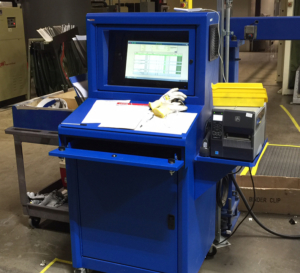
In 2015, Fuyao acquired PPG’s automotive glass manufacturing facilities and underwent major renovations before production could begin. Fuyao sought a heavy-duty industrial computer enclosure to house vital electronics on the plant floor. The requirements for the enclosure solution included a NEMA 12 rating and enough space to house a wide screen monitor, keyboard, mouse, computer and barcode printer. Fuyao’s major concerns included finding a quality product, at a competitive price, that would withstand a manufacturing environment. Due to the rapid expansion, the glass manufacturer required the enclosures very quickly to meet an aggressive timeline and ‘go live’ date.
CHALLENGES:
Based on a competitor’s cabinet, Fuyao set a very low budget for deploying the computer enclosures. Fuyao, not willing to accept an inferior product, contacted ITSENCLOSURES for 100 piece pricing on a comparable enclosure product. Unfortunately, the competitor’s products were not of the same quality of ITSENCLOSURES’ products and failed in Fuyao’s harsh, dirty environment. In order to show the product’s differences, ITSENCLOSURES offered to send Fuyao an evaluation unit to review internally before making a purchasing decision. In the end, the companies were able to negotiate a price that kept Fuyao within their desired budget.
SOLUTION:
ITSENCLOSURES recommended the IceStation TITAN freestanding computer enclosure. The TITAN enclosure accommodates up to a 24-inch wide screen monitor, has an integrated keyboard drawer with a sloped work surface, and space underneath the keyboard drawer for a PC and power supply. In addition to the standard offerings, Fuyao desired an external side mounted shelf to support a thermal barcode printer. A sealed cable entry gland, installed next to the shelf, easily routes electrical cables and wires without jeopardizing the NEMA 12 enclosure rating. To keep the electronics running at optimum temperatures, a 200 CFM filtered fan system, with a normally open thermostat, was installed on the enclosure.
INSTALLATION DATE:
Fuyao issued a purchase order in September 2015. Shipments of the computer enclosures began immediately and spanned over 3 months. ITSENCLOSURES completed the deliveries in December 2015, just before the holidays.
SUMMARY OF PROJECT:
In all, Fuyao deployed 130 IceStation TITAN enclosures between their Moraine, OH and Lake Orion, MI facilities. ITSENCLOSURES easily scaled production to meet Fuyao’s needs and delivered the enclosures ahead of their schedule. The automotive glass supplier is very pleased with the performance of the IceStation TITANS and hopes to order more cabinets in the future.
PRODUCT PAGE OF THE SOLUTION: Click Here
YOUTUBE VIDEO: Click Here
HAVE QUESTIONS?
Let us know how we can best assist you! Contact an ‘ITSENCLOSURES expert’ at 1-800-423-9911 -OR- send us an email: info@itsenclosures.com
The post Fuyao Glass America appeared first on ITSENCLOSURES.
]]>The post Steps for Selecting a Computer Enclosure appeared first on ITSENCLOSURES.
]]>In an industrial environment or machining factory, protecting a PC, printer, monitor, and related peripherals from dangers – like dirt, dust, grease, humidity, liquids and harmful corrosives – is critical. Performing a simple Internet search will display multiple computer enclosures from many differing manufacturers. It may be a difficult task to find an enclosure which is best suited for multi-purpose use in an unforgiving plant setting.
From critical processes to equipment operation to simply checking email, end users will not have to worry about downtime if the appropriate workstation is specified in the initial plans. The steps below point out important items for an organization to consider, which will simplify the process of choosing the best computer enclosure.
4 Steps to Choosing the Exact Computer Enclosure
- In what type of environment will the computer and/or electronics be located?
When starting an enclosure search, determine the National Electrical Manufacturers Association (NEMA) rating recommended for your environment. Some examples of NEMA ratings that will work in many harsh environments, include the following:
NEMA 12 enclosures protect against dust, dirt, oils, lubricants, grease, and light splashing fluids (non-corrosive). NEMA 12 is intended for indoor use.
NEMA 4 enclosures protect against falling dirt, dust, splashing water and hose directed water. NEMA 4 is intended for indoors or outdoors (offers protection against rain, snow, ice, sleet).
NEMA 4X enclosures protect against falling dirt, dust, splashing water, hose directed water and corrosive materials. NEMA 4X is intended for indoors or outdoors (offers protection against rain, snow, ice, sleet).
-
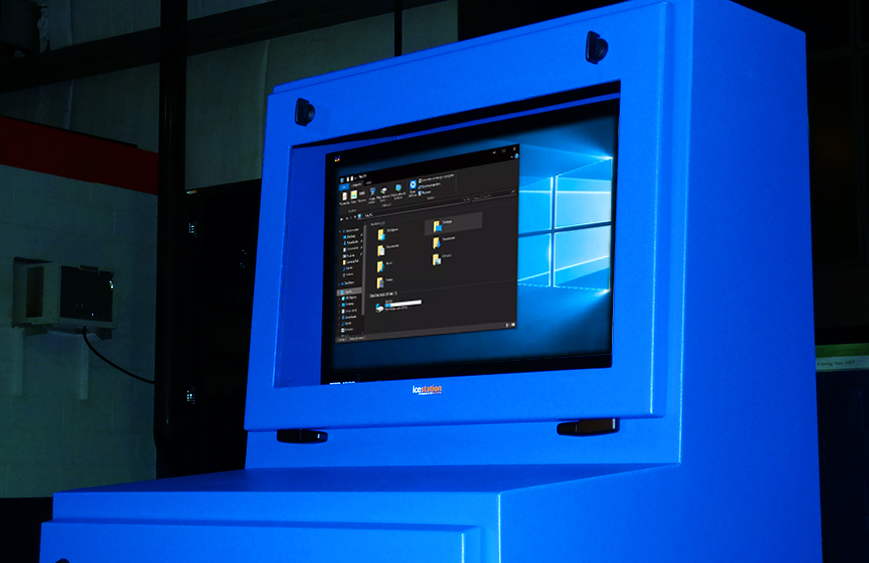 Is bacteria and/or washdown a concern?
Pharmaceutical and food/drink processing plants should be aware of the computer enclosures’ ability to be thoroughly cleaned without harboring microbial contaminants. Stainless steel/sloped top computer enclosures will be the best option – in any environment – to shed water and reduce the possibility of bacterial growth. A heavy-duty gasket around the door frame, that is bacteria resistant, is also worth considering for additional protection.
- What accessories best compliment the workstation?
During the selection process, a team leader should consider a wide range of optional accessories. Does the computer enclosure need to be mobile or stationary? Should the enclosure have lockable doors for security? How many shelves will be used for electronics? Is a VESA mount included for monitor installation? How will the wires/cables be organized? Will thermal management be a necessity in a hot/humid environment? Could a heater be installed in a freezer area? These questions (and many more) should be addressed during the selection process. Research the included features to ensure that the base computer enclosure model will fit any operator’s needs. Sliding shelves, industrial-grade castors, bolt down legs, lockable doors, keyboard drawers, mouse pads, cable entry glands, power cords, USB connectors, and hinged printer access doors are just some of the accessories that can enhance the end user experience and the enclosure’s overall utility.
- What are the plans for the future?
Monitors, computers, keyboards, and printers are forever changing. Just when someone gets accustomed to a specific widescreen monitor or state-of-the-art computer system, the manufacturer introduces a newer version or a ‘faster, better model.’ When choosing a computer enclosure workstation, research features that will allow “growth” in the future. Viewing windows that can accept up to 24”, 27” or even 32” monitors will ensure that there is plenty of room to upgrade from the 19” monitor currently in use. Printers may get larger or smaller, depending on the printed material, so ensure that an enclosure shelf can hold varying amounts of weight and a hinged printer door can be used with different sizes of labels or paper. Computers can also change drastically over the years, so an enclosure with extra room will make all of the difference!
A buyer should always perform the proper product evaluation when purchasing a computer enclosure. Do not base a decision solely on price. Less expensive often means less quality and utility. Research various products on the market to determine the solution that will offer the most value in the long term. Computer enclosures are an investment. Choosing the right enclosure – for the job – will decrease the chance of an expensive replacement! Selecting the proper computer enclosure up front will maximize the life cycle of any computer system and ultimately be cost effective.
HAVE QUESTIONS? LET US KNOW HOW WE CAN BEST ASSIST YOU! CONTACT AN ‘ITSENCLOSURES EXPERT’ AT 1-800-423-9911 -or- SEND US AN EMAIL: INFO@ITSENCLOSURES.COM
The post Steps for Selecting a Computer Enclosure appeared first on ITSENCLOSURES.
]]>The post Issues a Computer Enclosure Can Eliminate appeared first on ITSENCLOSURES.
]]>What is the secret to ensure uptime? It is simple – protect all electronics with a high quality enclosure system.
When one relies on computers, printers, monitors, keyboards, and other peripherals to drive the manufacturing process, a proper shield – from harmful elements – is critical. How many times have unprotected electronics failed because of damaging dust, dirt, lint, grease, corrosives, or water in the air? A manufacturer that utilizes a quality NEMA rated computer enclosure will have a solid output, a higher ROI, and will help maximize the lifetime of electronics.
3 Problems a Computer Enclosure will Eliminate
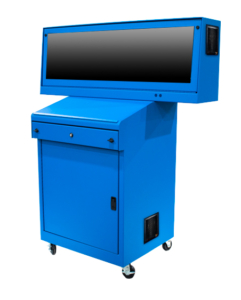 Costly Downtime
A company will experience downtime if a computer system fails because of exposure to dust, grease, moisture, or other harmful contaminants. Consider the amount of time necessary for procurement, installation and start-up to replace a system during a failure. Many control panels and computer systems are custom and may not be readily available, thus adding even more downtime. Account for the needs of all parties involved – from IT and engineering, to maintenance and operators who work directly with the computer system. Above all, downtime costs money. Every minute, hour, or day that goes by without a resolution will become more problematic and expensive!- Reduced Lifetime of Electronics
The temperature range in which a PC should operate is typically disclosed in the product specification booklet. The document should be reviewed carefully with engineering. Overexposure to high heat or low temperatures can damage essential components of a computer, monitor, or printer. In addition, warranties will likely be voided if the electronics are not stored/operated within the recommended temperature range. - Security Gap
Choose an enclosure workstation that incorporates heavy-duty doors with locks, which require a unique key. Locks will prevent theft and system operators from changing settings, which are carefully established by the IT department. In addition, lockable doors will prevent employees from storing inappropriate material inside of the enclosure system. It goes without saying – liquids (coffee!) never mix well with pricey electronics!
So, how much money is lost when a machine is down?
No company situation is the same, but DOWNTIME WILL COST MONEY! Consider all of the options available for computer enclosures. Weigh possibilities that include versatility, dependability, and overall value for your capital equipment dollars. The upfront cost of implementing a high quality industrial pc enclosure may be substantial, but the old adage applies. “You get what you pay for.” Low quality solutions which are purchased based on price alone rarely offer any real protection at all. Once the correct enclosure is chosen, your company will have peace of mind knowing the investment will work in an unforgiving environment and during mission critical situations.
HAVE QUESTIONS? LET US KNOW HOW WE CAN BEST ASSIST YOU! CONTACT AN ‘ITSENCLOSURES EXPERT’ AT 1-800-423-9911 -or- SEND US AN EMAIL: INFO@ITSENCLOSURES.COM
The post Issues a Computer Enclosure Can Eliminate appeared first on ITSENCLOSURES.
]]>The post Overhead Door appeared first on ITSENCLOSURES.
]]>According to the company’s website, “The Overhead Door™ Brand is one of the most recognized and respected brands in the garage door industry. C.G. Johnson, invented the upward-lifting garage door in 1921 and the electric garage door opener in 1926.” Overhead Door has been installing garage doors for almost 100 years and has over 450 authorized dealers across the United States.
 HOW DID THEY FIND ITSENCLOSURES:
After performing an extensive online search for free-standing all-in-one pc/printer enclosures, Overhead Door, in Lewistown, PA, found ITSENCLOSURES and reached out for NEMA 12 enclosure options and ballpark pricing on a few different stand-up units. During this time, they were also looking at other enclosure companies to compare quality and price.
PROJECT:
Overhead Door was interested in installing PCs and network printers in all of the company’s departments across the plant. Due to the amount of dirt, dust, and oil floating around, they desired to protect the overall set-up of each workstation. Overhead Door would be installing 24″ displays, small form computers and barcode printers measuring 15″H x 10.5″W x 19″D. The printer labels exited out of the front of the printer. In general, the goal was to fit everything into one enclosure that could be moved in the future, if necessary.
CHALLENGES:
The Overhead Door facility in Lewistown, PA required heavy-duty industrial computer enclosures to protect against dust, dirt, and oil. Overhead Door desired a solution which included a NEMA 12 rating, enough space to house a wide screen monitor, keyboard, computer and barcode printer. Overhead Door’s main challenge was finding a quality product, at a competitive price, which would endure for many years within a manufacturing environment.
 SOLUTION:
After review of the situation, ITSENCLOSURES recommended the IceStation Titan freestanding computer enclosure, which is built out of 14-gauge steel. The NEMA 12 TITAN accommodates a 24″ monitor with space behind the monitor for a computer, has an integrated keyboard drawer with a sloped work surface and space underneath the keyboard drawer for a Zebra barcode printer. ITSENCLOSURES suggested the addition of sliding shelf brackets to make it easier/quicker to change out the labels/media on the printer and a hinged printer door (installed on the bottom front door) with a clasp to make it easier to retrieve labels. A filtered fan system was also added to the IceStation TITAN for proper airflow and to keep particulate matter out of the cabinet. Overhead Door also ordered a 10-foot power cord and a 6-outlet surge protector for each cabinet.
SUMMARY OF PROJECT:
Overhead Door deployed 25 IceStation Titan (15 Blue & 10 Black) enclosures. ITSENCLOSURES ramped up production to meet Overhead Door’s schedule and delivered the enclosures on-time for the desired installation week. Alex Demastrie, Overhead Door Maintenance Engineer, was happy with the TITAN enclosures and with the push to have the cabinets delivered in a timely manner, “We were all very impressed with the enclosures. They arrived without a single scratch or ding and have been instrumental in keeping our equipment safe. Thanks again for working with us to meet our schedule.” Overhead Door is pleased with the performance of the IceStation TITANS and an additional location has requested a quote to outfit their facility.
HAVE QUESTIONS?
Let us know how we can best assist you! Contact an ‘ITSENCLOSURES expert’ at 1-800-423-9911 -OR- send us an email: info@itsenclosures.com
The post Overhead Door appeared first on ITSENCLOSURES.
]]>The post ITSENCLOSURES Introduces TITAN Dual Monitor Enclosure appeared first on ITSENCLOSURES.
]]>Mt. Pleasant, PA (November 27, 2017) – A leader in the industrial enclosure market, ITSENCLOSURES engineers and builds the most durable, high-quality computer enclosures on the market. ITSENCLOSURES continues to add new products to the best-selling IceStation TITAN Family with the introduction of the TITAN dual monitor enclosure. The NEMA 12 dual monitor enclosure protects against dust, dirt, grease, fibers in the air, and splashing fluids.
Designed specifically to house two 27” widescreen monitors side by side, the dual monitor (ID21542-12) enclosure body is constructed out of heavy-duty 14-gauge welded steel and 12-gauge door thickness. The enclosure stands at 21” high x 54” wide x 12” deep and the finish is a polyester powder paint available in blue, gray, or any custom color found on the RAL color chart.
The large 13.45” high x 49” wide viewing window is hinged at the bottom and easily folds down to accept two (up to 27-inch) 16×9 wide screen monitors in landscape orientation. For stress-free installation, adjustable VESA mounts are included. Utilizing OEM stands, the displays can also be placed on the flat surface below the mount. A removable rear plate (15” high x 29.5” wide) makes it easy to quickly install the suitable monitors. Customers have a choice between a tempered safety glass or a polycarbonate viewing window.
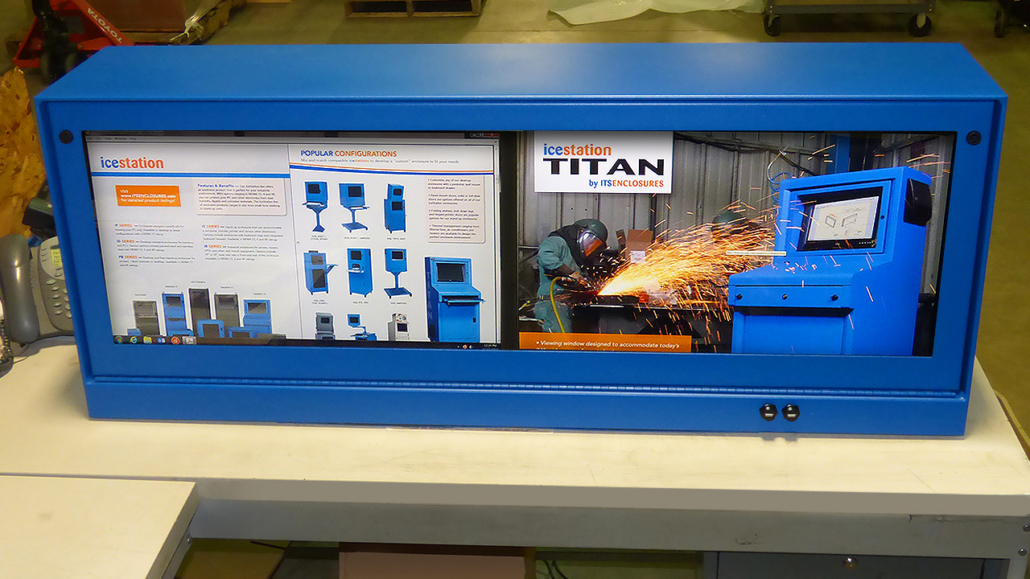 “In 2017, ITSENCLOSURES introduced two new enclosures to the popular and versatile TITAN family of pc enclosures,” said JT Spangler, President of ITSENCLOSURES. “The innovative dual monitor enclosure derived from the IceStation TITAN Hammerhead enclosure. Due to the overwhelming popularity of the Hammerhead enclosure, it was a natural progression for ITS to modify this product for customers that did not require the full freestanding enclosure.” Spangler continued, “The dual monitor enclosure is ideal for space saving applications, because the enclosure can sit on a desk or mount to the wall. We are extremely pleased with how this rugged product came together and are excited to formally introduce it to our customers. ”
Thermal management options, available for the dual monitor enclosure, include a filtered fan system and vortex cooling unit. Either thermal management system will keep the equipment running smoothly in mission critical environments.
“ITSENCLOSURES plans to introduce new products to the market in 2018, including a new line of label printer enclosures,” added Mr. Spangler. “Our business model has always been to protect electronics in any environment, in turn helping companies realize the maximum life cycle of their equipment.”
The NEMA 12 enclosure can be customized with various accessories, including two waterproof USB connectors for a keyboard or scanning device, sealed cable entry gland, a 6-outlet surge protector, a 10-foot power cord, or an industrial keyboard and mouse.
Proudly ‘Made in the USA,’ ITSENCLOSURES ships every product completely assembled and ready to use upon delivery!
To visit the Dual Monitor Enclosure Product Page – Click Here
The post ITSENCLOSURES Introduces TITAN Dual Monitor Enclosure appeared first on ITSENCLOSURES.
]]>The post ITSENCLOSURES Introduces Dual Monitor Computer Enclosure appeared first on ITSENCLOSURES.
]]>Mt. Pleasant, PA (April 26, 2017) – For over three decades, ITSENCLOSURES (Integration Technology Systems) has been engineering and fabricating the most heavy-duty computer enclosures on the market. ITSENCLOSURES continues to add to the popular TITAN family with the introduction of the Hammerhead – the new dual monitor NEMA 12 freestanding computer enclosure. The ‘Hammerhead’ dual monitor enclosure protects against dust, dirt, grease, and splashing fluids.
With the ability to store two 27” widescreen monitors side by side, the TITAN Hammerhead’s (IS615427-12) enclosure body is constructed out of 14-gauge welded steel and 12-gauge door thickness, and stands 61” high x 54” wide (bottom portion is 29.5” wide) x 27” deep. The dual monitor enclosure finish is a polyester powder paint available in blue, gray, or any custom RAL color.
The 49” wide x 13.45” high viewing window is hinged at the bottom and easily folds down to accept two (up to 27-inch) 16×9 widescreen monitors in landscape orientation. Adjustable, VESA mounts are included for easy installation. The displays can also be placed on the flat surface – below the mount – utilizing OEM stands. A removable rear plate (15” high x 29.5” wide) makes it easy to quickly install the suitable monitors. Customers have a choice between a tempered safety glass or a polycarbonate viewing window.
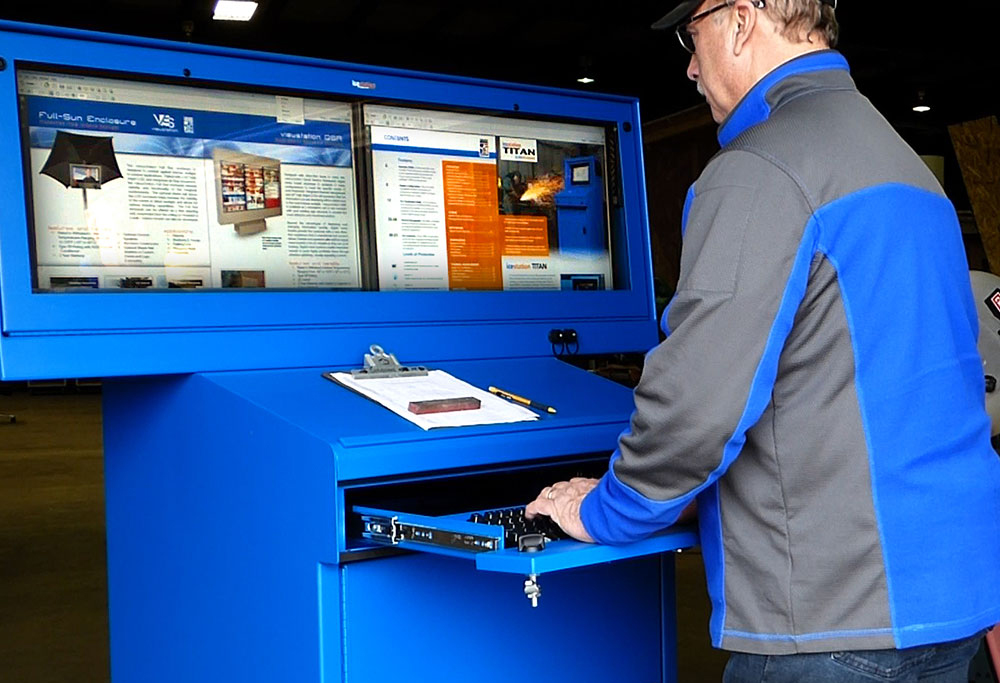 The dual monitor enclosure doors feature lift and turn style key lockable latches and dual durometer EPDM gasket for additional protection against a harsh environment. The lower rear door measures 30.65” high and is ideal for accessing the back of electronics stored in the enclosure. The bottom half of the TITAN provides plenty of space to house a computer, printer, UPS, power supply, and additional important electronics. An adjustable, vented shelf, attached to uni-strut, is also included for placement of electronics.
“ITSENCLOSURES is excited to, once again, introduce another product to the TITAN family of industrial computer enclosures,” said JT Spangler, Owner & President of ITSENCLOSURES. “Customer feedback warranted the Hammerhead product, as manufacturers and system integrators sought a cabinet with the ability to house two monitors within one enclosure. The Hammerhead creates a revolutionary workspace for factory and industrial settings. We are excited to see this product on manufacturing floors across the globe. Every product sold is designed and manufactured with a commitment to quality and satisfaction.”
A sloped work surface, with raised ledge, provides a useful area for important documents, file folders, and writing utensils. Beneath the work surface is a retractable keyboard/mouse drawer. The drawer is lockable and the front folds down to provide an ergonomic wrist rest. When completely extended, the drawer measures 22.7″ wide x 9″ deep x 3.5″ high.
Swivel casters are a standard feature. When the computer enclosure is in its desired location, the front casters lock into place with a foot brake. For areas that require a stationary workstation, bolt down legs can be installed on the enclosure.
Various thermal management options are available for the TITAN Hammerhead, including a filtered fan system, air conditioners (ranging in size from 2,000 – 6,000 BTU), heat exchanger, and vortex cooling unit. If additional airflow is required between the two halves of the Hammerhead, a recirculating fan can be installed in a pre-cut hole below the monitors.
Customize the NEMA 12 enclosure with numerous accessories, including sliding shelf brackets for the vented shelf, waterproof USB connectors for scanning devices, hinged printer door for a barcode printer, 19” wide adjustable rack mount rails, 6 outlet surge protector, 10-foot power cord, and industrial keyboards or hula points.
Always proudly ‘Made in the USA,’ ITSENCLOSURES ships every product completely assembled and ready to use upon delivery at the plant or manufacturing facility!
For more information on ITSENCLOSURES and their wide array of innovative products, please email ITSENCLOSURES(info@itsenclosures.com) or call 1.800.423.9911 to speak to a salesperson.
Visit the TITAN HAMMERHEAD product page: Click Here
The post ITSENCLOSURES Introduces Dual Monitor Computer Enclosure appeared first on ITSENCLOSURES.
]]>