The post Avoid Computer Enclosure Pitfalls with Planning appeared first on ITSENCLOSURES.
]]>If the proper planning is executed from the beginning of the process, finding the best computer enclosure does not have to be overwhelming. Setting aside time for adequate research is the best course of action and will pay off in the long run. Keep in mind: not every enclosure company has the same product for the same price, and appropriate product comparisons should be made and reviewed.
What steps should be completed to find the perfect solution?
6 Steps to Specifying the Best Computer Enclosure for the Job:
- Define Requirements
Meet with the team members involved on the enclosure expansion to clearly define the computer enclosure requirements. Important items to consider, include the NEMA rating, power supply, locks, hinges, window choices, thermal management, environmental temperature extremes, space requirements to house electronics (computer, monitor, printer, UPS, etc.), and the overall durability of the enclosure material. If every team member is on the same page at the beginning, there will be no surprises when the equipment arrives on site.
- Research
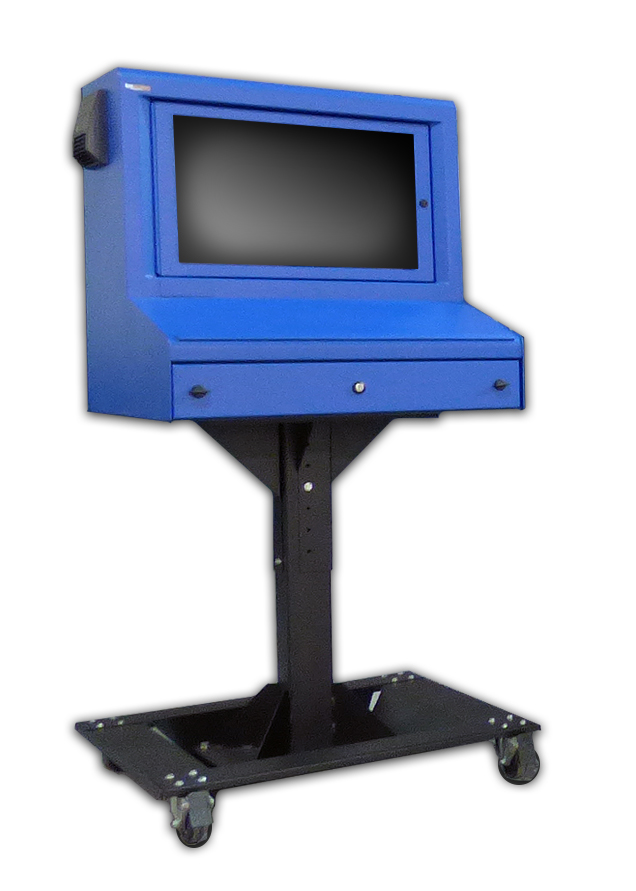 Complete the necessary homework! Every enclosure company is going to make claims that they offer the highest quality computer enclosures on the market. However, if you dig a little deeper, you will find that the materials and hardware used – to build some enclosures – are flimsy. In the end, experience speaks for itself. To make sure you are purchasing the best product, submit the clearly defined project requirements to enclosure providers for a recommendation on their best product. Also, do not overlook the length of the warranty being offered. This could help down the road, if something unexpected occurs.
- Choose the Best Supplier
When possible, evaluate a potential computer enclosure in person, or inquire if an evaluation unit is available. Most companies are willing to send one unit for a hands-on review, in anticipation of selling multiple units after the evaluation period is over. Companies with heavy duty units are always eager to send over a sample unit, because it will likely impress the end user. If an evaluation unit is not available, ask the enclosure supplier for a list of referrals of similar companies that they have worked with on previous projects.
- Pricing
Once it is determined what (product) and who (enclosure supplier) has the best solution for the project, obtain a competitive price quote. Too often, customers ‘ballpark’ their budget far too low in the beginning and do not perform the correct evaluation of the products available on the market. Poor initial budgets could equate to sacrificing enclosure quality, which may end up costing a company more money over the course of time.
- Create a Timeline
From electronics to accessories, understand the lead time for all the items required to properly execute a successful computer enclosure plan. Enclosure suppliers always have a handful of best-selling products ‘in stock,’ which means the lead time should only be a few days. However, if a specialized project requires a custom-made enclosure, then the lead time can be extensive. At times, a customer may need an enclosure solution in two weeks, but in order to fabricate a new product, the lead time could take up to 2 months. This will create headaches for everyone involved in the process. Failing to prepare – in a timely manner – may result in expedite fees to meet the company’s “go live” date.
- Execute
If all of the ducks are in a row, executing the project will prove to be the easiest part! Be sure to assign a project manager to keep everything moving on the right track. In the end, if the plan was implemented properly, then the project will be a huge success. Also, save the enclosure supplier’s number or email, because you may want to order more units in the future!
Poor planning may result in poor product choices. In order to get the right product for the job, always ask questions (and more questions) during the process. How much will this cost? Will the chosen enclosure be best for my environment? What is the lead time? How will this ship? Can this product have thermal management? Can a printer fit? How will power enter the enclosure? These are just a few of the queries to ponder.
Detailed research is always the best course of action. When it comes to purchasing new computer enclosures, it is always good to have a strategy.
HAVE QUESTIONS? LET US KNOW HOW WE CAN BEST ASSIST YOU! CONTACT AN ‘ITSENCLOSURES EXPERT’ AT 1-800-423-9911 -or- SEND US AN EMAIL: INFO@ITSENCLOSURES.COM
The post Avoid Computer Enclosure Pitfalls with Planning appeared first on ITSENCLOSURES.
]]>The post Customizing Your Industrial Computer Enclosure appeared first on ITSENCLOSURES.
]]>The term “custom” enclosure often gets a poor reputation for being more expensive than standard units and having excessive lead times. However, this is not always the case. When researching the best industrial computer enclosure for the job, it is critical to choose an enclosure provider which utilizes off-the-shelf items to customize a solution that meets the users’ needs.
Finding the right enclosure for a computer enclosure project is more extensive than just simply picking out a steel or stainless steel ‘box.’ Enclosures are available in a variety of shapes, sizes, and materials with numerous options for accessories, mounting, connectivity, and climate control. End users and system integrators can simplify the process by choosing a customized solution that ships ready to be used upon delivery.
In order to meet the individual requirements of users, enclosure companies usually stock popular models and valuable accessories. Therefore, the company will be able to “build” an enclosure tailored to the end user’s specific needs more efficiently, than if it was constructed ‘from-scratch.’
Custom Factors to Consider:
Custom Colors
Sometimes the standard color offerings (gray, white, black, or even blue) will not suit the needs of a customer. Custom colors to fit a company’s branding scheme, to match other equipment, or for safety reasons may be required for certain applications. It is necessary for an enclosure company to provide specialized color(s) choices (Pantone or equivalent RAL color) on a small or large scale.
 Custom Doors
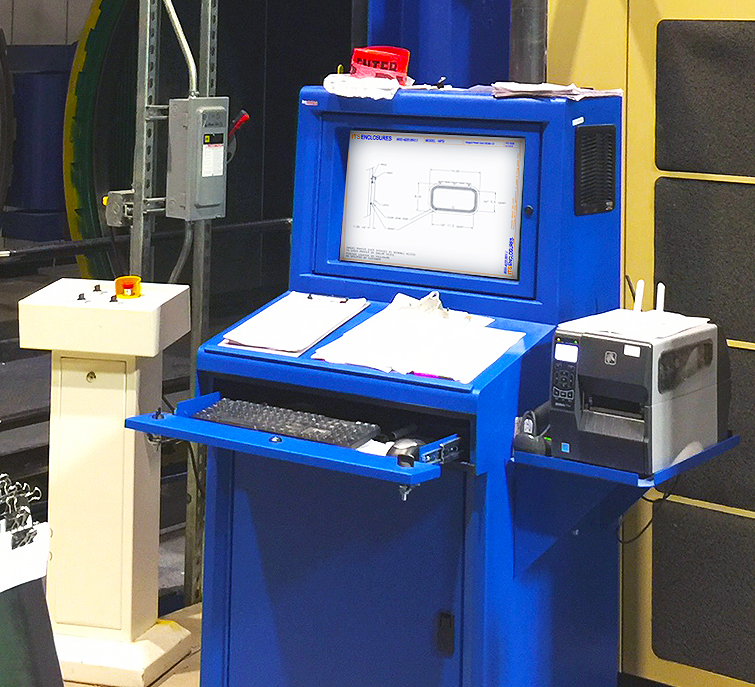
Custom doors, ranging from dust-free printer access doors to rear extended doors to panel mountable doors for touchscreens, are crucial to the efficiency of the enclosure solution. Finding a means to access the electronics inside the pc enclosure is just as important as protecting the electronics from outside dirt, grease and other harmful contaminants. The enclosure can be rendered useless if there is not an easy way to access printer tickets or the ability to use a touchscreen.
Thermal Management
It goes without saying, but all industrial and manufacturing areas are different. It is beneficial to work with an enclosure specialist that has a thorough understanding of specifying the correct heating or cooling (or both) for a computer enclosure. The ability to tailor an off-the-shelf enclosure solution with a filtered fan system, air conditioner, vortex cooling unit, heat exchanger, or various sizes of heaters – specific to the environment the system will be installed – is crucial.
Ask the pc enclosure provider if they have a worksheet to fill out in order to find the best thermal management solution.
Additional Accessories
Although it may seem like minor details compared to the points already discussed, accessories like a foldable mousepad, sliding shelf brackets, mobile or bolt down pedestals (painted steel or stainless), cable entry glands, and power supplies can make a big difference. Most enclosure company websites will list out complimentary accessories below the product, so that an end user can select what will work best for the application. Enclosure specialists will work with customers to find the most appropriate accessories for the specified installation.
Never let the word “custom” affect a computer enclosure solution decision. Custom can simply mean that the end user can pick & choose how the industrial computer enclosure will look and function in a working environment. Homework is essential. As always, do not let price steer you in the wrong direction. In the end, durability and longevity should always be the most important factors when deciding on a brand new enclosure solution.
HAVE QUESTIONS? LET US KNOW HOW WE CAN BEST ASSIST YOU! CONTACT AN ‘ITSENCLOSURES EXPERT’ AT 1-800-423-9911 -or- SEND US AN EMAIL: INFO@ITSENCLOSURES.COM
The post Customizing Your Industrial Computer Enclosure appeared first on ITSENCLOSURES.
]]>The post How to Customize Computer Enclosures appeared first on ITSENCLOSURES.
]]>It’s not just a simple steel box.
Enclosure manufacturers always strive to quickly ship the ideal cabinet to satisfy customers’ requests. The value added through flexibility and modifications can be very appealing if integrators work with a supplier that “can do it all.” When searching online for heavy-duty pc enclosures, integrators and project engineers often investigate outsourcing certain components of a computer workplace to help reduce costs and shorten delivery time. When deploying a new workstation or upgrading an existing enclosure system, designers must determine what type of computer enclosure will perform the best, and plan how components and wiring will come together to complete the project.
Best Practices for Enclosure Customization
1. Cutouts
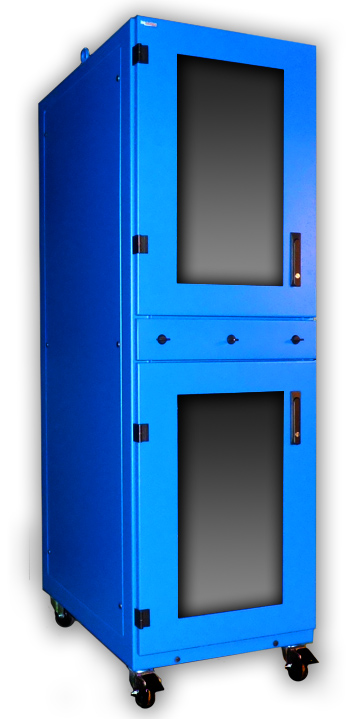 Prior to an enclosure being populated with functional electronics, holes must be cut out and connections must be mounted. It is common for factories and panel shops to knockout or punch holes for a perceived ‘quicker’ turnaround and cost. This may lead to inaccuracy, especially if the factory or panel shop does not have the correct size of punch or bit. Finding an industrial enclosure company that has the skill and ability to modify an enclosure – before shipping – may eliminate hours of in-house measuring and cutting by hand. Enclosure companies make cutouts and custom modifications daily, and do so with great precision. Popular modifications include cable glands, liquid-tight conduit, and cutouts for knobs and push buttons.
2. Wiring
Wiring electrical outlets, fan systems, thermostats, air conditioners, and heaters can be time consuming for the inexperienced. Large jobs may require a completely turnkey solution with necessary wiring and cabling before deploying the computer enclosure in the field. If an integrator is purchasing a sizeable quantity of enclosures and drop shipping them directly to their customer, the enclosure solution must be ‘plug & play’ and ready to use upon delivery. Ask your enclosure manufacturers if outlets, thermal management and other electrical components are installed at the manufacturing facility before shipping. Properly sourced manpower will greatly reduce the final installation time on big projects.
3. Mounting
Internal components such as brackets, DIN rail, mounting track, unistrut, rack channel, and sub panels are vital for mounting switches and controls. If these items are pre-installed prior to delivery from the manufacturer, it will greatly reduce assembly time for your customer and will help them reach a ‘go live’ date. Again, coordination with the enclosure manufacturer will ensure that everything is installed properly and professionally. Manufacturers perform modification tasks regularly and employ proper installation procedures!
When it comes to industrial pc enclosures, many system integrators, engineers and buyers only consider the purchase price and not the entire package. An enclosure company’s reputation and experience can make all the difference! Over time, a great business relationship can be created between the integrator and manufacturer. Leveraging an enclosure manufacturers’ experience can help eliminate some of the ‘heavy lifting’ on behalf of the integrator and end user/customer. It is always best to research solutions on the market and discuss the project with enclosure experts.
HAVE QUESTIONS? LET US KNOW HOW WE CAN BEST ASSIST YOU! CONTACT AN ‘ITSENCLOSURES EXPERT’ AT 1-800-423-9911 -or- SEND US AN EMAIL: INFO@ITSENCLOSURES.COM
The post How to Customize Computer Enclosures appeared first on ITSENCLOSURES.
]]>The post ITS Announces IO35-4X Computer Enclosure appeared first on ITSENCLOSURES.
]]>The latest IceStation industrial computer enclosure is the IO352813-4X stainless-steel monitor/computer enclosure, which was designed specifically for the food, beverage, and pharmaceutical industries in mind. NEMA 4X enclosures will defend against dust, dirt, hose directed fluids, corrosive materials, and most weather conditions.f
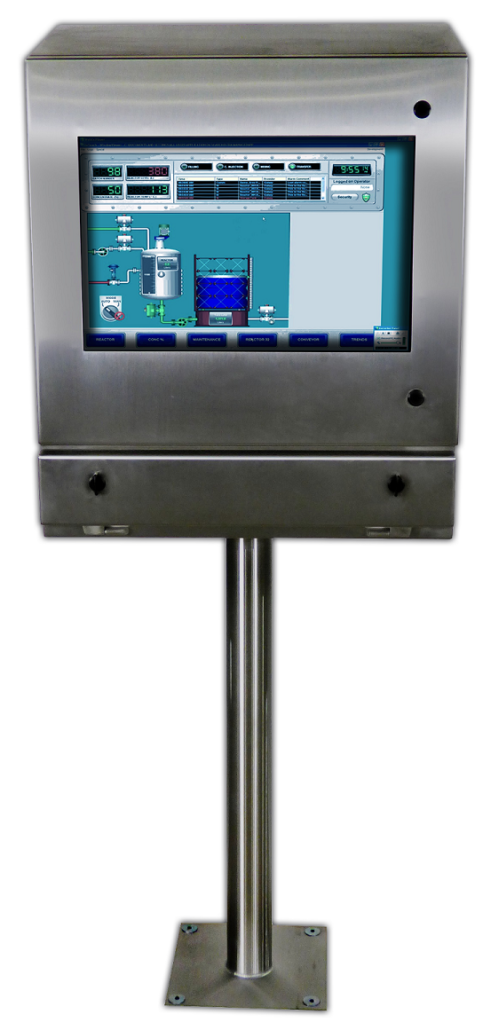 ITSENCLOSURES IO series enclosures are designed for use with flat panel monitors and thin client/small form computers. The computer enclosures are the perfect solution for limited space environments.
The NEMA 4X IO35 computer enclosure is formed and fully welded with type 304 stainless-steel and a vertical #3F finish. This enclosure features a built-in keyboard drawer to store a desktop or industrial keyboard and mouse. The roll-out keyboard tray – with two quarter turn compression latches – measures 3″ High by 22.62″ Wide x 9.88″ Deep.
The IO35-4X measures 35” High by 28” Wide by 12” Deep with a 25.5” diagonal window measuring 13.75” High by 21.5” Wide. ITSENCLOSURES offers tempered safety glass or polycarbonate window options for the front door. The stainless-steel door panel includes concealed hinges and two quarter turn screwdriver style latches (key locking latches are also available). A monitor sized up to 25-inches can be installed to the internal VESA mount, which is part of the vertical support bracket. The bracket is used to tip out and install the PC/monitor. The chassis includes a 100-cfm re-circulating fan.
“The IO35 is the modern brain-child of our sales team and engineering team with very valuable customer influence. I love that our employees work together to find workable solutions which resonate with our customers. This new stainless-steel IceStation product incorporates pieces of our best-selling products and I am quite pleased with the functionality of the enclosure,” stated JT Spangler, Owner of ITSENCLOSURES, “We will continue to develop and manufacture additional heavy-duty units throughout 2020. Our dynamic products continue to innovate and advance beyond our wildest expectations and we feel that solid growth is in our near future.”
For installation, the heavy-duty IO35-4X computer enclosure can be affixed to a wall with a mount, a stainless-steel bolt down pedestal, or a stainless-steel mobile pedestal with swivel castors, which can be locked into place. A Roxtec sealed cable entry gland can be installed – in various spots on the enclosure – for the ingress and egress of power cords, wires, and cables. ITSENCLOSURES also offers surge protectors, industrial keyboards, and thermal management options, like stainless-steel vortex heat exchangers for cooling or an electric thermal heater for refrigerated environments.
ITSENCLOSURES has two additional stainless-steel monitor/computer enclosures; the IO28-4X (measuring 28″ High x 26″ Wide x 8″ Deep) for a 22” monitor and the IO29-4X (measuring 29″ High x 28″ Wide x 12″ Deep) for a 25” monitor.
“Computers, printers, monitors, and other essential electronics are protected in our IceStation NEMA rated products. As we always say, our monitor, printer, and computer enclosures are built-to-last and we stand by that promise,” added Mr. Spangler.
IceStation by ITSENCLOSURES has over 3 decades of experience in successful printer, monitor, keyboard, and computer enclosure deployments and offers a wide variety of ‘built-to-last’ products.
For more information and to watch the product video, visit the IO35-4X product page
——-
About ITSENCLOSURES
ITSENCLOSURES builds the strongest, NEMA rated computer enclosures, which are ideal for all environments where dust, dirt, and exposure to liquids or corrosives are present. The IceStation line of products allow the use of computers, printers, keyboards, and monitors in the harshest locations and will protect a company’s investment and maximize the lifetime of the electronics protected.
To learn more about ITSENCLOSURES, contact the Sales Department: 1-800-423-9911 –or– info@itsenclosures.com
###
The post ITS Announces IO35-4X Computer Enclosure appeared first on ITSENCLOSURES.
]]>The post Senior Flexonics Pathway – Computer Enclosure appeared first on ITSENCLOSURES.
]]>COMPANY SYNOPSIS:
In business since 1902, Senior Flexonics Pathway (SFP) has two locations in the United States: New Braunfels, Texas and Lewiston, Maine. According to SFPathway.com, the company has been a pioneer in delivering solutions to movements in high pressure and temperature process equipment. Senior Flexonics provides custom designed expansion joints, dampers, and HVAC for piping and ducting applications.
HOW DID THEY FIND ITSENCLOSURES:
When researching stand-up enclosures for their plant, Senior Flexonics Pathway found ITSENCLOSURES on the Internet. While at ITSENCLOSURES.com, SFP reached out to the ITS sales department via the online chat tool. Originally, SFP was interested in a unit that could house a touchscreen monitor. After receiving a follow-up email from ITSENCLOSURES, Patrick Miller, the IT Manager, requested pricing on a stand-up enclosure and decided against deploying a touchscreen.
PROJECT:
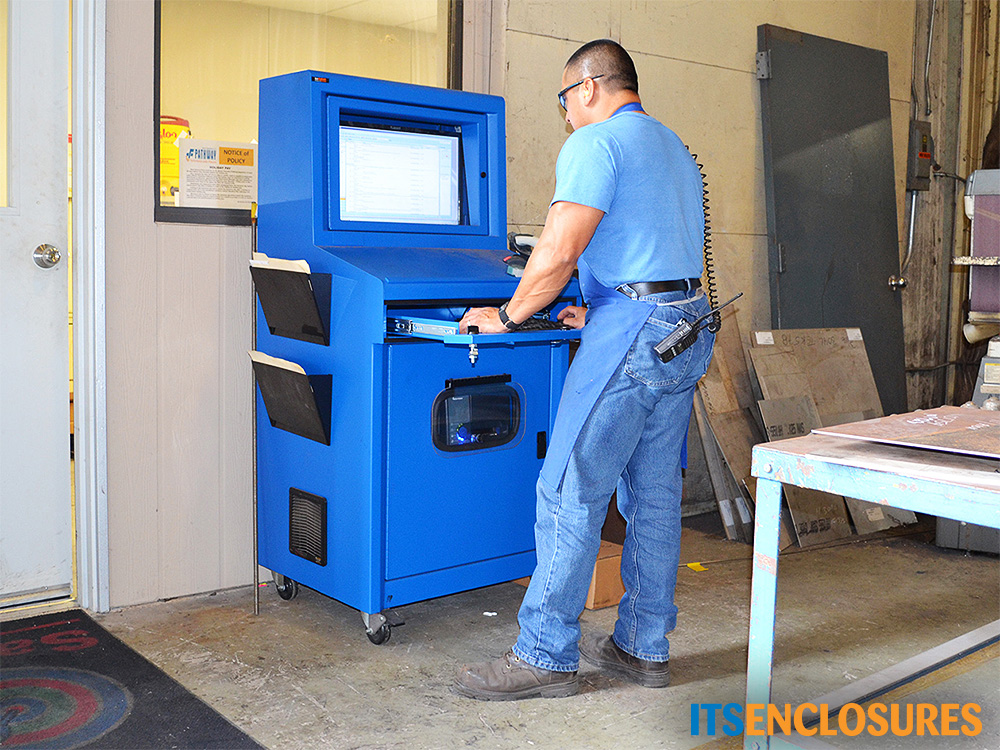
Senior Flexonics Pathway was in search of a mobile inventory computer enclosure for its workers. SFP wanted to save employees from walking to different parts of the plant to perform tasks. According to Patrick Miller, IT Manager at Senior Flexonics Pathway, SFP wanted to provide employees with the equipment to take inventory, print, labels and scan barcodes at the point of where the work is actually being done, on the manufacturing floor.
CHALLENGES:
Senior Flexonics sought an all-in-one solution that would allow all of their complex systems to work together in one enclosure. SFP’s manufacturing environment is quite harsh, and required a heavy duty NEMA 12 enclosure solution.
SOLUTION:
Senior Flexonics Pathway purchased a number of IceStation TITAN (IS603027-12) computer enclosure workstations. The freestanding enclosure solution consisted of 24” extension sliding shelf brackets and a hinged printer door. The added accessories were installed for the barcode printers that are used throughout the workday. The hinged printer door makes it simple to retrieve labels and the sliding shelf brackets create an efficient way to change the media and load additional labels. In order to regulate the temperature inside of the enclosure, a 200 CFM filtered fan system, with thermostat, was installed.
INSTALLATION DATE:
Senior Flexonics purchased the NEMA 12 computer enclosures in the spring of 2015 to be installed in the New Braunfels, TX and Lewiston, ME locations. The units are deployed in key areas of the production floor, including the Metal Bellows manufacturing area, Parts Distribution, and Burn Table work centers.
SUMMARY OF PROJECT:
Mr. Miller summed up the success of the project, “The products that Senior Flexonics Pathway makes [are] in some of the harshest environments in the world. IceStation computer enclosures were a perfect fit for our company! ITSENCLOSURES products are rugged and well designed. [The TITANS] have given our shop employees the ability to access internal system applications and to speed up the processing of part issues.” He continued, “The flexibility has been a definite plus, as the IceStation [units] have been really easy to adapt to our specific needs. We have a wireless computer inside of the unit, along with a wireless barcode printer. Our employees are able to do part issues, print barcodes labels, check drawings, review hotlists, welding procedures, and to clock in and out of jobs.”
“We’ve tested other stand-alone units, and IceStation has been an exceptional addition to our facility!”
ADDITIONAL PRODUCT INFORMATION:
HAVE QUESTIONS?
Let us know how we can best assist you! Contact an ‘ITSENCLOSURES expert’ at 1-800-423-9911 -OR- send us an email: info@itsenclosures.com
The post Senior Flexonics Pathway – Computer Enclosure appeared first on ITSENCLOSURES.
]]>The post Engineered Software Products – Printer Enclosure appeared first on ITSENCLOSURES.
]]>COMPANY SYNOPSIS:
Engineered Software Products (ESP) began operation over 29 years ago as a traditional control systems integrator providing PLC, HMI, and plant floor information management solutions. Ten years ago, ESP expanded its capabilities and added engineered power solutions to its provisions, referred to as a turnkey electrical package, providing: Portable Prefabricated Electrical Building (eHouse), Electrical Equipment – Power Distribution and Motor Control, Automation System – PLC, HMI, Data Management, Electrical Engineering Services – Electrical Design and Automation Programming
 ESP’s directive, as a technology partner, has been to develop automation strategies, for client’s plants, which are current with today’s ever-changing technology. The primary goal for each plant is to provide an expandable open architecture control system, which is cost effective and consistent with corporate standards. To achieve this goal, ESP has been instrumental in assisting its clients in establishing key standards, as they relate to the PLC/HMI automation and power distribution/motor control systems. Throughout the years, ESP has provided control systems to a variety of industries, including Aggregates, Cement, Chemical, Food & Beverage, Pulp & Paper, Traffic Control, Wastewater, and Wood Pellets.
HOW DID ESP FIND ITSENCLOSURES:
Engineered Software Products (ESP) scoured the Internet in search of rugged, industrial, computer and printer enclosures and discovered ITSENCLOSURES. After researching and reviewing the ITSENCLOSURES website, ESP located the IceStation product line, which was exactly what they were looking for in an computer and printer enclosure product.
PRINTER ENCLOSURE PROJECT:
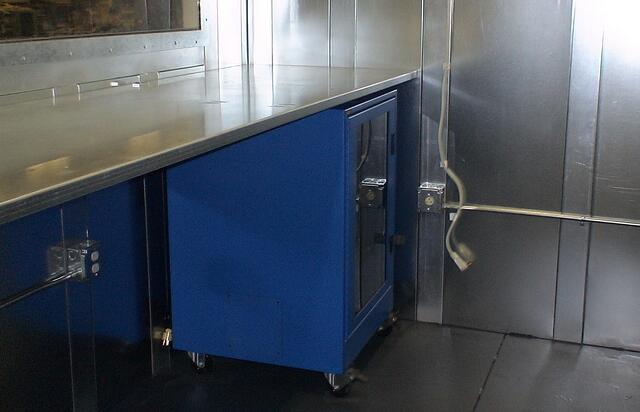
ESP provides turnkey electrical buildings and elevated control towers. They required an enclosure to fit under a countertop in control rooms. A computer and printer enclosure was needed to protect PC and printer equipment and be deployed by Greenfield plants mostly in the aggregate, mining and cement industries.
CHALLENGES:
ESP desired a computer and printer enclosure which could protect against extremely dusty, dirty environments, and provide security and stability against vibrations from plant equipment.
PRINTER ENCLOSURE SOLUTION:
ESP chose the NEMA 12 IceStation IS362626 computer and printer enclosure, which includes 2 adjustable, vented shelves, lockable front and rear doors, industrial-grade swivel castors, and a tool-free rear split panel. These benefits were the ultimate reason why ESP decided to utilize the IS362626-12 computer and printer enclosure. According to Jeff Patenaude, Principal at Engineered Software Products Inc., the IS36-12 is a good fit, because it is “dustproof, has rubber bushings on its shelves to protect against vibration, has a convenient gland plate for easy cable entry, and [industrial] castors for ease of use.”
SUMMARY OF PROJECT:
ESP continues to deploy many of the IS362626-12 computer and printer enclosures at various plants and locations across the United States. Jeff Patenaude is very pleased with the staff at ITSENCLOSURES and with the heavy-duty products, “ITSENCLOSURES has been a reliable supplier that delivers a quality product on time, every time.”
ADDITIONAL PRODUCT INFORMATION
HAVE QUESTIONS?
Let us know how we can best assist you! Contact an ‘ITSENCLOSURES expert’ at 1-800-423-9911 -OR- send us an email: info@itsenclosures.com
The post Engineered Software Products – Printer Enclosure appeared first on ITSENCLOSURES.
]]>The post 3 Reasons to Add Cooling to Computer Enclosures appeared first on ITSENCLOSURES.
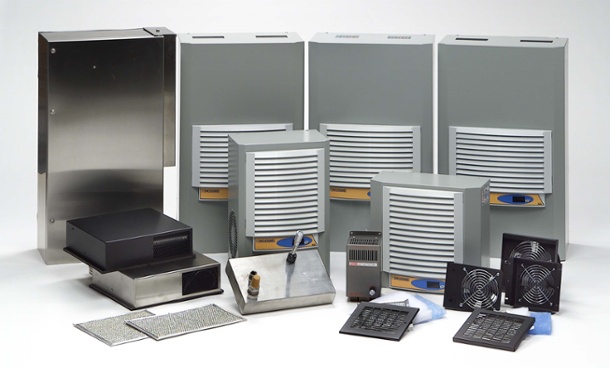
]]>Why Proper Thermal Management Helps:
- Prolongs the Life of Electronics
The average lifetime of a computer is approximately 3-5 years. According to AZ Central (USA Today Network), the lifespan is “gauged by a variety of factors including environmental conditions, usage patterns, and computing needs. Many computers will last far longer than this, and possibly a decade or more if properly maintained.” In general, computers and electronics will not survive – on their own – in a hot, dusty manufacturing facility, if not protected inside of a pc enclosure. Furthermore, electronics – installed within the sealed computer enclosure– may also need thermal management to survive. When electronics are used daily, it is good business to maximize their life cycle. If a printer is overheated, then the media may not print properly and if a computer is overheated, it may shut down completely. By keeping electronics running at optimal temperatures, production will never need to slow down.
 Reduces Costly Downtime
If electronics are housed in an computer enclosure, which is in a hot industrial environment, high ambient temperatures will slowly damage a computer or other electronic devices. If the inside of an enclosure is cool and humidity is removed, the equipment will not overheat and will continue to operate at a peak performance. If the computer or printer is needed for everyday tasks, then it must be WORKING(!)… plain and simple. According to the article, The Cost of IT Downtime, Michael Copeland writes, “Because there are so many differences in how businesses operate, downtime, at the low end, can be as much as $140,000 per hour, $300,000 per hour on average, and as much as $540,000 per hour at the higher end… Downtime is extremely expensive, and in ways that can make or break the success of your organization.” Time is money!
- Cuts Down on Replacements
Utilizing the same computer enclosure equipment for many years will offer a strong return on investment for businesses. To put it into perspective, the average computer can cost upwards of $800 to $1,200 (if not more), a replacement thermal transfer printer can run from $400 to thousands of dollars, and even standard LCD monitors are a few hundred dollars. Obviously, to save man-hours and money, a company does not want to constantly be swapping out its essential equipment. Plus, replacement products will take a long time to configure, and oftentimes replacements are in short supply – just adding to downtime and lost profits. The learning curve for brand-new equipment is also costly, as it takes time for employees to learn the latest computer system, printer, or other peripheral.
To determine the correct thermal management for an computer enclosure, it is always useful to perform the proper research, so that the electronics being housed are appropriately protected. Companies will often offer a website form to fill out, so that a buyer can purchase the appropriate equipment.
—–
This formula can also be useful for picking the right thermal management:
(watts x 3.413) + (1.25 x area in square feet x ∆T temperature difference in degrees F) = BTU/hr.
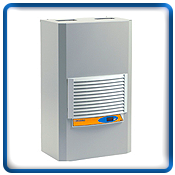
Watts = The total heat load inside the enclosure (the sum of all heat-producing equipment)
Area = Total exposed surface area of the enclosure expressed in square feet
∆T = The difference in temperature between the maximum expected degrees Fahrenheit temperature outside the enclosure and the maximum degrees Fahrenheit temperature allowed inside of the enclosure
HAVE QUESTIONS? LET US KNOW HOW WE CAN BEST ASSIST YOU! CONTACT AN ‘ITSENCLOSURES EXPERT’ AT 1-800-423-9911 -or- SEND US AN EMAIL: INFO@ITSENCLOSURES.COM
The post 3 Reasons to Add Cooling to Computer Enclosures appeared first on ITSENCLOSURES.
]]>The post FerraStone – Computer Enclosures appeared first on ITSENCLOSURES.
]]>COMPANY SYNOPSIS:
According to the company’s website, “FerraStone’s expertise, since 1960, has been hand casting fine statuary. Custom sculptured lines range from religious statuary to beer tap handles. Each item is designed and manufactured under the expert direction of highly skilled artists and sculptors. Skilled craftsmen hand cast and hand finish each piece of statuary.” FerraStone is located in Newport, Kentucky.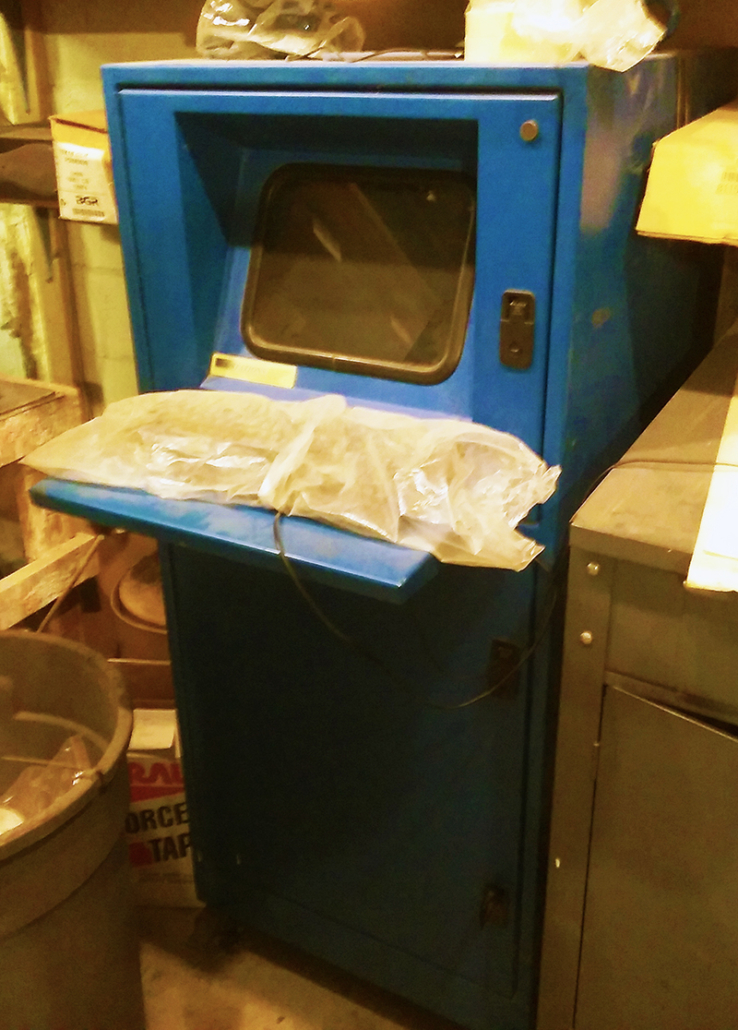
HOW DID FERRASTONE FIND ITSENCLOSURES:
Over 2 decades(!) ago, FerraStone discovered ITSENCLOSURES’ large line of NEMA rated computer enclosures by performing a search for dust-proof industrial enclosures. The president of FerraStone reached out to obtain pricing on a NEMA 12 tower computer enclosure and a NEMA 12 stand-up computer enclosure.
PROJECT:
Because FerraStone manufactures statues and incense powders, they desired a freestanding computer enclosure to house a monitor, printer, and computer. A second enclosure was needed to house a tower pc and would be stored underneath a desk.
CHALLENGES:
One of the biggest challenges: damaging dust and dirt in the air. FerraStone wished to maintain the utmost cleanliness throughout its facility and protect electronics and computers. The customer noted that, “there is so much dust, that it would have choked the fans!”
SOLUTION:
After reviewing various IceStation models, FerraStone deployed the IS562626-12 freestanding computer enclosure, which is rated NEMA 12 and protects against dust and dirt. The customer’s enclosure houses a computer, printer, and a monitor. The IS56-12 (powder coated blue) configuration includes 3 adjustable shelves, industrial grade casters, a keyboard tray, a rear split panel, lockable doors, lifting eye bolts to move the enclosure around with ease, and it can comfortably house a 21” monitor.
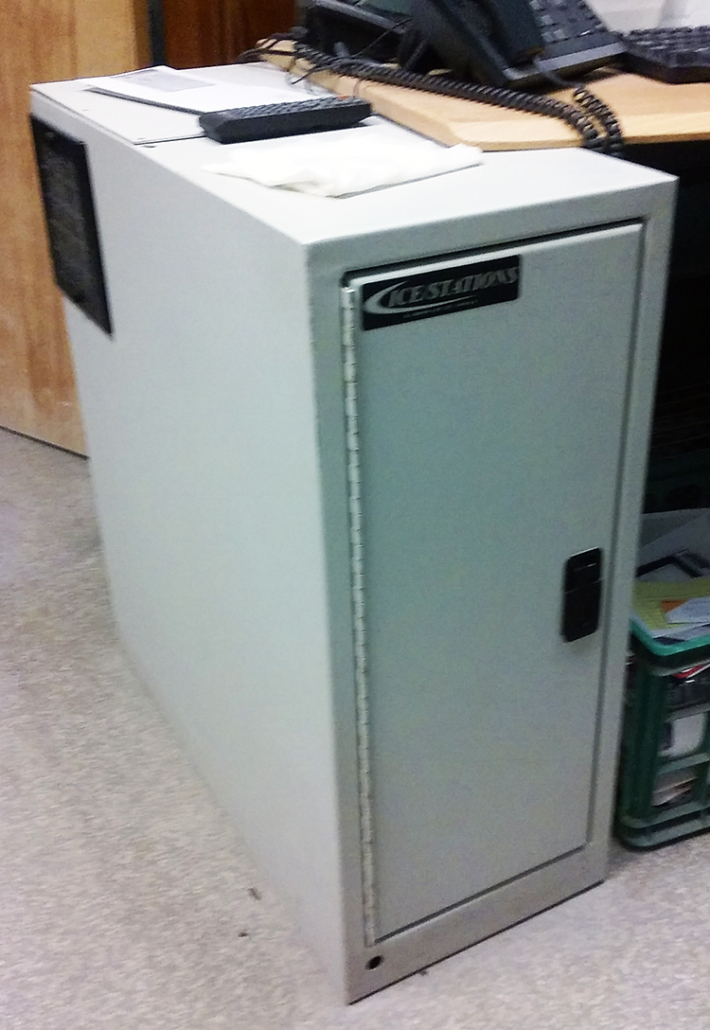 The second solution was an IP122826-12, which is also rated NEMA 12 and is designed to protect a tower computer. The IP12-12 (powder coated putty) features a lockable front door, power cord, and rear split panel for running wires and cables.
SUMMARY OF PROJECT:
The customer continues to be very happy with both IceStation enclosures. They exclaimed, “The ITSENCLOSURES products kept virtually ALL of the dust from the computers. You could take a white glove and find no dust. [The enclosures] were installed in 1999 and it is now 2018 and they are still working fine!”
ADDITIONAL PRODUCT INFORMATION:
HAVE QUESTIONS?
Let us know how we can best assist you!
Contact an ‘ITSENCLOSURES expert’ at 1-800-423-9911 -OR- email: info@itsenclosures.com
The post FerraStone – Computer Enclosures appeared first on ITSENCLOSURES.
]]>The post Creating the Perfect TITAN Computer Enclosure appeared first on ITSENCLOSURES.
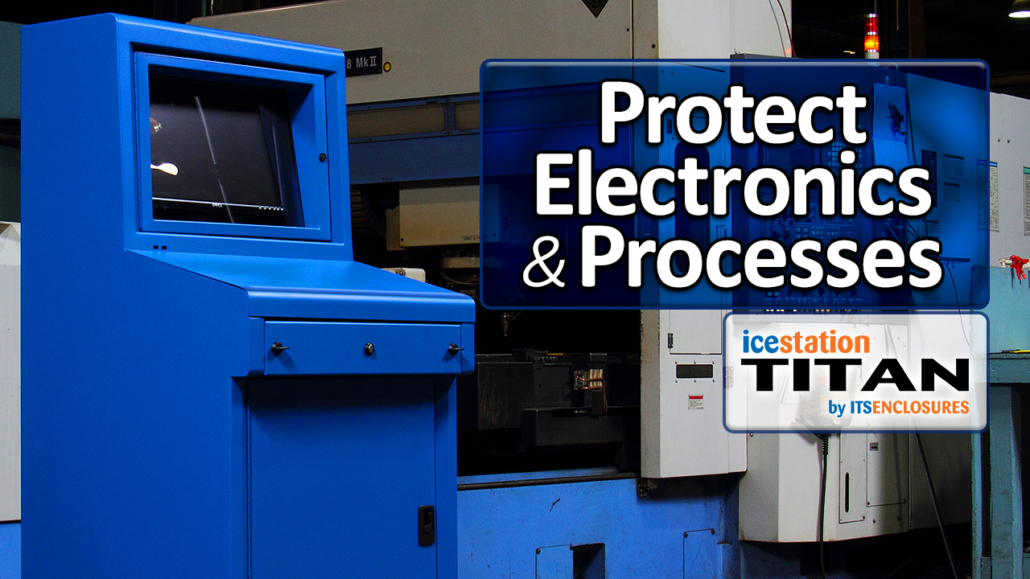
]]>Meet the NEMA 12 IceStation TITAN computer enclosure by ITSENCLOSURES! Measuring at 60-inches high, 30-inches wide, and 27-inches deep, the 14 gauge steel (with 12 gauge doors) TITAN pc enclosure is an all-in-one industrial workstation that will protect your PC and electronics from dust, dirt, grease, contaminants, and light splashing fluids.
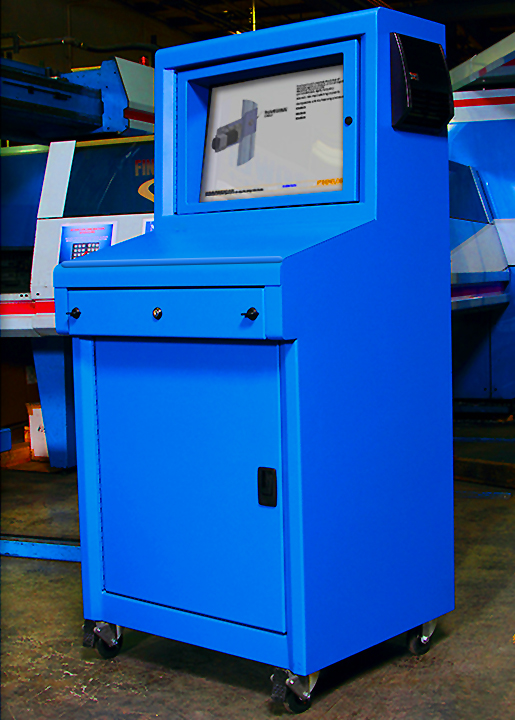 Out of the box, the TITAN (IS603027-12) computer enclosure includes:
- 24-inch tempered safety glass viewing window (polycarbonate window also available)
- Adjustable monitor shelf with VESA mount
- Integrated keyboard drawer with ergonomic wrist-rest and sloped work surface
- Key locking latches
- Industrial casters and gasketed split panel for cable entry
- Available in Blue, Gray, Black, or any Custom RAL color of your choice (additional charge)!
These are all very convenient features, but what additional options are available to create the ‘Perfect TITAN’ computer enclosure for a manufacturing environment?
Accessories to Consider:
- Thermal Management – A filtered fan system, air conditioner, heat exchanger or vortex cooling unit can be added to the IceStation TITAN. If unsure which system best suits your manufacturing needs, please consult an ITSENCLOSURES representative for a cooling recommendation.
- Bolt Down Legs – All TITANs come equipped with industrial casters that enable the enclosure to be mobile. The front casters are lockable for positioning the enclosure in its desired location. If the TITAN needs to be anchored into place, bolt down legs can easily replace the casters.
- Surge Protector/Power Supply – Every TITAN needs power! Adding a 6 outlet surge protector to the inside of the TITAN will enable a user to plug in various electronics, including printers, monitors and computers. Plus, add a simple 10 foot power supply cord to easily reach an outlet.
- External Shelf – Add a folding or stationary fixed shelf to either side of the TITAN for paperwork, file folders, an extra work space, or any other vital accessory needed to ‘get the job done’ on a daily basis. The shelf’s weight capacity is approximately 75 pounds.
- Printer Access Door – Installing a printer inside of the TITAN? Consider adding a hinged printer door. The printer access doors will allow easy access to printouts/labels, without having to open the enclosure door. The location of the desired printer door can be installed based on the height and size of the printer.
- Sliding Shelf Brackets – The TITAN includes a fixed, adjustable shelf for electronics. Consider adding sliding shelf brackets for easy access to the printer, computer or other various electronics that will reside in the TITAN. The sliding shelf is especially helpful when accessing a printer to change media/labels.
We can talk about the benefits of the TITAN all day, but sometimes it is just better to watch an informative product video.
HAVE QUESTIONS? LET US KNOW HOW WE CAN BEST ASSIST YOU! CONTACT AN ‘ITSENCLOSURES EXPERT’ AT 1-800-423-9911 -or- EMAIL: INFO@ITSENCLOSURES.COM
The post Creating the Perfect TITAN Computer Enclosure appeared first on ITSENCLOSURES.
]]>The post Questions to Ask When Searching for a Computer Enclosure appeared first on ITSENCLOSURES.
]]>If your company is looking to purchase a heavy-duty enclosure for a computer, monitor, or printer, what questions should be pondered when searching for the right solution? There are various items to consider before placing a purchase order. For example, what is the temperature range of the enclosure’s environment? Will dust and dirt be in abundance? Will a chemical washdown occur daily?
These are just some of the harmful dangers to consider. Computer enclosure protection is a must when it comes to installing electronics in dirty, dusty, and wet locations.
Here are various questions/situations to consider:
- What NEMA rating is required?
Will your enclosure be in direct contact with splashing water or oil? Will a large amount of dirt and dust be blowing around the enclosure? Will you ever need to wash the enclosure down with a hose? The NEMA Rating should be one of the first things to consider. A NEMA 12 enclosure will protect against dust, dirt, and splashing fluids. A NEMA 4 enclosure will protect against dust, dirt, hose directed water, and corrosive materials. A NEMA 4X enclosure will protect against dust, dirt, hose directed fluids, and corrosive materials.
 What will be mounted inside of the enclosure?
If installing a computer, monitor, and printer, will the computer enclosure be able to fit all three, and still have room for cables and other essential accessories? Will the enclosure be used to protect rack mountable servers? Before looking at enclosures online or in a catalog, it is always pertinent to have the make/model of your PC, monitor, servers, or printer on hand. Obviously, if the electronics simply do not fit, then the enclosure is impractical. Monitor sizes and PC sizes are always changing, so an enclosure that worked at a warehouse five years ago may not work properly now. It is always best to double check the sizes of all electronics that you will be installing inside of the computer enclosure.- Where will the enclosure be installed?
Will the enclosure be installed on a wall, bolted to the floor, or have castors to enable it to roll around a factory floor? Most castors have a locking mechanism, which will make the enclosure both mobile and stationary for added versatility. If the enclosure is a desktop enclosure, then it can simply be situated or bolted to a table or desk or even under a desk. The placement of the computer enclosure is important to consider, because it might live in the same space for many years. - What add-on enclosure accessories are necessary?
Will a 10-foot power supply or a 6-outlet surge protector be needed? Does the enclosure require lockable doors to keep everything secure? Will the enclosure benefit from having a window in the door, or will a solid door be advantageous? If the enclosure is NEMA 4 or NEMA 4X, will it need a waterproof, dust-free/dirt-free cable entry gland, in order to run cables into the enclosure? Will a keyboard tray or dust-tight keyboard drawer be an essential item? Will the enclosure need a hinged printer door? Do you need a waterproof keyboard or mouse? There are many accessories that will improve the overall effectiveness of an computer enclosure. - Is thermal management needed?
If the enclosure is in an indoor environment, will a filtered fan system be necessary for air circulation or an air conditioner to protect against the heat and humidity? If stored outdoors, will winter temperatures require a heater and summer temperatures require an air conditioner? Thermal management should be discussed before the enclosure is installed in the field, because an enclosed peripheral may overheat under certain circumstances and, therefore, cease to work.
When researching a new computer nclosure for your company, it is best to make a comprehensive checklist and guarantee that everything is well-thought-out before deciding on the solution. Doing preliminary homework will cause less stress down the road. Also, make sure that the enclosure will be shipped completely assembled and ready to use upon arrival. This will save time and money!
HAVE QUESTIONS? LET US KNOW HOW WE CAN BEST ASSIST YOU! CONTACT AN ‘ITSENCLOSURES EXPERT’ AT 1-800-423-9911 -or- SEND US AN EMAIL: INFO@ITSENCLOSURES.COM
The post Questions to Ask When Searching for a Computer Enclosure appeared first on ITSENCLOSURES.
]]>