The post Avoid Computer Enclosure Pitfalls with Planning appeared first on ITSENCLOSURES.
]]>If the proper planning is executed from the beginning of the process, finding the best computer enclosure does not have to be overwhelming. Setting aside time for adequate research is the best course of action and will pay off in the long run. Keep in mind: not every enclosure company has the same product for the same price, and appropriate product comparisons should be made and reviewed.
What steps should be completed to find the perfect solution?
6 Steps to Specifying the Best Computer Enclosure for the Job:
- Define Requirements
Meet with the team members involved on the enclosure expansion to clearly define the computer enclosure requirements. Important items to consider, include the NEMA rating, power supply, locks, hinges, window choices, thermal management, environmental temperature extremes, space requirements to house electronics (computer, monitor, printer, UPS, etc.), and the overall durability of the enclosure material. If every team member is on the same page at the beginning, there will be no surprises when the equipment arrives on site.
- Research
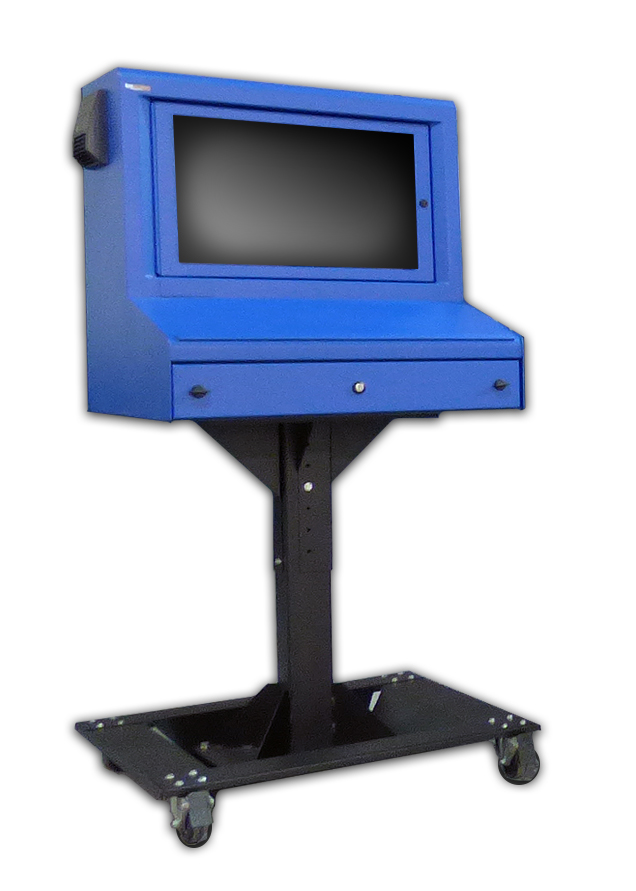 Complete the necessary homework! Every enclosure company is going to make claims that they offer the highest quality computer enclosures on the market. However, if you dig a little deeper, you will find that the materials and hardware used – to build some enclosures – are flimsy. In the end, experience speaks for itself. To make sure you are purchasing the best product, submit the clearly defined project requirements to enclosure providers for a recommendation on their best product. Also, do not overlook the length of the warranty being offered. This could help down the road, if something unexpected occurs.
- Choose the Best Supplier
When possible, evaluate a potential computer enclosure in person, or inquire if an evaluation unit is available. Most companies are willing to send one unit for a hands-on review, in anticipation of selling multiple units after the evaluation period is over. Companies with heavy duty units are always eager to send over a sample unit, because it will likely impress the end user. If an evaluation unit is not available, ask the enclosure supplier for a list of referrals of similar companies that they have worked with on previous projects.
- Pricing
Once it is determined what (product) and who (enclosure supplier) has the best solution for the project, obtain a competitive price quote. Too often, customers ‘ballpark’ their budget far too low in the beginning and do not perform the correct evaluation of the products available on the market. Poor initial budgets could equate to sacrificing enclosure quality, which may end up costing a company more money over the course of time.
- Create a Timeline
From electronics to accessories, understand the lead time for all the items required to properly execute a successful computer enclosure plan. Enclosure suppliers always have a handful of best-selling products ‘in stock,’ which means the lead time should only be a few days. However, if a specialized project requires a custom-made enclosure, then the lead time can be extensive. At times, a customer may need an enclosure solution in two weeks, but in order to fabricate a new product, the lead time could take up to 2 months. This will create headaches for everyone involved in the process. Failing to prepare – in a timely manner – may result in expedite fees to meet the company’s “go live” date.
- Execute
If all of the ducks are in a row, executing the project will prove to be the easiest part! Be sure to assign a project manager to keep everything moving on the right track. In the end, if the plan was implemented properly, then the project will be a huge success. Also, save the enclosure supplier’s number or email, because you may want to order more units in the future!
Poor planning may result in poor product choices. In order to get the right product for the job, always ask questions (and more questions) during the process. How much will this cost? Will the chosen enclosure be best for my environment? What is the lead time? How will this ship? Can this product have thermal management? Can a printer fit? How will power enter the enclosure? These are just a few of the queries to ponder.
Detailed research is always the best course of action. When it comes to purchasing new computer enclosures, it is always good to have a strategy.
HAVE QUESTIONS? LET US KNOW HOW WE CAN BEST ASSIST YOU! CONTACT AN ‘ITSENCLOSURES EXPERT’ AT 1-800-423-9911 -or- SEND US AN EMAIL: INFO@ITSENCLOSURES.COM
The post Avoid Computer Enclosure Pitfalls with Planning appeared first on ITSENCLOSURES.
]]>The post Customizing Your Industrial Computer Enclosure appeared first on ITSENCLOSURES.
]]>The term “custom” enclosure often gets a poor reputation for being more expensive than standard units and having excessive lead times. However, this is not always the case. When researching the best industrial computer enclosure for the job, it is critical to choose an enclosure provider which utilizes off-the-shelf items to customize a solution that meets the users’ needs.
Finding the right enclosure for a computer enclosure project is more extensive than just simply picking out a steel or stainless steel ‘box.’ Enclosures are available in a variety of shapes, sizes, and materials with numerous options for accessories, mounting, connectivity, and climate control. End users and system integrators can simplify the process by choosing a customized solution that ships ready to be used upon delivery.
In order to meet the individual requirements of users, enclosure companies usually stock popular models and valuable accessories. Therefore, the company will be able to “build” an enclosure tailored to the end user’s specific needs more efficiently, than if it was constructed ‘from-scratch.’
Custom Factors to Consider:
Custom Colors
Sometimes the standard color offerings (gray, white, black, or even blue) will not suit the needs of a customer. Custom colors to fit a company’s branding scheme, to match other equipment, or for safety reasons may be required for certain applications. It is necessary for an enclosure company to provide specialized color(s) choices (Pantone or equivalent RAL color) on a small or large scale.
 Custom Doors
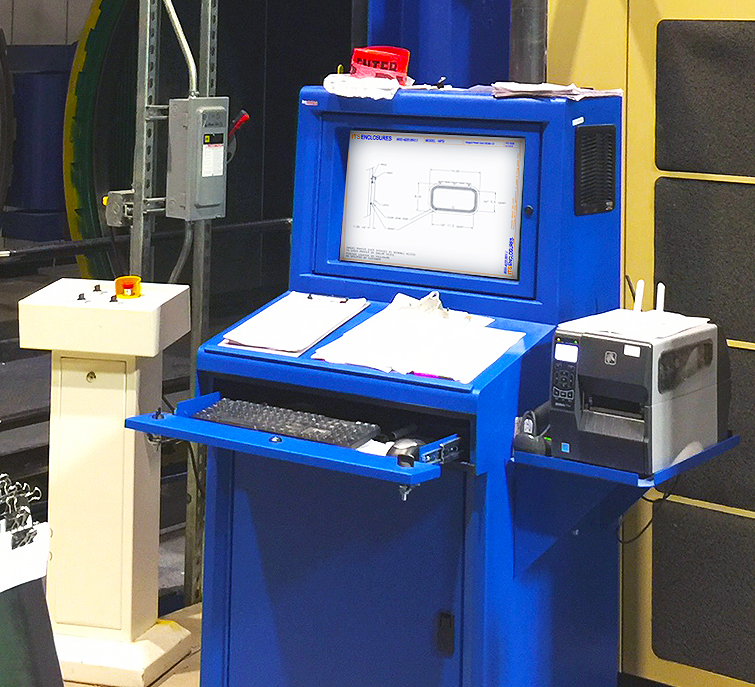
Custom doors, ranging from dust-free printer access doors to rear extended doors to panel mountable doors for touchscreens, are crucial to the efficiency of the enclosure solution. Finding a means to access the electronics inside the pc enclosure is just as important as protecting the electronics from outside dirt, grease and other harmful contaminants. The enclosure can be rendered useless if there is not an easy way to access printer tickets or the ability to use a touchscreen.
Thermal Management
It goes without saying, but all industrial and manufacturing areas are different. It is beneficial to work with an enclosure specialist that has a thorough understanding of specifying the correct heating or cooling (or both) for a computer enclosure. The ability to tailor an off-the-shelf enclosure solution with a filtered fan system, air conditioner, vortex cooling unit, heat exchanger, or various sizes of heaters – specific to the environment the system will be installed – is crucial.
Ask the pc enclosure provider if they have a worksheet to fill out in order to find the best thermal management solution.
Additional Accessories
Although it may seem like minor details compared to the points already discussed, accessories like a foldable mousepad, sliding shelf brackets, mobile or bolt down pedestals (painted steel or stainless), cable entry glands, and power supplies can make a big difference. Most enclosure company websites will list out complimentary accessories below the product, so that an end user can select what will work best for the application. Enclosure specialists will work with customers to find the most appropriate accessories for the specified installation.
Never let the word “custom” affect a computer enclosure solution decision. Custom can simply mean that the end user can pick & choose how the industrial computer enclosure will look and function in a working environment. Homework is essential. As always, do not let price steer you in the wrong direction. In the end, durability and longevity should always be the most important factors when deciding on a brand new enclosure solution.
HAVE QUESTIONS? LET US KNOW HOW WE CAN BEST ASSIST YOU! CONTACT AN ‘ITSENCLOSURES EXPERT’ AT 1-800-423-9911 -or- SEND US AN EMAIL: INFO@ITSENCLOSURES.COM
The post Customizing Your Industrial Computer Enclosure appeared first on ITSENCLOSURES.
]]>The post TEU Services Outdoor Digital Signage appeared first on ITSENCLOSURES.
]]>According to the company’s website, “TEU Services began operation in 2009 as an electronic message center (digital signs) designed to help business professionals grow their business by talking to more people without tying up their time and money.” The company believes that “there will be more people passing by your store each day than visit your website or social media pages. [With outdoor digital signage, a company can] advertise specials or events and new products and change the message at any time from a computer.”
HOW DID TEU SERVICES FIND ITSENCLOSURES:
According to a TEU representative, “We were working with a restaurant in Kerrville, Texas to provide outdoor digital signage, and they were requesting an outdoor digital menu board. At the time, we did not have a supplier for this product.”
PROJECT:
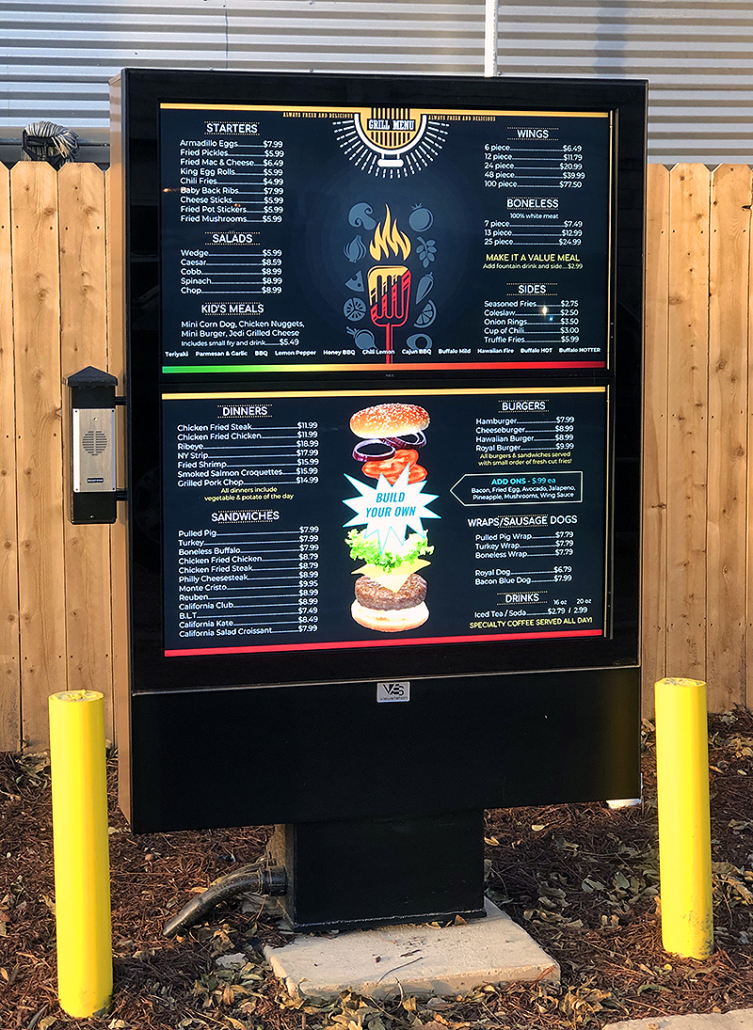 In the Summer of 2018, TEU Services was in search of an all-weather, outdoor digital signage menu board to be installed at a restaurant in Texas (north of San Antonio). According to TEU, “This was a new [digital signage display] install for a new local restaurant/coffee shop called Monroe’s East End Grill. The building had been remodeled from a working cabinet shop that was in operation for over 30 years.”
The main function of the outdoor digital signage would be to display the menu for Monroe’s breakfast, lunch, dinner, and coffee selections. The restaurant desired signage which would permit them to easily make content changes, especially throughout the day as the menu changes for different dayparts.
CHALLENGES:
The proposed LCD enclosure solution needed to be operational 7 days a week from 6:00 am to 9:00 pm. The outdoor digital signage would be deployed outdoors in the direct sun, therefore, the end user was also concerned about any glare from the sun and the monitor getting overheated and failing in the hot Texas sun, specifically during busy lunch traffic.
SOLUTION:
TEU Services reviewed two different solutions, the 3-screen outdoor menu board and the 2-screen outdoor menu board. In the end, TEU chose the 2-screen menu board, enabling the restaurant to use similar content indoors and outdoors.
TEU mounted the all-weather, outdoor digital signage in the drive-thru of Monroe’s East End Grill. The solution includes two 47-inch, 2000 nit high-bright LCD monitors (in landscape orientation), and a filtered fan system to circulate the internal air. A small speaker system, not part of the ViewStation solution, was mounted to the side of the enclosure for customers to order food and drinks.
SUMMARY OF PROJECT:
Walter McBroom, from TEU Services, summed up the project, “The new owners did a beautiful job on the remodeling [by] trying to keep the old feel of the building. They even left the antique post and electrical wiring in place. Other than that, it was an easy install. Even before the installation was completed, we had a request from another restaurant across town for a quote to replace their exterior signage. Very nice product and I am sure we will do business again.”
HAVE QUESTIONS?
Let us know how we can best assist you!
Contact an ‘ITSENCLOSURES expert’ at 1-800-423-9911 -OR- send us an email: info@itsenclosures.com
The post TEU Services Outdoor Digital Signage appeared first on ITSENCLOSURES.
]]>The post How to Customize Computer Enclosures appeared first on ITSENCLOSURES.
]]>It’s not just a simple steel box.
Enclosure manufacturers always strive to quickly ship the ideal cabinet to satisfy customers’ requests. The value added through flexibility and modifications can be very appealing if integrators work with a supplier that “can do it all.” When searching online for heavy-duty pc enclosures, integrators and project engineers often investigate outsourcing certain components of a computer workplace to help reduce costs and shorten delivery time. When deploying a new workstation or upgrading an existing enclosure system, designers must determine what type of computer enclosure will perform the best, and plan how components and wiring will come together to complete the project.
Best Practices for Enclosure Customization
1. Cutouts
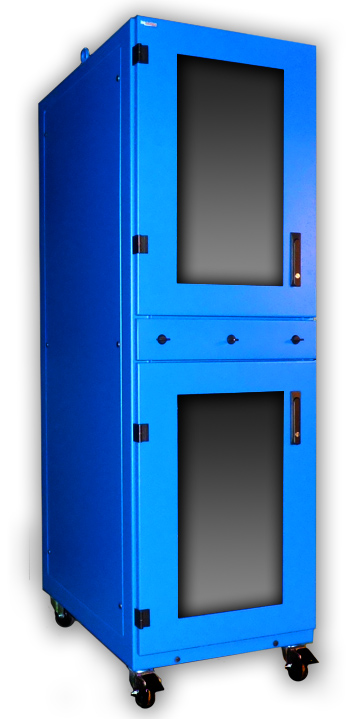 Prior to an enclosure being populated with functional electronics, holes must be cut out and connections must be mounted. It is common for factories and panel shops to knockout or punch holes for a perceived ‘quicker’ turnaround and cost. This may lead to inaccuracy, especially if the factory or panel shop does not have the correct size of punch or bit. Finding an industrial enclosure company that has the skill and ability to modify an enclosure – before shipping – may eliminate hours of in-house measuring and cutting by hand. Enclosure companies make cutouts and custom modifications daily, and do so with great precision. Popular modifications include cable glands, liquid-tight conduit, and cutouts for knobs and push buttons.
2. Wiring
Wiring electrical outlets, fan systems, thermostats, air conditioners, and heaters can be time consuming for the inexperienced. Large jobs may require a completely turnkey solution with necessary wiring and cabling before deploying the computer enclosure in the field. If an integrator is purchasing a sizeable quantity of enclosures and drop shipping them directly to their customer, the enclosure solution must be ‘plug & play’ and ready to use upon delivery. Ask your enclosure manufacturers if outlets, thermal management and other electrical components are installed at the manufacturing facility before shipping. Properly sourced manpower will greatly reduce the final installation time on big projects.
3. Mounting
Internal components such as brackets, DIN rail, mounting track, unistrut, rack channel, and sub panels are vital for mounting switches and controls. If these items are pre-installed prior to delivery from the manufacturer, it will greatly reduce assembly time for your customer and will help them reach a ‘go live’ date. Again, coordination with the enclosure manufacturer will ensure that everything is installed properly and professionally. Manufacturers perform modification tasks regularly and employ proper installation procedures!
When it comes to industrial pc enclosures, many system integrators, engineers and buyers only consider the purchase price and not the entire package. An enclosure company’s reputation and experience can make all the difference! Over time, a great business relationship can be created between the integrator and manufacturer. Leveraging an enclosure manufacturers’ experience can help eliminate some of the ‘heavy lifting’ on behalf of the integrator and end user/customer. It is always best to research solutions on the market and discuss the project with enclosure experts.
HAVE QUESTIONS? LET US KNOW HOW WE CAN BEST ASSIST YOU! CONTACT AN ‘ITSENCLOSURES EXPERT’ AT 1-800-423-9911 -or- SEND US AN EMAIL: INFO@ITSENCLOSURES.COM
The post How to Customize Computer Enclosures appeared first on ITSENCLOSURES.
]]>The post Kewpee Hamburgers appeared first on ITSENCLOSURES.
]]>
COMPANY SYNOPSIS:
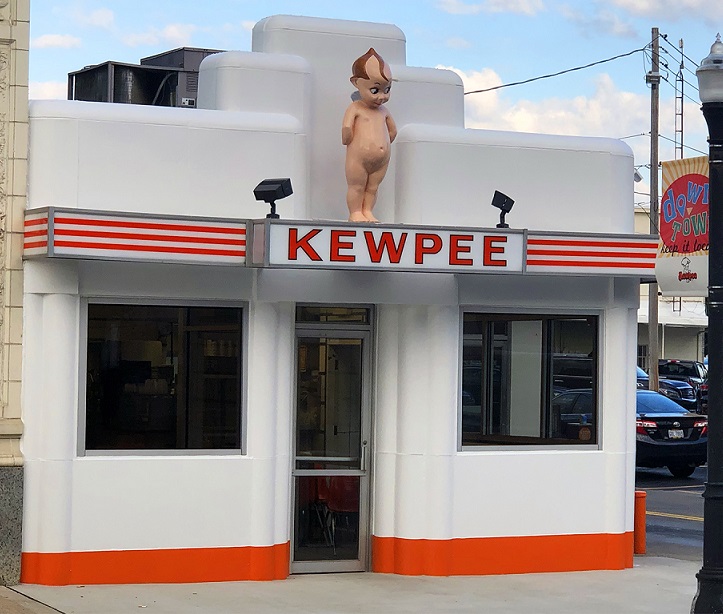
For almost 100 years, Kewpee Hamburger has been serving fresh ground hamburgers with high quality fixings, fresh baked pie, frosted malts, and much more to many happy customers across the mid-west. The first Kewpee restaurant opened in 1923 in Flint, Michigan. Burger Beast notes that “Kewpee Hamburgers is the 2nd oldest Burger Chain in the United States after White Castle.” According to the Cleveland.com website, “during the 1940s, there were more than 400 Kewpee locations nationwide.” Today, Kewpee Hamburgers has locations in Lima, Ohio, including the downtown, westside, and eastside locations, and two out of state locations (Lansing, Michigan & Racine, Wisconsin). In addition, Kewpee has been recognized for having one of the first drive-thrus in the country. It is rumored, in the industry, that Wendy’s copied the square burgers made famous at Kewpee!
HOW DID KEWPEE BURGERS FIND ITSENCLOSURES:
Scott Shutt, Kewpee Hamburgers owner/operator, found the ITSENCLOSURES website while performing an online Google search for drive thru digital signage. He was interested in a menu board for the drive-thrus at his three Lima locations. Once he found the solution that would work for his needs, he called ITSENCLOSURES and talked to a salesperson about his options.
 PROJECT:
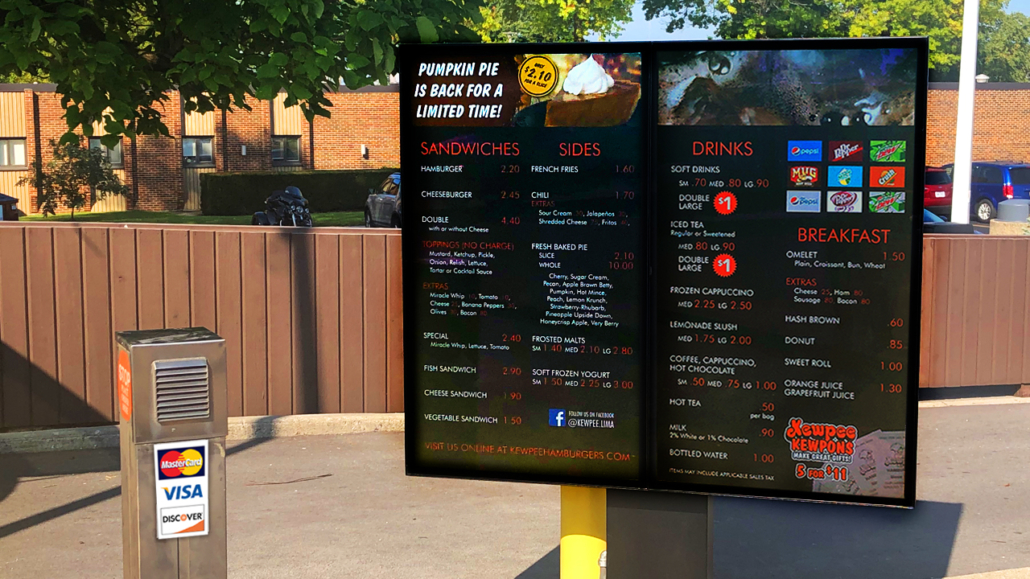
Mr. Shutt was in pursuit of an all-weather, outdoor digital menu board to be installed at Kewpee Hamburgers in Lima, Ohio. He researched various digital signs and monitor solutions available on the market. His main goal was to determine what competitors were utilizing at fast food/quick service restaurants in the United States. The most important function of the digital signage would be displaying the restaurant’s menu for Kewpee’s breakfast, lunch, dinner, and dessert selections. Mr. Shutt wanted the ability to change out advertising on the screens, as well as update pricing and promote best-selling food items and seasonal items, like holiday pies.
CHALLENGES:
The current static signage would need to be removed, new heavy-duty bolts installed in existing concrete, and updated wiring would have to be fed into the building under the ground. Also, the digital signage would be deployed in a tight area in the existing drive-thru lane. Mr. Shutt was concerned about drivers being able to maneuver around the drive-thru without hitting the sign. He also wanted to make sure that the sign was bright enough in direct sunlight. In addition, two of his locations would need special mounting, as the signs were in close proximity to brick walls.
SOLUTION:
Kewpee Hamburgers reviewed a few different solutions over the course of a few months and, after visiting ITSENCLOSURES in Mt. Pleasant, Pennsylvania, chose the VS-6 2×1 digital menu board with two high bright Samsung outdoor monitors. Kewpee and ITSENCLOSURES mounted the all-weather menu board in the drive-thru of the downtown Lima Kewpee Hamburgers. The innovative solution includes two 55-inch, 2,500 nit high-bright LCD monitors (in portrait orientation) encased in a mount/pole configuration with housing for media players and other necessary electronics. The signage encasement is marine grade aluminum with a polyester powder paint finish and stainless steel fasteners. For the locations with limited space, ITSENCLOSURES designed a custom ‘swinging arm’ mount for the menu boards installed near brick walls. This built-to-last structure would make it easier to access the monitors, while keeping air circulation intact.
SUMMARY OF PROJECT:
Scott Shutt, Kewpee Hamburgers owner/operator, summed up the digital sign project, “Like much technology today, there are considerations to be made with hardware and software. Many vendors have a background in software and it becomes apparent that they are more interested in selling software licenses than how the menu board will perform. The engineering of the ITS VS-6 2×1 is superb and the quality of the fabrication is unsurpassed. The ITSENCLOSURES’ VS-6 2×1 gives us the flexibility to use a media platform of our choosing knowing that the structure will provide us years of outstanding services.”
ADDITIONAL PRODUCT INFORMATION
HAVE QUESTIONS?
Let us know how we can best assist you! Contact an ‘ITSENCLOSURES expert’ at 1-800-423-9911 -OR- send us an email: info@itsenclosures.com
The post Kewpee Hamburgers appeared first on ITSENCLOSURES.
]]>The post How LCD Enclosures Can Enhance a Manufacturing Environment appeared first on ITSENCLOSURES.
]]>
More and more manufacturers are using LCD enclosures on dirty, dusty plant floors. With digital signage, management can communicate vital information efficiently to employees with a few clicks of a button.
Deploying an LCD in a warehouse or factory environment involves extensive planning. The same dangers that harm a computer or printer system will also exist for an LCD. Dust, humidity, liquids and temperature fluctuations can wreak havoc on a standard display. Manufacturers recognize the need for an enclosure to house a large commercial monitor, and enclosures are available in various shapes and sizes.
LCD Enclosure for Manufacturing Environments
1. Safety
 Workplace safety is a top priority at any company, especially in manufacturing. Many companies are turning to digital signage as a fast and effective way to reach their employees. Digital signage is an easily managed tool to improve safety procedures. Michelle Hopkins, in the article, “10 Simple Steps to Improve Workplace Safety,” expresses the importance of signs, “… Signs are a cheap and effective way to quickly communicate important information. They’re usually simple and rely on pictures to detail hazards and proper procedures. These tools are good reminders and warnings for even the most experienced worker.” Digital signage can replace the old-fashioned bulletin board ‘signs’ in the lunchroom or on poles in the factory, saving paper and time. Human resources can now focus on more important issues!
2. Critical Processes
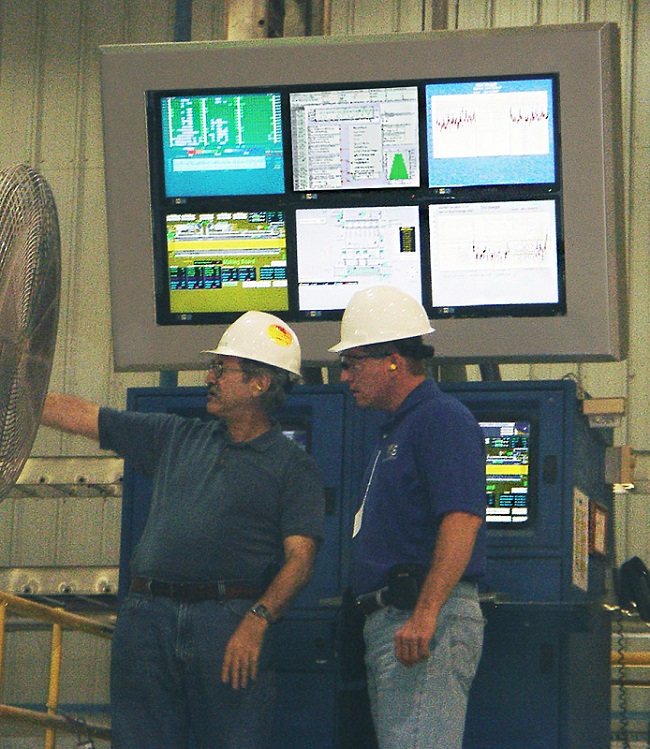
Digital signage can help manufacturers display critical production line information. The notion of “set it and forget it” programming is especially beneficial to plant managers. Utilizing digital signage on a manufacturing floor can help reduce response time for production quality issues. In the blog, ‘9 Scenarios of Common Assembly Line Issues,’ Dan McKiernan emphasizes the importance of having real time information for workers and managers, “Whether you need ongoing information, periodic status updates or data to observe a recent line change, it is imperative to have a tool to continually monitor and analyze your assembly line. [Digital signage] provides you with real-time, continuous and standardized task level data to provide analysis for every station in your assembly process. With a good understanding of your assembly line, you can easily identify problems and make accurate decisions to meet the changing demands of your assembly line.”
3. Performance
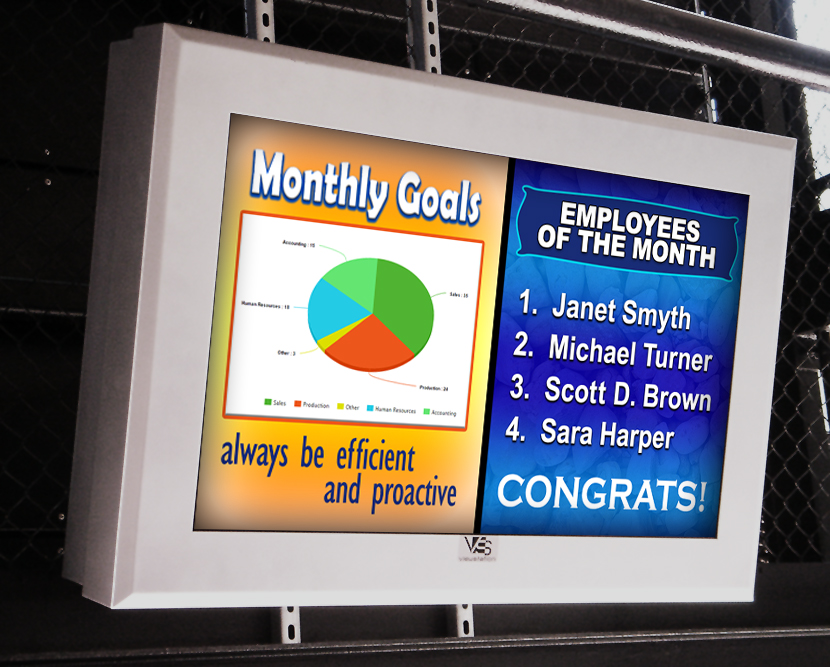
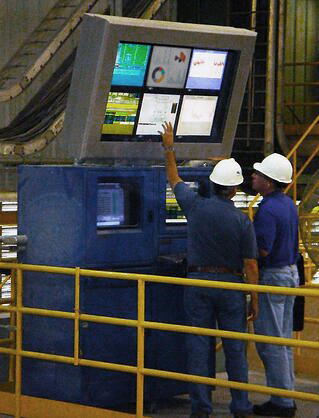 To keep employees motivated and attitudes positive, digital signage can also be utilized to display workplace goals and performance statistics. Keeping employees informed of key metrics, quality control or inventory levels can help drive enthusiasm. A simple daily ‘to-do list’ or real-time statistics on a digital screen will do wonders. According to the article, ‘Why Leaders Need To Embrace Employee Motivation‘ motivation is key, “Employees whose managers involve them in goal setting are 3.6 times more likely than other employees to be engaged… [Furthermore], Gallup estimates the cost of poor management and lost productivity from employees in the U.S. who are not engaged or actively disengaged to be between $960 billion and $1.2 trillion per year.”
Now more than ever, visual communication is a powerful tool to engage, educate and even inspire employees. Loud machinery and large open spaces with high ceilings can make real-time company communication (via a loudspeaker) a real challenge on the plant floor. Regardless if your goal is to improve performance, increase safety or empower your workforce, be sure to choose the right LCD enclosure that will keep your message running 24/7.
HAVE QUESTIONS? LET US KNOW HOW WE CAN BEST ASSIST YOU! CONTACT AN ‘ITSENCLOSURES EXPERT’ AT 1-800-423-9911 -or- EMAIL: INFO@ITSENCLOSURES.COM
The post How LCD Enclosures Can Enhance a Manufacturing Environment appeared first on ITSENCLOSURES.
]]>The post Central Ohio Transit Auth. – Outdoor Digital Signage appeared first on ITSENCLOSURES.
]]>
CENTRAL OHIO TRANSIT AUTHORITY (COTA) SYNOPSIS:
Since January 1971, COTA (Central Ohio Transit Authority) has been the official bus service for the city of Columbus, Ohio and surrounding areas. COTA is currently in the process of deploying CMAX, an all-new rapid transit service. CMAX is a limited-stop service and will connect passengers to major destinations in and around downtown Columbus. According to the official COTA website, the new service will improve service, improve mobility and reliability in congested areas, be less expensive for travelers, provide more travel options, and improve pedestrian access and safety.
HOW DID COTA FIND ITSENCLOSURES:
In the summer of 2014, COTA reached out to ITSENCLOSURES, whom they had worked with before on a different outdoor digital signage solution, to glean pricing on fabricating an all-weather, LCD enclosure for a bus stop shelter makeover across the city of Columbus, Ohio. The plan was in the initial stages, but it was anticipated that the overall project would take place over the course of a few years. COTA’s proposal included a prototype bus shelter at the company’s headquarters, located at 1333 Fields Avenue in Columbus, Ohio.
 PROJECT:
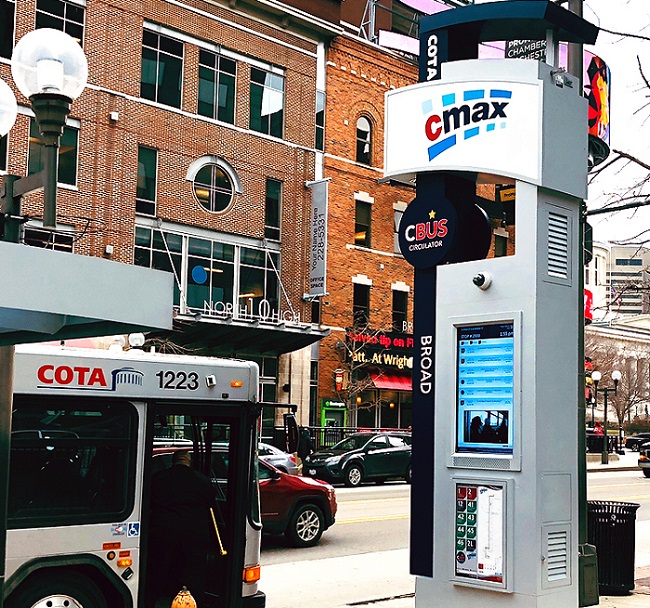
COTA desired to install eye-catching outdoor digital signage at every CMAX bus stop and the project entailed a custom, environmental LCD enclosure to be housed in a large pylon, attached to a bus shelter. Considering the complexity of the project and having successfully worked with ITSENCLOSURES on previous transportation projects, COTA felt confident that the new CMAX signage strategy would become a reality with ITSENCLOSURES’ durable, heavy-duty products.
CHALLENGES:
Being in Columbus, Ohio, a city that experiences all four seasons of weather, COTA required various thermal management options as they were concerned about freezing, snowy winters, and humid, sunny summers. In addition, COTA required high bright, commercial-grade monitors, so that passengers could view the bus routes at all hours of the day. Another critical concern for COTA was the possibility of vandalism and destruction of the screens.
SOLUTION:
After weighing different options, COTA decided to install a custom, fan-cooled, outdoor digital signage that is recessed into a bus shelter. To study and review the enclosure in various weather conditions, COTA built a fully functioning CMAX shelter to prototype in the winter of 2016. COTA plans to install a combination of pylons, single and double sided, at each CMAX bus stop to display real-time information, including arrival and departure times. Each outdoor digital sign is equipped with a 47-inch, high bright LCD and a thermostatically controlled fan/heater system to protect the electronics in the extreme, central Ohio weather conditions. The enclosure houses a media player to ensure seamless content delivery.
SUMMARY OF PROJECT:
In all, COTA purchased 77 LCD enclosures designed for 47-inch monitors, which were installed throughout 2017 and into the Spring of 2018. The innovative outdoor digital signage will be housed in a total of 64 pylons throughout Columbus. COTA anticipates that the digital signage will help passengers find the correct bus route and arrive at their destination in a timely manner. CMAX bus stop shelters and busses will change the way that people travel in Columbus.
HAVE QUESTIONS?
Let us know how we can best assist you! Contact an ‘ITSENCLOSURES expert’ at 1-800-423-9911 -OR- email: info@itsenclosures.com
The post Central Ohio Transit Auth. – Outdoor Digital Signage appeared first on ITSENCLOSURES.
]]>The post Senior Flexonics Pathway – Computer Enclosure appeared first on ITSENCLOSURES.
]]>COMPANY SYNOPSIS:
In business since 1902, Senior Flexonics Pathway (SFP) has two locations in the United States: New Braunfels, Texas and Lewiston, Maine. According to SFPathway.com, the company has been a pioneer in delivering solutions to movements in high pressure and temperature process equipment. Senior Flexonics provides custom designed expansion joints, dampers, and HVAC for piping and ducting applications.
HOW DID THEY FIND ITSENCLOSURES:
When researching stand-up enclosures for their plant, Senior Flexonics Pathway found ITSENCLOSURES on the Internet. While at ITSENCLOSURES.com, SFP reached out to the ITS sales department via the online chat tool. Originally, SFP was interested in a unit that could house a touchscreen monitor. After receiving a follow-up email from ITSENCLOSURES, Patrick Miller, the IT Manager, requested pricing on a stand-up enclosure and decided against deploying a touchscreen.
PROJECT:
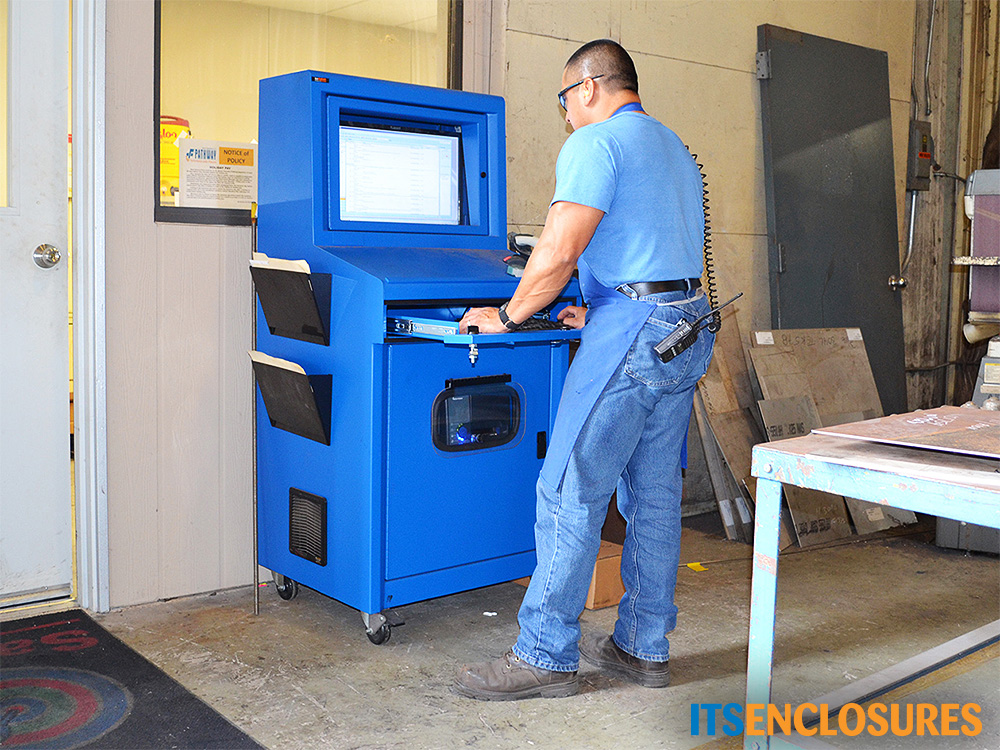
Senior Flexonics Pathway was in search of a mobile inventory computer enclosure for its workers. SFP wanted to save employees from walking to different parts of the plant to perform tasks. According to Patrick Miller, IT Manager at Senior Flexonics Pathway, SFP wanted to provide employees with the equipment to take inventory, print, labels and scan barcodes at the point of where the work is actually being done, on the manufacturing floor.
CHALLENGES:
Senior Flexonics sought an all-in-one solution that would allow all of their complex systems to work together in one enclosure. SFP’s manufacturing environment is quite harsh, and required a heavy duty NEMA 12 enclosure solution.
SOLUTION:
Senior Flexonics Pathway purchased a number of IceStation TITAN (IS603027-12) computer enclosure workstations. The freestanding enclosure solution consisted of 24” extension sliding shelf brackets and a hinged printer door. The added accessories were installed for the barcode printers that are used throughout the workday. The hinged printer door makes it simple to retrieve labels and the sliding shelf brackets create an efficient way to change the media and load additional labels. In order to regulate the temperature inside of the enclosure, a 200 CFM filtered fan system, with thermostat, was installed.
INSTALLATION DATE:
Senior Flexonics purchased the NEMA 12 computer enclosures in the spring of 2015 to be installed in the New Braunfels, TX and Lewiston, ME locations. The units are deployed in key areas of the production floor, including the Metal Bellows manufacturing area, Parts Distribution, and Burn Table work centers.
SUMMARY OF PROJECT:
Mr. Miller summed up the success of the project, “The products that Senior Flexonics Pathway makes [are] in some of the harshest environments in the world. IceStation computer enclosures were a perfect fit for our company! ITSENCLOSURES products are rugged and well designed. [The TITANS] have given our shop employees the ability to access internal system applications and to speed up the processing of part issues.” He continued, “The flexibility has been a definite plus, as the IceStation [units] have been really easy to adapt to our specific needs. We have a wireless computer inside of the unit, along with a wireless barcode printer. Our employees are able to do part issues, print barcodes labels, check drawings, review hotlists, welding procedures, and to clock in and out of jobs.”
“We’ve tested other stand-alone units, and IceStation has been an exceptional addition to our facility!”
ADDITIONAL PRODUCT INFORMATION:
HAVE QUESTIONS?
Let us know how we can best assist you! Contact an ‘ITSENCLOSURES expert’ at 1-800-423-9911 -OR- send us an email: info@itsenclosures.com
The post Senior Flexonics Pathway – Computer Enclosure appeared first on ITSENCLOSURES.
]]>The post 4 Tips for Choosing the Best LCD for Outdoor Digital Signage appeared first on ITSENCLOSURES.
]]>Many customers exclaim, “I will just provide my own LCD monitor for my outdoor digital signage project.” But, will the monitor be an effective solution installed outdoors? When deploying outdoor digital signage, the LCD chosen really does matter! For many customers, it might be desirable to purchase the “best deal” or least expensive monitor on the market, whether online or at a big box store. The simple truth: consumer-grade monitors found at big box stores or on the web will most likely be too dark or fail if installing outdoors in the elements. A consumer-grade television will not perform in the same way as a commercial-grade or high bright LCD monitor. They are quite different.
If a company attempts to use a consumer-grade screen outdoors, several challenges exist.
4 LCD Challenges for Outdoor Digital Signage
(1.) Not Bright Enough for Outdoor Use
On average, most consumer-grade televisions are only rated at 150-300 nits of brightness (a nit is a measure of brightness and equal to 1 candela per square meter of light). This is great for a living room or bedroom, but outdoor installations are very unique and quite different. It is recommended that you choose a screen that is at least 2,000-2,500 nits to be visible in an outdoor environment. Consider what happens when you try to view your iPhone or Android smartphone outdoors on a sunny day. The screen appears black and you can barely make out the text or images. The exact same effect occurs when using a screen outdoors that is insufficiently bright.
(2.) Length of Warranty
Many popular brands of consumer LCD televisions only offer a 90-day to 1-year warranty and retailers may try to “upsell” you with an extended warranty, which might be for 2-5 years. However, the outdoor digital signage warranty will be ‘void’ if the monitor is not used properly, for example – leaving the monitor on for an extended period of time. According to the website, LCD TV Buying Guide, “The warranties do not cover damages resulting from misuse, natural disasters, or accidents. For these causes it may be best to find a store bought protection plan or extended warranty.” However, there are stipulations for extended warranties as well. Prior to installation, it is best to review what is not covered. Commercial-grade displays offer a standard 3-year warranty with the option to upgrade up to 5 years. This is an important detail when planning an outdoor signage project.
(3.) Prolonged Daily Usage and Solar Load
Most outdoor digital signage applications dictate that the LCD needs to deliver a menu or powerful marketing message 18-24 hours a day! A consumer-grade television is only meant to be used approximately 5-6 hours a day. Prolonged daily use will result in premature failure. HDTVs purchased at a retail store are not built or designed to be powered on for extended periods of time. Plus, when the sun beats down on the screen, it will quickly show wear and lose clarity. The effects of solar gain can be dramatic, and overheating will cause isotropic effects (screen will turn black or dark).
(4.) Low Value Proposition
Many integrators and end users simply do not understand why they should purchase an LCD that can be 3-5 times the expense of what they can buy at a “big box store” or online. A significant amount of time and money is invested in making the transition to outdoor digital signage or menu boards. A direct sunlight environment presents many more challenges to overcome than a shaded area or outdoor canopy protected application, all of which can be resolved if you choose the correct LCD and enclosure solution. Skimping on an LCD or enclosure budget will be detrimental to the quality of the overall solution.
Always do your homework and choose the correct high bright LCD or LCD/enclosure combo solution which will keep your outdoor digital signage menu board running 24/7, 365 days a year! You need longevity and peace of mind that a solution is going to work for many, many years.
HAVE QUESTIONS? LET US KNOW HOW WE CAN BEST ASSIST YOU! CONTACT AN ‘ITSENCLOSURES EXPERT’ AT 1-800-423-9911 -or- EMAIL: INFO@ITSENCLOSURES.COM
The post 4 Tips for Choosing the Best LCD for Outdoor Digital Signage appeared first on ITSENCLOSURES.
]]>The post Dairy Queen – Outdoor Digital Signage appeared first on ITSENCLOSURES.
]]>COMPANY SYNOPSIS:
Who doesn’t love a creamy, delicious DQ Blizzard Treat? According to DairyQueen.com, the first Dairy Queen opened in Joliet, Illinois in 1940. Today, “International Dairy Queen Inc., (IDQ) develops, licenses and services a system of more than 6,800 locations in the United States, Canada and more than 25 other countries. The Dairy Queen system offers a variety of treats and products including burgers, chicken strips, artisan sandwiches and the famous DQ soft-serve.”
HOW DID DAIRY QUEEN FIND ITSENCLOSURES:
Judy Lynn-Craig, the President and Owner of Lynn Dairy Queens, Inc. and Dairy Queen of S.W. Pennsylvania (PA), Inc., and Joe Cooper, Creative Marketing Director for Lynn Dairy Queens, Inc., found the ITSENCLOSURES website while searching for outdoor digital menu boards on Google. The team was interested in outdoor digital marketing for DQ locations owned by Lynn Dairy Queens, Inc. Locations include Brownsville, Centerville, Connellsville, Uniontown, and Mount Pleasant. The ‘Lynn Dairy Queens’ collective has been in operation for over 65 years.
 PROJECT:
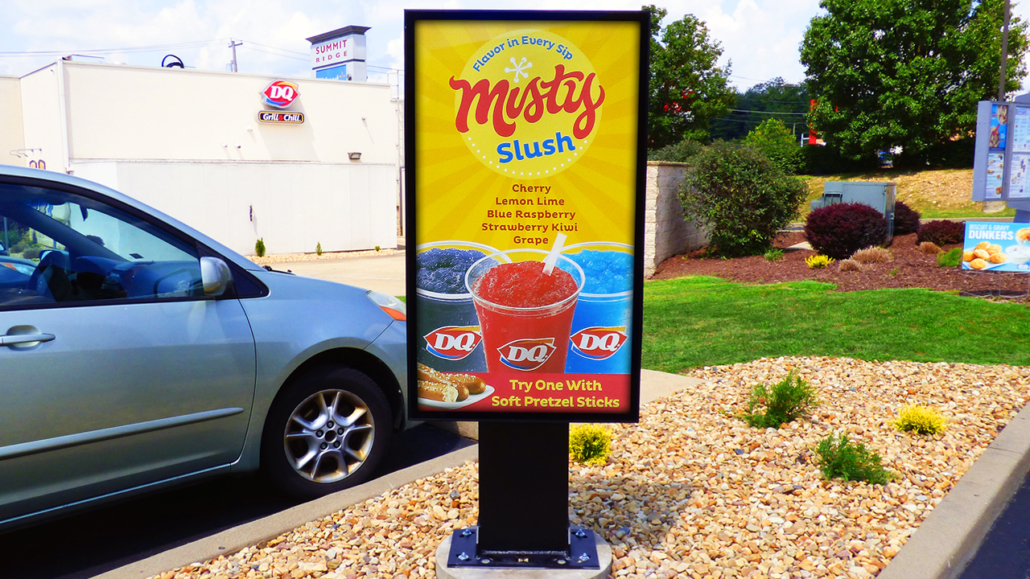
Judy and Joe wished to install a pre-sell outdoor digital signage board at a drive-thru to test the impact to sales and product mix in comparison to a static pre-sell board, which the locations have had in place for many years.
“We are looking at possibly installing either a digital pre-sell board or a full outdoor digital signage solution. Five stores have breakfast, so it’s getting hard to fit everything on the boards without taking up the parking lot,” said Joe. In addition, they also wanted the ability to change marketing messages and promotions on outdoor screens, especially the pre-sell board. The Mount Pleasant, PA location would be the first DQ restaurant in Southwestern PA with an all-weather, digital board. The main drive-thru menu board was also considered.
CHALLENGES:
Lynn Dairy Queens would have to remove the existing static signage and fresh heavy-duty bolts would need to be installed in the concrete. The customer also desired that the outdoor digital signage be bright enough to be seen in direct sunlight throughout the day. Furthermore, the installation of a one screen or two screen solution or both needed to be reviewed and discussed during the early stages.
SOLUTION:
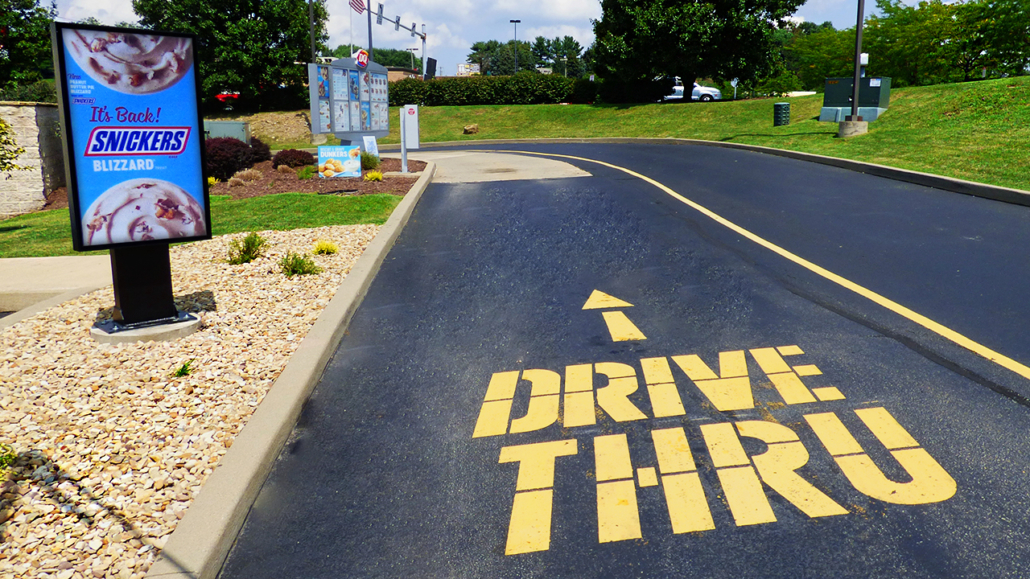
After much consideration and a few in-person meet & greets to see what ITSENCLOSURES had to offer, Lynn Dairy Queens chose the VS-6 1×1 digital pre-sell board to replace their pre-existing static promotional sign. The robust solution includes a Samsung 55-inch (OH55F), 2,500 nit high-bright LCD monitor (in portrait orientation) encased in a mount/pole configuration with a rear all-weather enclosure for a media player and other necessary electronics. The signage encasement is marine grade aluminum with a polyester powder paint finish.
Promotions and LTOs (limited time offers) can be altered and updated throughout the day and/or scheduled for different dayparts. Joe created the digital content based off of promotional content provided by Dairy Queen.
Originally, the main menu was intended to be digital, but after further review, it was decided that the restaurant had far too many menu items to fit on two screens and the 2nd phase of the project was put on the back burner.
SUMMARY OF PROJECT:
Judy Lynn-Craig was impressed with the quality of the digital screen and was pleased with the installation, stating, “You were very cooperative in making this happen. We will continue to work with [the digital signage] to see how we can use it to boost our sales. Also, we will gather data and site photos to share with the team at American Dairy Queen, who is investigating a full outdoor digital signage solution to possibly offer to DQ restaurants across the U.S. system.”
ADDITIONAL PRODUCT INFORMATION:
Have Questions? Let us know how we can best assist you!
Contact an ‘ITSENCLOSURES expert’ at 1-800-423-9911 -OR- send us an email: info@itsenclosures.com
The post Dairy Queen – Outdoor Digital Signage appeared first on ITSENCLOSURES.
]]>