The post ITS Announces IO35-4X Computer Enclosure appeared first on ITSENCLOSURES.
]]>The latest IceStation industrial computer enclosure is the IO352813-4X stainless-steel monitor/computer enclosure, which was designed specifically for the food, beverage, and pharmaceutical industries in mind. NEMA 4X enclosures will defend against dust, dirt, hose directed fluids, corrosive materials, and most weather conditions.f
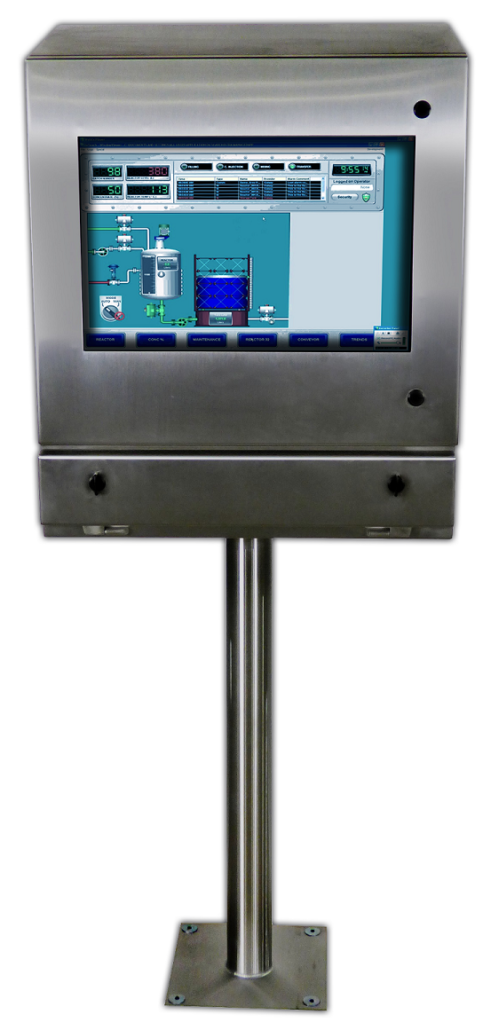 ITSENCLOSURES IO series enclosures are designed for use with flat panel monitors and thin client/small form computers. The computer enclosures are the perfect solution for limited space environments.
The NEMA 4X IO35 computer enclosure is formed and fully welded with type 304 stainless-steel and a vertical #3F finish. This enclosure features a built-in keyboard drawer to store a desktop or industrial keyboard and mouse. The roll-out keyboard tray – with two quarter turn compression latches – measures 3″ High by 22.62″ Wide x 9.88″ Deep.
The IO35-4X measures 35” High by 28” Wide by 12” Deep with a 25.5” diagonal window measuring 13.75” High by 21.5” Wide. ITSENCLOSURES offers tempered safety glass or polycarbonate window options for the front door. The stainless-steel door panel includes concealed hinges and two quarter turn screwdriver style latches (key locking latches are also available). A monitor sized up to 25-inches can be installed to the internal VESA mount, which is part of the vertical support bracket. The bracket is used to tip out and install the PC/monitor. The chassis includes a 100-cfm re-circulating fan.
“The IO35 is the modern brain-child of our sales team and engineering team with very valuable customer influence. I love that our employees work together to find workable solutions which resonate with our customers. This new stainless-steel IceStation product incorporates pieces of our best-selling products and I am quite pleased with the functionality of the enclosure,” stated JT Spangler, Owner of ITSENCLOSURES, “We will continue to develop and manufacture additional heavy-duty units throughout 2020. Our dynamic products continue to innovate and advance beyond our wildest expectations and we feel that solid growth is in our near future.”
For installation, the heavy-duty IO35-4X computer enclosure can be affixed to a wall with a mount, a stainless-steel bolt down pedestal, or a stainless-steel mobile pedestal with swivel castors, which can be locked into place. A Roxtec sealed cable entry gland can be installed – in various spots on the enclosure – for the ingress and egress of power cords, wires, and cables. ITSENCLOSURES also offers surge protectors, industrial keyboards, and thermal management options, like stainless-steel vortex heat exchangers for cooling or an electric thermal heater for refrigerated environments.
ITSENCLOSURES has two additional stainless-steel monitor/computer enclosures; the IO28-4X (measuring 28″ High x 26″ Wide x 8″ Deep) for a 22” monitor and the IO29-4X (measuring 29″ High x 28″ Wide x 12″ Deep) for a 25” monitor.
“Computers, printers, monitors, and other essential electronics are protected in our IceStation NEMA rated products. As we always say, our monitor, printer, and computer enclosures are built-to-last and we stand by that promise,” added Mr. Spangler.
IceStation by ITSENCLOSURES has over 3 decades of experience in successful printer, monitor, keyboard, and computer enclosure deployments and offers a wide variety of ‘built-to-last’ products.
For more information and to watch the product video, visit the IO35-4X product page
——-
About ITSENCLOSURES
ITSENCLOSURES builds the strongest, NEMA rated computer enclosures, which are ideal for all environments where dust, dirt, and exposure to liquids or corrosives are present. The IceStation line of products allow the use of computers, printers, keyboards, and monitors in the harshest locations and will protect a company’s investment and maximize the lifetime of the electronics protected.
To learn more about ITSENCLOSURES, contact the Sales Department: 1-800-423-9911 –or– info@itsenclosures.com
###
The post ITS Announces IO35-4X Computer Enclosure appeared first on ITSENCLOSURES.
]]>The post Fuyao Glass America appeared first on ITSENCLOSURES.
]]>Fuyao Glass Industry Group Co. is a leading international manufacturer of automotive and industrial glass located in the People’s Republic of China. Fuyao Glass America is an OEM glass supplier for the world’s top auto manufacturers, including GM, BMW, Isuzu, Chevrolet, Jeep, Chrysler, Honda, Ford, Toyota, Audi, Volkswagen, and Mercedes… just to name a few. Fuyao’s locations in the United States include: Lake Orion, MI, Greenville, SC, Moraine, OH, and Mt. Zion, IL.
 HOW DID FUYAO FIND ITSENCLOSURES:
Fuyao initially contacted ITSENCLOSURES after an internet search for computer enclosures. ITSENCLOSURES was re-engaged on the project through the referral of an integrator for Fuyao.
PROJECT:
In 2015, Fuyao acquired PPG’s automotive glass manufacturing facilities and underwent major renovations before production could begin. Fuyao sought a heavy-duty industrial computer enclosure to house vital electronics on the plant floor. The requirements for the enclosure solution included a NEMA 12 rating and enough space to house a wide screen monitor, keyboard, mouse, computer and barcode printer. Fuyao’s major concerns included finding a quality product, at a competitive price, that would withstand a manufacturing environment. Due to the rapid expansion, the glass manufacturer required the enclosures very quickly to meet an aggressive timeline and ‘go live’ date.
CHALLENGES:
Based on a competitor’s cabinet, Fuyao set a very low budget for deploying the computer enclosures. Fuyao, not willing to accept an inferior product, contacted ITSENCLOSURES for 100 piece pricing on a comparable enclosure product. Unfortunately, the competitor’s products were not of the same quality of ITSENCLOSURES’ products and failed in Fuyao’s harsh, dirty environment. In order to show the product’s differences, ITSENCLOSURES offered to send Fuyao an evaluation unit to review internally before making a purchasing decision. In the end, the companies were able to negotiate a price that kept Fuyao within their desired budget.
SOLUTION:
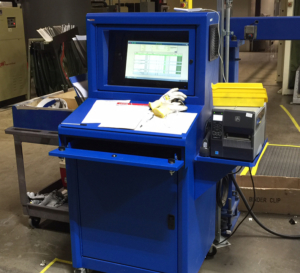
ITSENCLOSURES recommended the IceStation TITAN freestanding computer enclosure. The TITAN enclosure accommodates up to a 24-inch wide screen monitor, has an integrated keyboard drawer with a sloped work surface, and space underneath the keyboard drawer for a PC and power supply. In addition to the standard offerings, Fuyao desired an external side mounted shelf to support a thermal barcode printer. A sealed cable entry gland, installed next to the shelf, easily routes electrical cables and wires without jeopardizing the NEMA 12 enclosure rating. To keep the electronics running at optimum temperatures, a 200 CFM filtered fan system, with a normally open thermostat, was installed on the enclosure.
INSTALLATION DATE:
Fuyao issued a purchase order in September 2015. Shipments of the computer enclosures began immediately and spanned over 3 months. ITSENCLOSURES completed the deliveries in December 2015, just before the holidays.
SUMMARY OF PROJECT:
In all, Fuyao deployed 130 IceStation TITAN enclosures between their Moraine, OH and Lake Orion, MI facilities. ITSENCLOSURES easily scaled production to meet Fuyao’s needs and delivered the enclosures ahead of their schedule. The automotive glass supplier is very pleased with the performance of the IceStation TITANS and hopes to order more cabinets in the future.
PRODUCT PAGE OF THE SOLUTION: Click Here
YOUTUBE VIDEO: Click Here
HAVE QUESTIONS?
Let us know how we can best assist you! Contact an ‘ITSENCLOSURES expert’ at 1-800-423-9911 -OR- send us an email: info@itsenclosures.com
The post Fuyao Glass America appeared first on ITSENCLOSURES.
]]>The post New Website Introduced at ITSENCLOSURES appeared first on ITSENCLOSURES.
]]>ITSENCLOSURES just announced the launch of the company’s new, mobile friendly website, www.itsenclosures.com, which provides customers with a brand new experience. While the URL remains the exact same, the website has a renewed look and clean feel with easier navigation on any computer browser, tablet, or phone. The NEMA 12 IceStation TITAN is just one of the many products that makes a big splash on many of the site’s updated pages.
 Fresh Features:
- Quick buttons to download brochures, request a quote, live chat, & email
- Product pages with more useful, straight to the point information
- More videos and imagery for product lines, like IceStation, ViewStation, & NetStation
- Uncomplicated to navigate with updated navigation bar & dropdown menus
- More responsive on desktop computers, tablets, & smartphones
- High resolution banners that showcase the hottest, innovative products
JT Spangler, Owner and President of ITSENCLOSURES, loves how the new site functions and is excited to start collecting quote requests, “Our website is now easier to navigate with updated content and forms. The ITSENCLOSURES team studied and evaluated how customers interacted with our homepage and product pages and we hope that everyone will see a huge difference in how user friendly the site has become. Our plans are to continually refine our web presence, so our site continues to be a useful resource for our current and prospective customers.”
Since the site’s launch at the beginning of the month, the ITSENCLOSURES team has had an overwhelmingly positive response from users of the website. Customers can keep up to date with various product announcements, monthly blogs, and videos showcasing our products features.
“I love to see informative videos, large high resolution pictures, and bold colors and fonts. Our site really stands out when compared to other enclosure manufacturers and I hope that people will take notice and visit often. The overall goal is to grow our business and I believe that this new site will help us in that exciting endeavor.” added Mr. Spangler.
Visit the site, www.ITSENCLOSURES.com and see for yourself!
___
About ITSENCLOSURES
Located Southeast of Pittsburgh in Mt. Pleasant, Pennsylvania, ITSENCLOSURES designs and builds the toughest industrial enclosures on the market. ITSENCLOSURES’ large line of enclosures protect a company’s investment and maximize the lifetime of the electronics protected. ITSENCLOSURES’ products are always ‘Made in the USA’ and allow companies to safely use any electronics in the harshest operating environments. ITSENCLOSURES has been helping companies protect technology investments and realize the maximum life cycle of their equipment since its founding in 1985.
To learn more about ITSENCLOSURES, contact the Sales Department: 1-800-423-9911 –or– info@itsenclosures.com
The post New Website Introduced at ITSENCLOSURES appeared first on ITSENCLOSURES.
]]>The post Steps for Selecting a Computer Enclosure appeared first on ITSENCLOSURES.
]]>In an industrial environment or machining factory, protecting a PC, printer, monitor, and related peripherals from dangers – like dirt, dust, grease, humidity, liquids and harmful corrosives – is critical. Performing a simple Internet search will display multiple computer enclosures from many differing manufacturers. It may be a difficult task to find an enclosure which is best suited for multi-purpose use in an unforgiving plant setting.
From critical processes to equipment operation to simply checking email, end users will not have to worry about downtime if the appropriate workstation is specified in the initial plans. The steps below point out important items for an organization to consider, which will simplify the process of choosing the best computer enclosure.
4 Steps to Choosing the Exact Computer Enclosure
- In what type of environment will the computer and/or electronics be located?
When starting an enclosure search, determine the National Electrical Manufacturers Association (NEMA) rating recommended for your environment. Some examples of NEMA ratings that will work in many harsh environments, include the following:
NEMA 12 enclosures protect against dust, dirt, oils, lubricants, grease, and light splashing fluids (non-corrosive). NEMA 12 is intended for indoor use.
NEMA 4 enclosures protect against falling dirt, dust, splashing water and hose directed water. NEMA 4 is intended for indoors or outdoors (offers protection against rain, snow, ice, sleet).
NEMA 4X enclosures protect against falling dirt, dust, splashing water, hose directed water and corrosive materials. NEMA 4X is intended for indoors or outdoors (offers protection against rain, snow, ice, sleet).
-
 Is bacteria and/or washdown a concern?
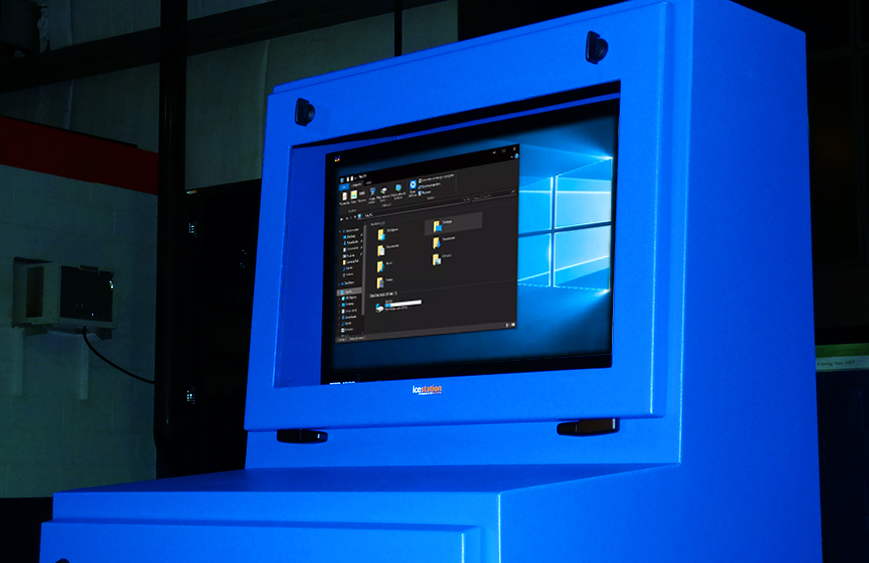
Pharmaceutical and food/drink processing plants should be aware of the computer enclosures’ ability to be thoroughly cleaned without harboring microbial contaminants. Stainless steel/sloped top computer enclosures will be the best option – in any environment – to shed water and reduce the possibility of bacterial growth. A heavy-duty gasket around the door frame, that is bacteria resistant, is also worth considering for additional protection.
- What accessories best compliment the workstation?
During the selection process, a team leader should consider a wide range of optional accessories. Does the computer enclosure need to be mobile or stationary? Should the enclosure have lockable doors for security? How many shelves will be used for electronics? Is a VESA mount included for monitor installation? How will the wires/cables be organized? Will thermal management be a necessity in a hot/humid environment? Could a heater be installed in a freezer area? These questions (and many more) should be addressed during the selection process. Research the included features to ensure that the base computer enclosure model will fit any operator’s needs. Sliding shelves, industrial-grade castors, bolt down legs, lockable doors, keyboard drawers, mouse pads, cable entry glands, power cords, USB connectors, and hinged printer access doors are just some of the accessories that can enhance the end user experience and the enclosure’s overall utility.
- What are the plans for the future?
Monitors, computers, keyboards, and printers are forever changing. Just when someone gets accustomed to a specific widescreen monitor or state-of-the-art computer system, the manufacturer introduces a newer version or a ‘faster, better model.’ When choosing a computer enclosure workstation, research features that will allow “growth” in the future. Viewing windows that can accept up to 24”, 27” or even 32” monitors will ensure that there is plenty of room to upgrade from the 19” monitor currently in use. Printers may get larger or smaller, depending on the printed material, so ensure that an enclosure shelf can hold varying amounts of weight and a hinged printer door can be used with different sizes of labels or paper. Computers can also change drastically over the years, so an enclosure with extra room will make all of the difference!
A buyer should always perform the proper product evaluation when purchasing a computer enclosure. Do not base a decision solely on price. Less expensive often means less quality and utility. Research various products on the market to determine the solution that will offer the most value in the long term. Computer enclosures are an investment. Choosing the right enclosure – for the job – will decrease the chance of an expensive replacement! Selecting the proper computer enclosure up front will maximize the life cycle of any computer system and ultimately be cost effective.
HAVE QUESTIONS? LET US KNOW HOW WE CAN BEST ASSIST YOU! CONTACT AN ‘ITSENCLOSURES EXPERT’ AT 1-800-423-9911 -or- SEND US AN EMAIL: INFO@ITSENCLOSURES.COM
The post Steps for Selecting a Computer Enclosure appeared first on ITSENCLOSURES.
]]>The post Issues a Computer Enclosure Can Eliminate appeared first on ITSENCLOSURES.
]]>What is the secret to ensure uptime? It is simple – protect all electronics with a high quality enclosure system.
When one relies on computers, printers, monitors, keyboards, and other peripherals to drive the manufacturing process, a proper shield – from harmful elements – is critical. How many times have unprotected electronics failed because of damaging dust, dirt, lint, grease, corrosives, or water in the air? A manufacturer that utilizes a quality NEMA rated computer enclosure will have a solid output, a higher ROI, and will help maximize the lifetime of electronics.
3 Problems a Computer Enclosure will Eliminate
 Costly Downtime
A company will experience downtime if a computer system fails because of exposure to dust, grease, moisture, or other harmful contaminants. Consider the amount of time necessary for procurement, installation and start-up to replace a system during a failure. Many control panels and computer systems are custom and may not be readily available, thus adding even more downtime. Account for the needs of all parties involved – from IT and engineering, to maintenance and operators who work directly with the computer system. Above all, downtime costs money. Every minute, hour, or day that goes by without a resolution will become more problematic and expensive!- Reduced Lifetime of Electronics
The temperature range in which a PC should operate is typically disclosed in the product specification booklet. The document should be reviewed carefully with engineering. Overexposure to high heat or low temperatures can damage essential components of a computer, monitor, or printer. In addition, warranties will likely be voided if the electronics are not stored/operated within the recommended temperature range. - Security Gap
Choose an enclosure workstation that incorporates heavy-duty doors with locks, which require a unique key. Locks will prevent theft and system operators from changing settings, which are carefully established by the IT department. In addition, lockable doors will prevent employees from storing inappropriate material inside of the enclosure system. It goes without saying – liquids (coffee!) never mix well with pricey electronics!
So, how much money is lost when a machine is down?
No company situation is the same, but DOWNTIME WILL COST MONEY! Consider all of the options available for computer enclosures. Weigh possibilities that include versatility, dependability, and overall value for your capital equipment dollars. The upfront cost of implementing a high quality industrial pc enclosure may be substantial, but the old adage applies. “You get what you pay for.” Low quality solutions which are purchased based on price alone rarely offer any real protection at all. Once the correct enclosure is chosen, your company will have peace of mind knowing the investment will work in an unforgiving environment and during mission critical situations.
HAVE QUESTIONS? LET US KNOW HOW WE CAN BEST ASSIST YOU! CONTACT AN ‘ITSENCLOSURES EXPERT’ AT 1-800-423-9911 -or- SEND US AN EMAIL: INFO@ITSENCLOSURES.COM
The post Issues a Computer Enclosure Can Eliminate appeared first on ITSENCLOSURES.
]]>The post Overhead Door appeared first on ITSENCLOSURES.
]]>According to the company’s website, “The Overhead Door™ Brand is one of the most recognized and respected brands in the garage door industry. C.G. Johnson, invented the upward-lifting garage door in 1921 and the electric garage door opener in 1926.” Overhead Door has been installing garage doors for almost 100 years and has over 450 authorized dealers across the United States.
 HOW DID THEY FIND ITSENCLOSURES:
After performing an extensive online search for free-standing all-in-one pc/printer enclosures, Overhead Door, in Lewistown, PA, found ITSENCLOSURES and reached out for NEMA 12 enclosure options and ballpark pricing on a few different stand-up units. During this time, they were also looking at other enclosure companies to compare quality and price.
PROJECT:
Overhead Door was interested in installing PCs and network printers in all of the company’s departments across the plant. Due to the amount of dirt, dust, and oil floating around, they desired to protect the overall set-up of each workstation. Overhead Door would be installing 24″ displays, small form computers and barcode printers measuring 15″H x 10.5″W x 19″D. The printer labels exited out of the front of the printer. In general, the goal was to fit everything into one enclosure that could be moved in the future, if necessary.
CHALLENGES:
The Overhead Door facility in Lewistown, PA required heavy-duty industrial computer enclosures to protect against dust, dirt, and oil. Overhead Door desired a solution which included a NEMA 12 rating, enough space to house a wide screen monitor, keyboard, computer and barcode printer. Overhead Door’s main challenge was finding a quality product, at a competitive price, which would endure for many years within a manufacturing environment.
 SOLUTION:
After review of the situation, ITSENCLOSURES recommended the IceStation Titan freestanding computer enclosure, which is built out of 14-gauge steel. The NEMA 12 TITAN accommodates a 24″ monitor with space behind the monitor for a computer, has an integrated keyboard drawer with a sloped work surface and space underneath the keyboard drawer for a Zebra barcode printer. ITSENCLOSURES suggested the addition of sliding shelf brackets to make it easier/quicker to change out the labels/media on the printer and a hinged printer door (installed on the bottom front door) with a clasp to make it easier to retrieve labels. A filtered fan system was also added to the IceStation TITAN for proper airflow and to keep particulate matter out of the cabinet. Overhead Door also ordered a 10-foot power cord and a 6-outlet surge protector for each cabinet.
SUMMARY OF PROJECT:
Overhead Door deployed 25 IceStation Titan (15 Blue & 10 Black) enclosures. ITSENCLOSURES ramped up production to meet Overhead Door’s schedule and delivered the enclosures on-time for the desired installation week. Alex Demastrie, Overhead Door Maintenance Engineer, was happy with the TITAN enclosures and with the push to have the cabinets delivered in a timely manner, “We were all very impressed with the enclosures. They arrived without a single scratch or ding and have been instrumental in keeping our equipment safe. Thanks again for working with us to meet our schedule.” Overhead Door is pleased with the performance of the IceStation TITANS and an additional location has requested a quote to outfit their facility.
HAVE QUESTIONS?
Let us know how we can best assist you! Contact an ‘ITSENCLOSURES expert’ at 1-800-423-9911 -OR- send us an email: info@itsenclosures.com
The post Overhead Door appeared first on ITSENCLOSURES.
]]>The post Computer Enclosures & Preventative Maintenance appeared first on ITSENCLOSURES.
]]>How can industrial computer enclosures help a manufacturing plant? Like modern medicine, the idea of proactively taking a role in the “health” of electrical equipment will provide great value to a company. If an illness is approaching, the human body has the ability to provide early warning signs. The same can be said about electronics. While the human body has the ability to cure itself of certain illnesses, if a defect appears on the plant floor with machinery, it is just a matter of time before the electronics fail. Unfortunately, electronics do not have the ability to “heal” themselves.
The majority of workers will not exert much concern for maintenance until the process is no longer working as it should. Paying little attention to corrective maintenance, on a regular schedule, will cause electronics housed in industrial computer enclosures to not perform as well as they did upon the original installation. According to the Library at AutomationDirect.com website, “Heat inside an enclosure can decrease the life expectancy of controlling units such as your PLC, HMI, AC drives and other items. Excessive heat can cause nuisance faults from your electrical and electronic components… Heat will also change the expected performance of circuit breakers and fuses, which can cause whole systems to shut down unexpectedly.” Assembling a small team of seasoned electricians and general mechanics is a step in the right direction in realizing the maximum lifetime of critical electronics.
2 Simple Steps to Maximize Lifetime of Electronics
Filter Maintenance
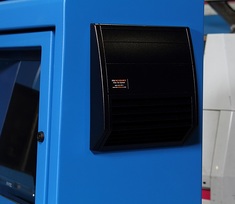
Most industrial computer enclosures utilize at least a fan system or, for warmer environments, an air conditioner. Both cooling systems have a filtering system in place to block particulate matter in the air and prevent dust and dirt from entering the interior of the enclosure. The type of manufacturing environment will dictate how often the filter media needs to be thoroughly cleaned or completely replaced. A filter that has been untouched will eventually impact the functionally of the cooling device, because the system will need to work double (or even triple) as it normally would if clean air were flowing through the schematic. This could lead to the cooling arrangement overcompensating and causing serious failures!
Energy.gov stresses that maintenance is vital, “Neglecting necessary maintenance ensures a steady decline in air conditioning performance while energy use steadily increases… Clogged, dirty filters block normal airflow and reduce a system’s efficiency significantly. With normal airflow obstructed, air that bypasses the filter may carry dirt directly into the evaporator coil and impair the coil’s heat-absorbing capacity. Replacing a dirty, clogged filter with a clean one can lower your air conditioner’s energy consumption by 5% to 15%… Clean or replace your air conditioning system’s filter or filters every month or two during the cooling season. Filters may need more frequent attention if the air conditioner is in constant use, [or] is subjected to dusty conditions.” Property thermal management is beyond crucial to the longevity of electronics within a sealed, industrial computer enclosure.
Keep Industrial Computer Enclosure Doors Closed
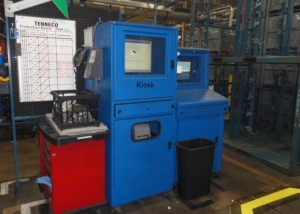
As is often the case at many manufacturing plants and factories, people accessing equipment inside of a sealed enclosure tend to get lackadaisical. Carelessness leads to split panels not being properly tightened around important wires and cables entering the industrial computer enclosure or drawers and doors sloppily left open. A lack of willingness to do simple tasks can lead to dust, grease and water finding its way into the enclosure, which is exactly what you want to keep out! One way to prevent these occurrences from happening is to keep the industrial computer enclosures locked at all times. If accessing a printer on a regular basis, check with the enclosure manufacturer about options for a hinged printer door that will minimize the amount of dirt from entering the cabinet.
Keeping a regular maintenance schedule is the best practice for all parties involved in the manufacturing process. It is important to set a schedule and carry through with the plan. Do not let preventative maintenance in your plant become just another “program of the month” that people will forget over time.
Change requires dedication, but will lead to success and a maximum return on the overall industrial computer enclosure investment.
The post Computer Enclosures & Preventative Maintenance appeared first on ITSENCLOSURES.
]]>The post ITSENCLOSURES Introduces TITAN Dual Monitor Enclosure appeared first on ITSENCLOSURES.
]]>Mt. Pleasant, PA (November 27, 2017) – A leader in the industrial enclosure market, ITSENCLOSURES engineers and builds the most durable, high-quality computer enclosures on the market. ITSENCLOSURES continues to add new products to the best-selling IceStation TITAN Family with the introduction of the TITAN dual monitor enclosure. The NEMA 12 dual monitor enclosure protects against dust, dirt, grease, fibers in the air, and splashing fluids.
Designed specifically to house two 27” widescreen monitors side by side, the dual monitor (ID21542-12) enclosure body is constructed out of heavy-duty 14-gauge welded steel and 12-gauge door thickness. The enclosure stands at 21” high x 54” wide x 12” deep and the finish is a polyester powder paint available in blue, gray, or any custom color found on the RAL color chart.
The large 13.45” high x 49” wide viewing window is hinged at the bottom and easily folds down to accept two (up to 27-inch) 16×9 wide screen monitors in landscape orientation. For stress-free installation, adjustable VESA mounts are included. Utilizing OEM stands, the displays can also be placed on the flat surface below the mount. A removable rear plate (15” high x 29.5” wide) makes it easy to quickly install the suitable monitors. Customers have a choice between a tempered safety glass or a polycarbonate viewing window.
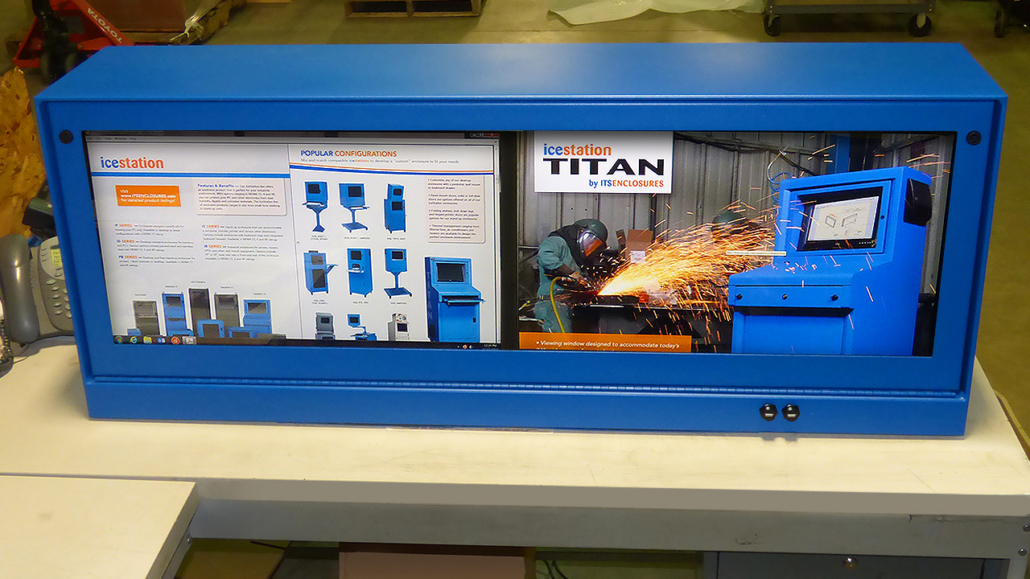 “In 2017, ITSENCLOSURES introduced two new enclosures to the popular and versatile TITAN family of pc enclosures,” said JT Spangler, President of ITSENCLOSURES. “The innovative dual monitor enclosure derived from the IceStation TITAN Hammerhead enclosure. Due to the overwhelming popularity of the Hammerhead enclosure, it was a natural progression for ITS to modify this product for customers that did not require the full freestanding enclosure.” Spangler continued, “The dual monitor enclosure is ideal for space saving applications, because the enclosure can sit on a desk or mount to the wall. We are extremely pleased with how this rugged product came together and are excited to formally introduce it to our customers. ”
Thermal management options, available for the dual monitor enclosure, include a filtered fan system and vortex cooling unit. Either thermal management system will keep the equipment running smoothly in mission critical environments.
“ITSENCLOSURES plans to introduce new products to the market in 2018, including a new line of label printer enclosures,” added Mr. Spangler. “Our business model has always been to protect electronics in any environment, in turn helping companies realize the maximum life cycle of their equipment.”
The NEMA 12 enclosure can be customized with various accessories, including two waterproof USB connectors for a keyboard or scanning device, sealed cable entry gland, a 6-outlet surge protector, a 10-foot power cord, or an industrial keyboard and mouse.
Proudly ‘Made in the USA,’ ITSENCLOSURES ships every product completely assembled and ready to use upon delivery!
To visit the Dual Monitor Enclosure Product Page – Click Here
The post ITSENCLOSURES Introduces TITAN Dual Monitor Enclosure appeared first on ITSENCLOSURES.
]]>The post Keeping Rack Enclosures Cool with Thermal Management appeared first on ITSENCLOSURES.
]]>Popular reasons for using thermal management, include: environments that are hot and dirty or electronics that produce a good amount of heat inside of an enclosure. For example, if the temperature outside a rack enclosure will reach 110° F or above, the internal components must be kept at a cooler temperature. However, proper cooling or ventilation is dependent on the environment and contents of the rack enclosure.
Why is cooling such an important factor in a rack enclosure solution? At the beginning of a project, if thermal management is not properly configured, several things could go wrong with the enclosed electronics. Faults in electrical components and overloads may lead to a tripped breaker, decreased life expectancy, or an unexpected equipment shutdown.
According to James Stratford, in his article, ‘The Importance of Thinking Thermal Early in the Design Process’, “It is very important to consider and deal with thermal challenges early in the design process and with assistance of specialists if you don’t have them in house. Doing this can lead to a better, more reliable end product with predictable performance that avoids the risk of components running at excessive temperatures that shorten their life expectancy and risk erratic performance.”
5 Types of Cooling Methods for Server Enclosures
- Vents/Louvers – The simplest method of enclosure cooling is utilizing a vent or louver to provide a natural convection/airflow. Natural convection cooling is simply air that is created when warm air rises and is replaced with cool air. Generally, louvers are added at the top for hot air to escape and at the bottom for cool air to be drawn into the enclosure. Is this right for your application? The maximum ambient temperature must be cooler than the maximum allowable enclosure temperature.
- Fans – Forced ventilation will move air across the enclosure to increase the cooling rate compared to vents. Fans will produce a higher air flow rate than natural convection cooling.
 Is this right for your application? The maximum ambient temperature must be cooler than the maximum allowable enclosure temperature. However, fans have the ability to filter particulate matter that should remain outside of the server cabinet.
- Heat Exchanger – Heat exchangers use a closed loop cooling system. The air inside of the enclosure is cooled and circulated without the exchange of ambient air and will also maintain the enclosure’s NEMA rating.
Is it right for your application? The maximum ambient temperature must be less than the maximum enclosure temperature. Depending on the construction, a heat exchanger may be used in a NEMA 12, 4 or 4X environment. - Vortex CoolerVortex cooling units use compressed air to cool internal components and displace the warm air that is inside of an enclosure.
Is it right for your application? A vortex cooling unit is not a closed loop system, but may be used with NEMA 12, 4 or 4X enclosures. These units also create positive pressure inside of the enclosure, so that dust and other particulate matter will not be drawn into the cabinet. There are no moving parts, so the lifetime is much longer than most thermal management systems and there is very little maintenance. - Air ConditionerAir conditioners are another common closed loop cooling system. The inside of the enclosure is cooled by an evaporator coil and circulated without mixing outside air.
Is it right for your application? Air conditioners will maintain an enclosure’s NEMA rating and they have a much wider cooling capacity compared to heat exchangers and fans. However, due to the compressor, air conditioners tend to be large in size.
Remember – consistent temperatures (inside of the cabinet) is key to creating optimal operating conditions. Inadequate cooling or air flow can destroy electronics! Knowing all of the options that exist for rack enclosure cooling, along with the benefits and limitations, will help you make the best choice for the application.
For an accurate recommendation on enclosure cooling, fill out a ‘Cooling Worksheet’ and speak to an enclosure specialist.
The post Keeping Rack Enclosures Cool with Thermal Management appeared first on ITSENCLOSURES.
]]>The post Effects of Heat & Humidity on Computer Enclosures appeared first on ITSENCLOSURES.
]]>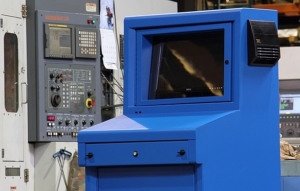
When choosing a computer enclosure, it is always a good rule of thumb to determine the necessary thermal management. An enclosure that has an internal temperature of over 95°F generally calls for a cooling system that is more powerful than a filtered fan system. Ambient air flow, through a filtered fan system, will not provide enough cooling power to regulate temperatures inside the computer enclosure within the recommended operating temperatures.
Appropriate cooling is absolutely necessary to keep electronics running smoothly and efficiently. Joe Primeau, from Acromag, describes in his blog, “Thermal Management for the Small Box,” how vents and fans can sometimes be ineffective, “Although forced convection can cool more effectively than vents alone, they share similar problems. Both methods allow moisture, dust and contaminants to enter the computer enclosure, threatening the electronics. Concern also has to be given to what happens if/when the fan fails or becomes blocked; this could quickly lead to overheating and possibly failure of the electronics.” When it comes to essential electronics, failure is not an option!
Technical specifications, published on a manufacturer website, will indicate the appropriate cooling and/or heating necessary to operate electronics within the suggested temperatures and humidity levels. It is no surprise that humidity can be extremely harmful to electronics, especially inside of a computer enclosure.
According to the article “Humidity, Its Effect on Electronic Industry and Solutions” by Uday Chakravarty, Sales Manager-International at Arctic India Sales, humidity is the root of many evils, “Humidity is a constant threat to production efficiency and product quality… Rust, mold, mildew, rot, decay, warping, stretching, lumping, caking, agglomeration and decomposition are all common enough problems encountered in our daily life. It is interesting to note that the root cause of all these problems and many more, is the presence of moisture or humidity in the air.”
If deploying electronics in a particularly humid environment, advanced systems such as a heat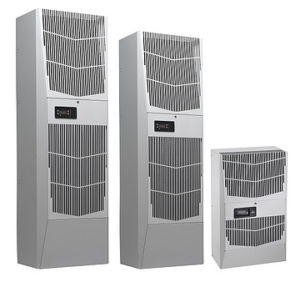 exchanger or air conditioner are smart cooling methods. Combined with a NEMA 12, NEMA 4, or NEMA 4X sealed computer enclosure, a closed loop cooling system will ensure humidity is kept outside of the cabinet and unable to harm sensitive (and often expensive) electronics.
Briskair, sums up the importance of air conditioners quite simply, “Regardless of the type of air conditioner or the job you perform, in general air conditioning offers a number of benefits… Extreme conditions such as heat and humidity can impact [electronics] overall physical intellectual activity, making even the simplest of tasks an absolute chore. Having a proper air conditioning system in place helps reduce heat and humidity, thus reducing the impact on our ability to perform and complete work tasks.”
The key to effectively managing heat in manufacturing environments is to determine the right thermal management before deploying a computer enclosure.
The three most vital things that you need to know: enclosure size (height x width x depth), ambient temperatures (highest and lowest expected temperature outside enclosure; highest and lowest temperature allowed inside enclosure), and the total equipment load in watts (sum of all heat producing equipment), which is typically available on the published manufacturers’ specs online. Enclosure construction (steel vs. aluminum vs. stainless steel) can also affect the necessary thermal management.
This simple to use formula is valuable for picking the right thermal management:
(watts x 3.413) + (1.25 x area in square feet x ∆T temperature difference in degrees F) = BTU/hr.
Watts = The total heat load inside the enclosure (the sum of all heat-producing equipment)
Area = Total exposed surface area of the enclosure expressed in square feet
∆T = The difference in temperature between the maximum expected degrees F temperature outside the enclosure and the maximum degrees F temperature allowed inside the enclosure
Always put in the time and effort to find the best thermal management that will reduce the harmful effects of heat and humidity. If the correct thermal management is not chosen in the beginning, money and productivity will be lost with every minute of downtime. Electronics’ and/or thermal management failures will end up costing more money in the long run. Choosing wisely up front will keep overhead down considerably!
The post Effects of Heat & Humidity on Computer Enclosures appeared first on ITSENCLOSURES.
]]>