The post NEMA Ratings – What they mean for Industrial Enclosures appeared first on ITSENCLOSURES.
]]>NEMA ratings and standards were established by the National Electrical Manufacturer’s Association and detail minimum enclosure construction, performance, test criteria, and corrosion resistance. When discussing enclosure standard types, two main categories exist: indoor and indoor/outdoor. It is important to note that the numbers do not always correspond to the level of protection. For example, NEMA 4X offers far more protection than a NEMA 12 industrial enclosure.
According to the official NEMA Ratings Documentation, here are the three main ratings for enclosures which are fabricated by ITSENCLOSURES (more detailed explanation below):
 NEMA 12
Protects against dust, dirt, lint, grease, fibers, and splashing fluids
 NEMA 4
Protects against dust, dirt, hose directed water and corrosive materials
 NEMA 4X (Stainless)
Protects against dust, dirt, and hose directed fluids and corrosive materials
NEMA 12: Enclosures constructed (without knockouts) for indoor use to provide a degree of protection to personnel against access to hazardous parts; to provide a degree of protection of the equipment inside the enclosure against ingress of solid foreign objects (falling dirt and circulating dust, lint, fibers, and flyings); and to provide a degree of protection with respect to harmful effects on the equipment due to the ingress of water (dripping and light splashing).
NEMA 4: Enclosures constructed for either indoor or outdoor use to provide a degree of protection to personnel against access to hazardous parts; to provide a degree of protection of the equipment inside the enclosure against ingress of solid foreign objects (falling dirt and windblown dust); to provide a degree of protection with respect to harmful effects on the equipment due to the ingress of water (rain, sleet, snow, splashing water, and hose directed water); and that will be undamaged by the external formation of ice on the enclosure.
Type 4X: Enclosures constructed for either indoor or outdoor use to provide a degree of protection to personnel against access to hazardous parts; to provide a degree of protection of the equipment inside the enclosure against ingress of solid foreign objects (windblown dust); to provide a degree of protection with respect to harmful effects on the equipment due to the ingress of water (rain, sleet, snow, splashing water, and hose directed water); that provides an additional level of protection against corrosion; and that will be undamaged by the external formation of ice on the enclosure.
Use the following flowchart to determine what NEMA rating to choose.
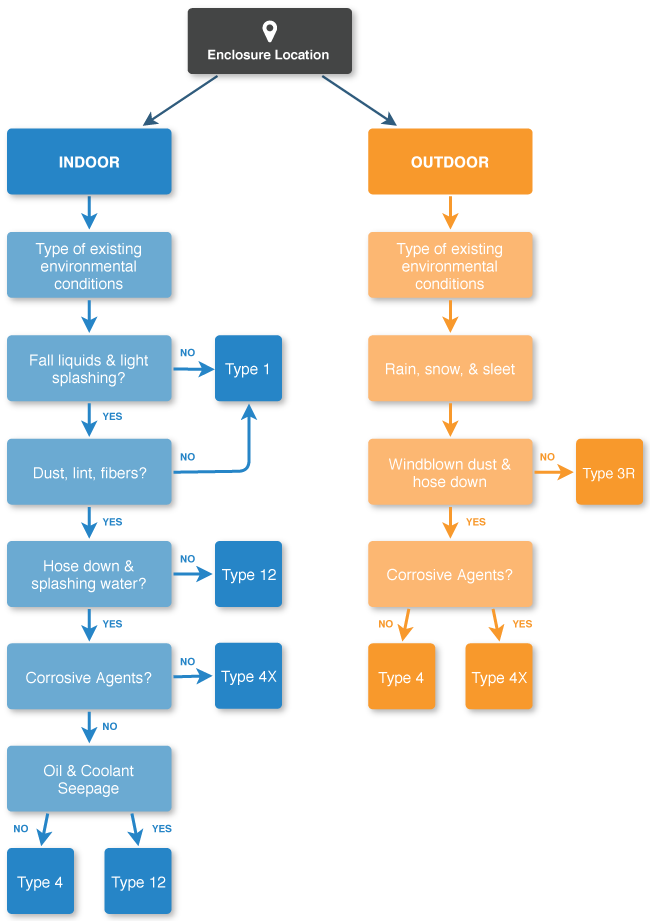
Source: https://www.nema.org/Products/Documents/nema-enclosure-types.pdf
The post NEMA Ratings – What they mean for Industrial Enclosures appeared first on ITSENCLOSURES.
]]>The post Keeping Rack Enclosures Cool with Thermal Management appeared first on ITSENCLOSURES.
]]>Popular reasons for using thermal management, include: environments that are hot and dirty or electronics that produce a good amount of heat inside of an enclosure. For example, if the temperature outside a rack enclosure will reach 110° F or above, the internal components must be kept at a cooler temperature. However, proper cooling or ventilation is dependent on the environment and contents of the rack enclosure.
Why is cooling such an important factor in a rack enclosure solution? At the beginning of a project, if thermal management is not properly configured, several things could go wrong with the enclosed electronics. Faults in electrical components and overloads may lead to a tripped breaker, decreased life expectancy, or an unexpected equipment shutdown.
According to James Stratford, in his article, ‘The Importance of Thinking Thermal Early in the Design Process’, “It is very important to consider and deal with thermal challenges early in the design process and with assistance of specialists if you don’t have them in house. Doing this can lead to a better, more reliable end product with predictable performance that avoids the risk of components running at excessive temperatures that shorten their life expectancy and risk erratic performance.”
5 Types of Cooling Methods for Server Enclosures
- Vents/Louvers – The simplest method of enclosure cooling is utilizing a vent or louver to provide a natural convection/airflow. Natural convection cooling is simply air that is created when warm air rises and is replaced with cool air. Generally, louvers are added at the top for hot air to escape and at the bottom for cool air to be drawn into the enclosure. Is this right for your application? The maximum ambient temperature must be cooler than the maximum allowable enclosure temperature.
- Fans – Forced ventilation will move air across the enclosure to increase the cooling rate compared to vents. Fans will produce a higher air flow rate than natural convection cooling.
 Is this right for your application? The maximum ambient temperature must be cooler than the maximum allowable enclosure temperature. However, fans have the ability to filter particulate matter that should remain outside of the server cabinet.
- Heat Exchanger – Heat exchangers use a closed loop cooling system. The air inside of the enclosure is cooled and circulated without the exchange of ambient air and will also maintain the enclosure’s NEMA rating.
Is it right for your application? The maximum ambient temperature must be less than the maximum enclosure temperature. Depending on the construction, a heat exchanger may be used in a NEMA 12, 4 or 4X environment. - Vortex CoolerVortex cooling units use compressed air to cool internal components and displace the warm air that is inside of an enclosure.
Is it right for your application? A vortex cooling unit is not a closed loop system, but may be used with NEMA 12, 4 or 4X enclosures. These units also create positive pressure inside of the enclosure, so that dust and other particulate matter will not be drawn into the cabinet. There are no moving parts, so the lifetime is much longer than most thermal management systems and there is very little maintenance. - Air ConditionerAir conditioners are another common closed loop cooling system. The inside of the enclosure is cooled by an evaporator coil and circulated without mixing outside air.
Is it right for your application? Air conditioners will maintain an enclosure’s NEMA rating and they have a much wider cooling capacity compared to heat exchangers and fans. However, due to the compressor, air conditioners tend to be large in size.
Remember – consistent temperatures (inside of the cabinet) is key to creating optimal operating conditions. Inadequate cooling or air flow can destroy electronics! Knowing all of the options that exist for rack enclosure cooling, along with the benefits and limitations, will help you make the best choice for the application.
For an accurate recommendation on enclosure cooling, fill out a ‘Cooling Worksheet’ and speak to an enclosure specialist.
The post Keeping Rack Enclosures Cool with Thermal Management appeared first on ITSENCLOSURES.
]]>The post Effects of Heat & Humidity on Computer Enclosures appeared first on ITSENCLOSURES.
]]>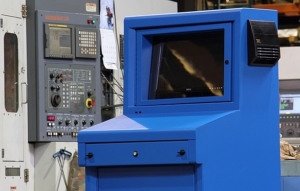
When choosing a computer enclosure, it is always a good rule of thumb to determine the necessary thermal management. An enclosure that has an internal temperature of over 95°F generally calls for a cooling system that is more powerful than a filtered fan system. Ambient air flow, through a filtered fan system, will not provide enough cooling power to regulate temperatures inside the computer enclosure within the recommended operating temperatures.
Appropriate cooling is absolutely necessary to keep electronics running smoothly and efficiently. Joe Primeau, from Acromag, describes in his blog, “Thermal Management for the Small Box,” how vents and fans can sometimes be ineffective, “Although forced convection can cool more effectively than vents alone, they share similar problems. Both methods allow moisture, dust and contaminants to enter the computer enclosure, threatening the electronics. Concern also has to be given to what happens if/when the fan fails or becomes blocked; this could quickly lead to overheating and possibly failure of the electronics.” When it comes to essential electronics, failure is not an option!
Technical specifications, published on a manufacturer website, will indicate the appropriate cooling and/or heating necessary to operate electronics within the suggested temperatures and humidity levels. It is no surprise that humidity can be extremely harmful to electronics, especially inside of a computer enclosure.
According to the article “Humidity, Its Effect on Electronic Industry and Solutions” by Uday Chakravarty, Sales Manager-International at Arctic India Sales, humidity is the root of many evils, “Humidity is a constant threat to production efficiency and product quality… Rust, mold, mildew, rot, decay, warping, stretching, lumping, caking, agglomeration and decomposition are all common enough problems encountered in our daily life. It is interesting to note that the root cause of all these problems and many more, is the presence of moisture or humidity in the air.”
If deploying electronics in a particularly humid environment, advanced systems such as a heat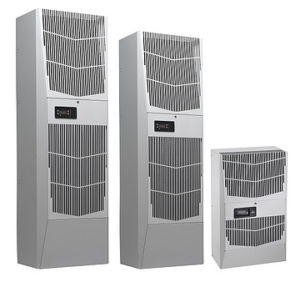 exchanger or air conditioner are smart cooling methods. Combined with a NEMA 12, NEMA 4, or NEMA 4X sealed computer enclosure, a closed loop cooling system will ensure humidity is kept outside of the cabinet and unable to harm sensitive (and often expensive) electronics.
Briskair, sums up the importance of air conditioners quite simply, “Regardless of the type of air conditioner or the job you perform, in general air conditioning offers a number of benefits… Extreme conditions such as heat and humidity can impact [electronics] overall physical intellectual activity, making even the simplest of tasks an absolute chore. Having a proper air conditioning system in place helps reduce heat and humidity, thus reducing the impact on our ability to perform and complete work tasks.”
The key to effectively managing heat in manufacturing environments is to determine the right thermal management before deploying a computer enclosure.
The three most vital things that you need to know: enclosure size (height x width x depth), ambient temperatures (highest and lowest expected temperature outside enclosure; highest and lowest temperature allowed inside enclosure), and the total equipment load in watts (sum of all heat producing equipment), which is typically available on the published manufacturers’ specs online. Enclosure construction (steel vs. aluminum vs. stainless steel) can also affect the necessary thermal management.
This simple to use formula is valuable for picking the right thermal management:
(watts x 3.413) + (1.25 x area in square feet x ∆T temperature difference in degrees F) = BTU/hr.
Watts = The total heat load inside the enclosure (the sum of all heat-producing equipment)
Area = Total exposed surface area of the enclosure expressed in square feet
∆T = The difference in temperature between the maximum expected degrees F temperature outside the enclosure and the maximum degrees F temperature allowed inside the enclosure
Always put in the time and effort to find the best thermal management that will reduce the harmful effects of heat and humidity. If the correct thermal management is not chosen in the beginning, money and productivity will be lost with every minute of downtime. Electronics’ and/or thermal management failures will end up costing more money in the long run. Choosing wisely up front will keep overhead down considerably!
The post Effects of Heat & Humidity on Computer Enclosures appeared first on ITSENCLOSURES.
]]>The post Finding a Computer Enclosure to Protect Your Tower appeared first on ITSENCLOSURES.
]]>I need to protect my computer tower – what is my best option? As technology progresses, it is more and more vital to have computers on the factory or plant floor. However, if they are not properly protected in a computer enclosure, the shelf life of the computer could be very short. Dirt, dust, and even liquids can ruin a tower rather quickly and it will cost time and money to repair or completely replace.
Some applications may not require an “all-in-one” industrial enclosure that has enough space for the PC, monitor, keyboard or printer. If all you need is to keep the PC safe, a desktop or tower computer enclosure will be your most efficient and cost effective solution.
If you don’t know where or what to look for, finding the right computer enclosure protection can be rather difficult.
5 COMPUTER ENCLOSURE ASPECTS TO CONSIDER
OVERALL PROTECTION:
When deciding on the best computer enclosure for your computer, you must decide on a NEMA rating. 1.) Will the computer be in a dusty, dirty area? 2.) Will water or corrosive materials be near the computer? 3.) Will you need to wash down the area on a regular basis? All of these questions need to be answered before deciding on a proper enclosure. For example, a NEMA 4X protects against dust, dirt, hose directed fluids, and harmful/corrosive materials, but a NEMA 12 only protects against dust, dirt, and splashing liquids. You want to choose the right NEMA rating, because the price difference between a NEMA 12 and NEMA 4X enclosure can be quite drastic.
HEATING & COOLING:
How hot or cold will the environment be on a regular basis? This is an important question to 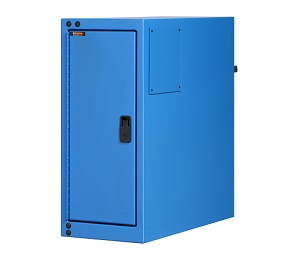 answer, because your enclosure may need a fan system, air conditioning system, or even a heat exchange unit. If the electronics inside the enclosure become overheated, you might have a dangerous problem on your hands. When deciding on the right enclosure for your needs, make sure you consider the ambient temperature in your factory or in your workshop area. Also, research the heat (wattage) your PC will produce and operating temperatures the unit must perform within an enclosure. This information can be found on most manufacturers’ spec sheets.
CABLE ENTRY:
Even in our world of technological advancements, computers still require cables, even if it’s only a few. The computer enclosure should contain an entry for these cables and this entry must, again, protect the entire computer from harmful, outside elements. A gasketed split panel or sealed cable gland entry will protect from dirt, dust, and liquid, and will keep all of the cables neat and organized.
SECURITY:
If you have various people in and out of your factory, it is always a good idea to choose a computer enclosure with lockable doors for safety and security. A lock will also keep the door tightly closed, which will, again, ensure that dirt, dust, and liquids do not enter the enclosure.
SIZE MATTERS:
After considering the aforementioned details, do not forget to measure the computer tower to ensure proper fit. The dimensions are very important. You will need to measure the height, length and depth of your tower. Select a pc enclosure that has amble space for air flow and cable management.
Finding the right enclosure is important, because it will protect your computer and vital company information. Consider the amount of downtime your company will incur if the computer system fails. The implications have a trickle down effect that is not often measured when planning for deployment.
When searching for the best option, make sure that it protects against dirt, dust, and liquids. Plus, consider the overall temperature, so that your computer doesn’t overheat and cause irreparable damage. Always do your homework and research what will work best for your company!
The post Finding a Computer Enclosure to Protect Your Tower appeared first on ITSENCLOSURES.
]]>