The post All Weather – Printer Enclosures Case Study appeared first on ITSENCLOSURES.
]]>
COMPANY SYNOPSIS:
According to the company’s website, “All Weather Inc. (AWI) is a leading developer of highly accurate, highly dependable aviation technology solutions that help… customers minimize risks in an unpredictable world. AWI combines state-of-the-art air traffic integration and surface weather measurement technology with flexible system design and comprehensive project management. Offerings include aviation weather systems, air traffic control systems, custom system engineering, and a wide range of precision meteorological sensors and systems.”
 HOW DID ALL WEATHER, INC. FIND ITSENCLOSURES:
While perusing the web for steel printer enclosures for a specific job, All Weather’s engineering department found the ITSENCLOSURES website and reached out for enclosure options, quantity pricing, and lead time.
PROJECT:
All Weather desired a heavy-duty printer enclosures for an airport system that was in the process of revamping its facility. AWI closely worked with a contractor on the bid and shared ITSENCLOSURES’ pricing and availability with the contracting team for evaluation.
CHALLENGES:
The biggest challenge that AWI would face is dust/dirt penetrating the printer and hindering its operation. Since the overall installation environment is dusty, the application required NEMA 12 rated printer enclosures to protect the printer from exterior contaminants.
SOLUTION:
After reviewing a few options, All Weather purchased a powder coated 14-gauge steel, PB202024-12 printer enclosure, which protects against dust, dirt, non-corrosive/splashing liquids, and fibers in the air. All Weather did not desire a printed material label slot, so ITSENCLOSURES installed a solid Lexan Polycarbonate window. The standard features – of the PB20-12 – include a sliding shelf (for printers weighing up to 80 pounds), a lockable front door, and a rear split panel for running cables and wires into the printer enclosures.
SUMMARY OF PROJECT:
All Weather is very happy with the PB20-12 printer enclosures and plans to purchase additional enclosures in the future as projects arise at airports across the country. An All Weather representative stated, “the purchasing experience was simple and fast!”
PB202024-12 PRODUCT PAGE: Click Here
HAVE QUESTIONS?
Let us know how we can best assist you! Contact an ‘ITSENCLOSURES expert’ at 1-800-423-9911 -OR- send us an email: info@itsenclosures.com
The post All Weather – Printer Enclosures Case Study appeared first on ITSENCLOSURES.
]]>The post ITSENCLOSURES Introduces NEMA 4 Printer Enclosure appeared first on ITSENCLOSURES.
]]>Mt. Pleasant, PA (January 9, 2019) – ITSENCLOSURES, the leader of American made industrial printer cabinets for barcode printers and desktop printers, has announced the latest product in a long line of high-quality printer enclosures: the PB282626-04, a NEMA 4 cabinet that protects and guards against dust, dirt, grease, hose directed water, and most weather conditions like rain and snow.
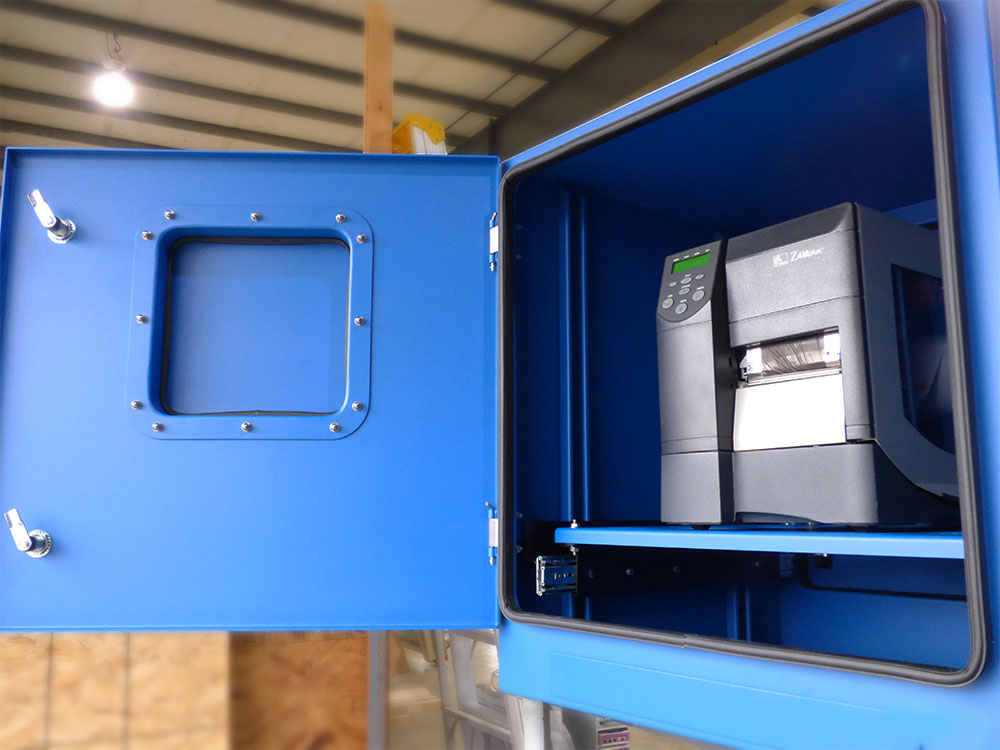
The printer enclosure is designed to shield desktop laser printers (such as Brother, Canon, HP, and Ricoh) and thermal transfer label printers (such as Zebra, Cognitive, Honeywell, and Intermec), on dusty, dirty, and wet factory floors. The PB28-04 enclosure is fabricated out of 14-gauge painted steel and the outside dimensions measure 28” high by 26” wide by 26” deep. The maximum printer dimensions, for the printer enclosure, are 18” high by 20” wide by 21” deep.
The PB28-04 front door features quarter turn knob-style compression latches and durable dual durometer EPDM gasket. The rear door is lockable and has a 22.0” high by 22.5” wide opening. The interior of the printer enclosure features an adjustable 20.2” extended sliding shelf, which provides effortless access to the printer for printouts, ink replacement, and label media loading. The sliding shelf is vertically adjustable and will support printers weighing up to 80 pounds.
 JT Spangler, Owner/President of ITSENCLOSURES, is very enthusiastic when talking about the new printer cabinet assembly, “The PB28 printer enclosure was engineered and fabricated out of necessity from our customers. We have found much success with our NEMA 12 and NEMA 4X printer enclosures and desired to have a NEMA 4 option in our product offerings. The end product was exactly what I had in mind and we look forward to installing these in harsh environments – both indoors and outdoors.”
ITSENCLOSURES offers useful accessories for all of the desktop and printer enclosures, including a vertically adjustable bolt down or mobile pedestal to create a suitable height for users, sealed cable entry glands for various sizes of cables and wires, power strips, and thermal management, including a NEMA 4 heat exchanger or vortex cooling unit.
“Our state-of-the-art NEMA 4 enclosures are heavy-duty and will protect electronics in most settings, which makes them extremely versatile for our customers,” added Mr. Spangler.
The printer enclosure enclosure is available in blue, gray, or any custom color found on the RAL color chart.
Based on a customer’s printing applications, ITSENCLOSURES printer enclosures are also available with NEMA 12 (powder coated steel) and NEMA 4X (stainless steel) ratings.
Manufacturing and engineering heavy-duty enclosures for over three decades, ITSENCLOSURES fabricates the toughest cabinets in the industry and ships each product assembled and ready to use upon delivery. Every product is designed, and field tested in Mt. Pleasant, Pennsylvania – outside of Pittsburgh.
For more information, visit the PB28-04 product page
The post ITSENCLOSURES Introduces NEMA 4 Printer Enclosure appeared first on ITSENCLOSURES.
]]>The post 3 Areas Printer Enclosures Protect Zebra Printers appeared first on ITSENCLOSURES.
]]>Luckily, there is a perfect solution! Deploying a NEMA-rated printer enclosure will allow a Zebra barcode printer to be installed in a multitude of areas that would normally be out of reach. With the help of a printer enclosure, manufacturers can print labels with ease in the following 3 harsh locations.
1. Cold, Freezer Environments
To create the proper thermal transfer on a label, Zebra printers require a regulated temperature of 32°F to 104°F. Thus, using a printer in a sub-freezing area is virtually an impossible task without some sort of heat source. Installing the printer inside of a sealed printer enclosure – with a supplemental heater – will ensure the appropriate operating temperature is maintained inside of the enclosure. Users are able to print labels quickly and efficiently. In addition, a NEMA 12 enclosure will eliminate the issue of bothersome condensation in freezer areas. Condensation occurs when the printer is moved in and out of a cold environment. The printer enclosure allows for a permanent printer solution.
2. Dirty Environments
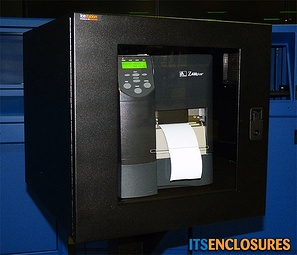
Production areas that are especially dirty or dusty will also affect the performance of a Zebra printer. Dust and dirt can cause a void or misprint numbers/letters on the label, which could be detrimental when shipping products. In order for the thermal transfer to work correctly, the ribbon needs to be extremely clean and free of ANY dust particles. Signs of a problem include: a wrinkle in the ribbon, light or faded text, white spots, or even a broken ribbon. Again, the best solution is to install a NEMA 12 barcode printer enclosure. A properly sealed enclosure will ensure outside particulate matter is kept far away from the printer and therefore allow the printing process to operate in its fully intended capacity.
3. Wet, Wash-Down Environments
Generally speaking, water and electronics do not mix! A stainless steel, NEMA 4X printer enclosure will solve the problem of deploying a printer in a harsh, wash-down environment. NEMA 4X printer enclosures will protect the printer against water, including dripping, hose directed, or splashing fluids. The printer will also be protected and shielded from abrasive chemicals that are often used in a wash-down procedure.
In the beginning, it may seem as though a printer enclosure solution is costly and out of budget. However, in the long run, it will save time, money, and will keep expensive printers guarded and safe from harm. Therefore, the installation locations of a Zebra printer are limitless with the right printer enclosure. Conduct the proper research and find the enclosure solution that will work best in your work environment.
The post 3 Areas Printer Enclosures Protect Zebra Printers appeared first on ITSENCLOSURES.
]]>The post Problems Printer Enclosures Solve for Printers appeared first on ITSENCLOSURES.
]]>By deploying printer enclosures with the correct thermal management, a Zebra printer can operate in a multitude of areas. Many Zebra printers use a process called “thermal transfer” to produce small or large high-quality prints on labels. The innovative method uses a precise heated ribbon to create long lasting images on the surface of a label or tag. Zebra printers can create robust wristbands, colorful cards, product identification tags, or certification labels.
With the versatility to create durable labels, it is natural for manufacturers, distribution centers, or warehouses to utilize these printers on the factory floor. However, not all areas are created equal!
Coolers, refrigerators, chillers, or freezer conditions can cause the following issues:
- Warning – Temperature Drops Below 59°F
When the ambient temperature of the facility drops below 59°F, Zebra printers will display a warning message. Although the actual printer is not at risk of any permanent damage, the print quality may degrade or the printer will slow down considerably – based on the colder ambient temperature.
- Error – Print Heat is Too Cold
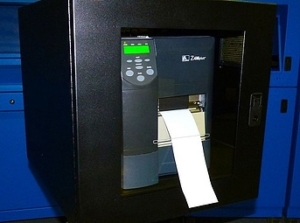
If the printer is close to a loading dock or an outside gate/garage door, it is susceptible to less than ideal operating temperatures. Essentially, the printer detects that it is unable to heat the printer head to a high enough temperature to print labels and simply ceases to work. In addition, if the environment is too cold, Zebra printers will display an error or shut down if the electrical or battery output drops to a low enough voltage level.
- Condensation
When a piece of electronic equipment is used in a cooler or freezer environment, condensation may occur. If the printer is moved in and out of a cold setting, water droplets can form, causing issues with the printer. The display screen may even be difficult to read.
The solution – A thermostatically controlled heated printer enclosure!
By deploying printer enclosures with the correct thermal management, Zebra printers can operate in a multitude of areas, as well as, extreme outdoor weather conditions. The printer enclosure will provide a reliable operating environment for the barcode printer no matter where the device resides in the factory. According to the blog, ‘Cool Solutions for the Cold Chain,’ “Label printing solutions, for instance, need purpose-built heater boxes to ensure printer functionality and also to keep the media at an effective application temperature.” The correct enclosure solution can translate into fulfilling more orders per day or increasing accuracy and productivity in a challenging area. A Zebra printer enclosure will serve as a permanent fix and eliminate the issue of harmful condensation.
The post Problems Printer Enclosures Solve for Printers appeared first on ITSENCLOSURES.
]]>The post 3 Reasons to Use Industrial Enclosures with Desktop 3D Printers appeared first on ITSENCLOSURES.
]]>As desktop 3D printers become commonplace, companies are realizing that simply purchasing the latest 3D printer is only half the battle. In order to achieve the best 3D product, many factors during the process must be met. 3D printers are an innovative and exciting product to use, but there are some drawbacks to using a 3D printer. Users complain about the fumes that the plastic emits, the heat that the printer generates, and the fact that it produces a loud noise when printing an object. Environmentally sealed industrial printer enclosures can help alleviate issues that arise when using a 3D printer.
Three 3D Printer Negatives
1. Sound
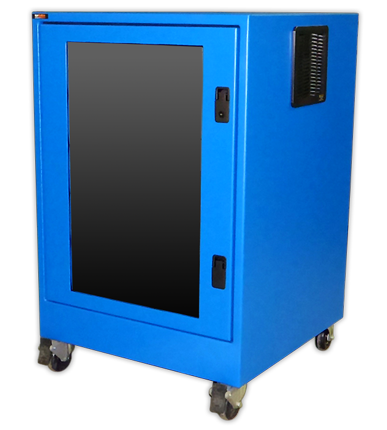 3D printers require a substantial amount of time to create a coffee mug or small plastic horse, and can be louder than the average office copier/printer. Depending on the location of the 3D printer, it may become an annoyance to employees. No one wants to sit and listen to a loud printer for hours at a time. Sealed industrial enclosures can help dampen the sound during the printing process. Most companies do not have the luxury of a room that is primarily used for a printer. By enclosing the printer inside of a printer enclosure, the sound can be minimized and employees can concentrate on important tasks.
2. Heat
Thermal management is always important when discussing printer enclosures. Michael Hackney, 3D Printing Blog writer, discusses how heating and cooling are both vital considerations to 3D printing, “A heated build surface… is an optional component that can help minimize part warping and improving filament adherence to the build surface.” He continues with the importance of cooling, “Two different types of fans are useful. The first is to cool the barrel, the tube above the heated nozzle that the filament passes through, and the second is to cool parts as they print to minimize distortion and warping. Proper use of these fans is dependent on the print material and the geometry of the part.”
When deciding on the correct heating and cooling system, the overall temperature of the room and how often the printer will be in use must be considered. For an accurate printer enclosure thermal management recommendation, download a cooling requirement worksheet.
3. Fumes/Air Emissions
It is best to store the 3D printer in a room with excellent ventilation, but if that is not a viable option, an industrial printer enclosure can help solve the problem. The fumes given off by the plastics can be very overwhelming. By enclosing the 3D printer, the fumes can be exhausted out of the room via building ducts.
Lyndsey Gilpin, from Tech Republic, explains that the air can be unhealthy, “The emissions from desktop 3D printers are similar to burning a cigarette or cooking on a gas or electric stove… While heating the plastic and printing small figures, the machines using PLA filament emitted 20 billion ultrafine particles per minute, and the ABS emitted up to 200 billion particles per minute. These particles can settle in the lungs or the bloodstream and pose health risk, especially for those with asthma.”
Sam Shead, also from Tech Republic reiterates how 3D printers cause an abundance of harmful particles, “The significant number of particles emitted as a result of 3D printing can be hazardous to humans when they are inhaled… When ultrafine particles (UFPs) are inhaled, they can end up in the lungs and even the brain.” A properly sealed enclosure can greatly cut down on the fumes and emissions produced by the printer.
With rugged, industrial printer enclosures, a company can help minimize all three of these concerns. Heidi Milkert, from 3dprint.com, explains, “Enclosures are a fairly important option, especially if you want to avoid some of the major issues commonly seen within the print process. With that said, even some of the better, higher quality machines out there lack an enclosure, making me wonder just how much better they could be if an enclosure would have be added.” Milkert adds, “[Enclosures] reduce or eliminate problems such as warping, curling, cracking, noise, heat loss, and fume emission.”
The post 3 Reasons to Use Industrial Enclosures with Desktop 3D Printers appeared first on ITSENCLOSURES.
]]>The post 3 Considerations for Choosing a Zebra Printer Enclosure appeared first on ITSENCLOSURES.
]]>If you are in the manufacturing field, you have probably used a Zebra barcode label printer. When it comes to printing out multiple labels in various sizes, colors, and shapes, Zebra is top of the line and very innovative. With just a few quick keystrokes, your company can have slick, branded labels for all of your shipping boxes and packaging. Zebra printers located on a plant floor might be exposed to dirt, dust, soot, coffee, and various other harmful elements. Although the printer is meant for industrial applications, it cannot withstand a dirty environment with extreme hot and cold temperatures. Utilizing the correct Zebra printer enclosure will be just the ticket to maximizing the lifetime of your printer and protecting against costly downtime.
3 Zebra Printer Enclosure Considerations
Level of Protection 
The first step to selecting the correct printer enclosure is to define the required level of enclosure protection. Determine if the enclosure needs to protect against dust (NEMA 12), water and dust (NEMA 4) or water, dust and a corrosive atmosphere (NEMA 4X).
Temperature Controls
Don’t forget about heating and cooling your Zebra printer enclosure! As a general rule of thumb, the operating temperature must live between 45⁰ to 95⁰F for the printer to work properly. This can be easily achieved by installing a thermostatically controlled filtered fan system or heater. Cooler temperatures are especially important to pay attention to, if using the enclosure in a refrigerated environment.
Serviceability 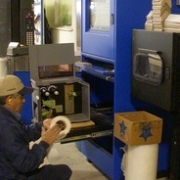
When printing mass quantities of labels on a daily basis, it is important to choose a Zebra printer enclosure that offers the user a high level of serviceability. Most Zebra printers load their label media and ribbon from the side. Choose a printer enclosure that has a sliding shelf, so that the printer is easily accessible without having to remove it from the cabinet. Also, a viewing window and slotted path on the front of the enclosure are especially important for retrieving the labels.
From government to consumer goods to manufacturing, Zebra barcode printers are built for high-volume, industrial applications. Boost your company’s productivity with the RIGHT Zebra printer enclosure!
The post 3 Considerations for Choosing a Zebra Printer Enclosure appeared first on ITSENCLOSURES.
]]>